PSXHAX.COM website and domain for sale. Contact Us with your offer!

You are using an out of date browser. It may not display this or other websites correctly.
You should upgrade or use an alternative browser.
You should upgrade or use an alternative browser.
PSXHAX - PSXHACKS: PSX HAX - PSX HACKS - PLAYSTATION HAX - PLAYSTATION HACKS
LEGO Batman 3, Tearaway Unfolded, More PS4 Games Added to PS Now
Joining Sony's PlayStation Now lineup this month are LEGO Batman 3, OlliOlli2, Tearaway Unfolded, and more PS4 games with a free PlayStation Now 7-Day Trial also available. 
Below is the full list of what's new this month from PlayStation Now Senior Marketing Manager Brian Dunn, as follows:
Here is the list of the latest batch of PS4 games available on PlayStation Now this month.
 Keep in mind, support for PS Now will discontinue on August 15, 2017 for all secondary devices besides the PlayStation 4 and Windows PC.
This includes PlayStation 3, PlayStation Vita, PlayStation TV, all Sony Blu-ray players, and all Sony Bravia and Samsung TVs.
All user save data is stored in the PS Now cloud, so you can continue your game progress on any PS4 and PC at any time with your PSN account and PS Now subscription.
Below is the full list of what's new this month from PlayStation Now Senior Marketing Manager Brian Dunn, as follows:
Here is the list of the latest batch of PS4 games available on PlayStation Now this month.
- Back to Bed
- Blazerush
- The Book of Unwritten Tales 2
- Chronicles of Teddy: Harmony of Exidus
- Goosebumps: The Game
- Farming Simulator 15
- Fluster Cluck
- Ironcast
- Jumpjet Rex
- Last Tinker: City of Colors
- Legend of Kay
- LEGO Batman 3: Beyond Gotham
- Leo’s Fortune
- OlliOlli
- OlliOlli 2
- Pure Chess
- Tearaway Unfolded
- Q*Bert Rebooted
- Velocibox
Keep in mind, support for PS Now will discontinue on August 15, 2017 for all secondary devices besides the PlayStation 4 and Windows PC.This includes PlayStation 3, PlayStation Vita, PlayStation TV, all Sony Blu-ray players, and all Sony Bravia and Samsung TVs.
All user save data is stored in the PS Now cloud, so you can continue your game progress on any PS4 and PC at any time with your PSN account and PS Now subscription.
PS4 1.76 Guide to Use FTP with Fixed Debug Settings by Zecoxao
Since enabling PS4 Debug Mode on retail consoles, adding Debug Settings to the PS4 WebKit Playground via PS4 FTP Payloads, some PS4 1.76 UI Mods and full implementation in PS4 Debug Settings Payload v2 today PlayStation 4 developer @zecoxao shared a guide on how to use PS4 FTP with fixed Debug Settings on 1.76 jailbroken consoles to access more devices. 
To quote from zecoxao: How to Use FTP with Fixed Debug Settings Tutorial
You need:
Before sending the payload, hexedit it to add your IP. Search for 192.168.000.000
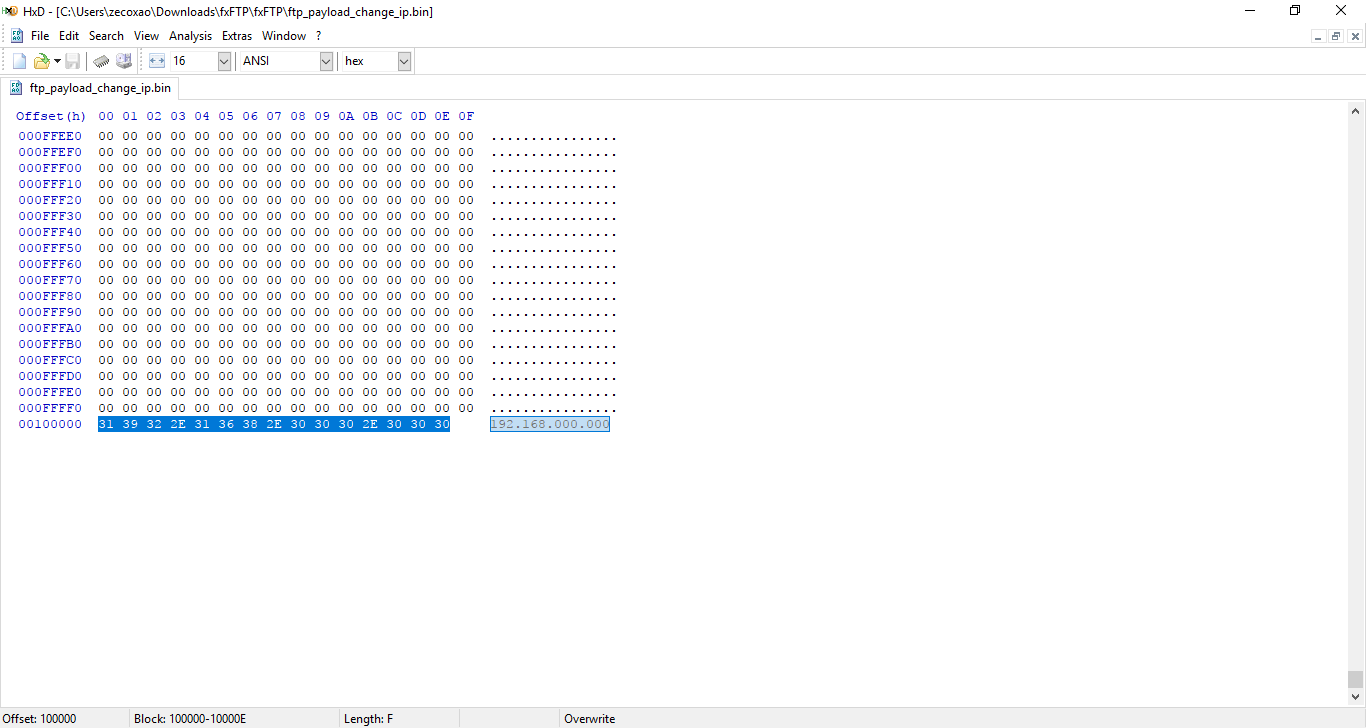
Replace it with your PS4 IP:
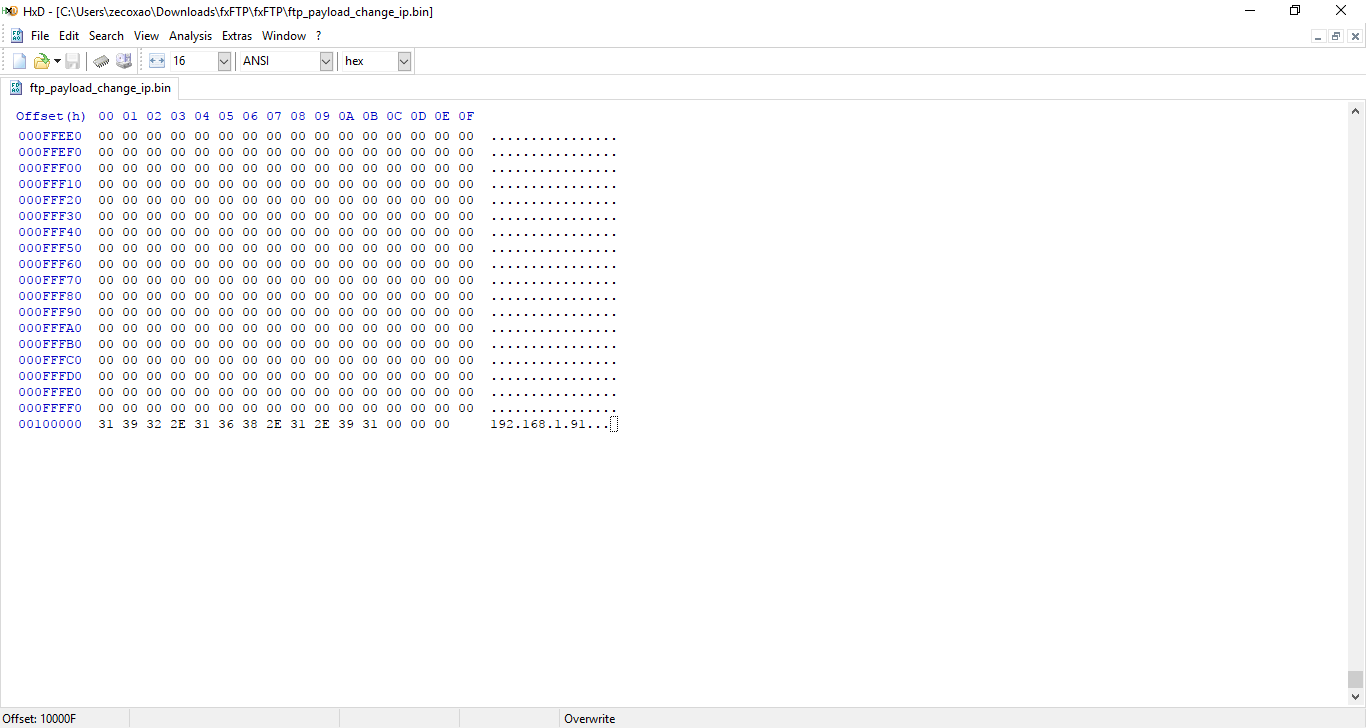
and just send it with netcat
You should have FTP working then.
Everything else is the same for CTurt payloads.
You get spoof to 5.00 firmware, FTP now allows you to dump crypt and cryptx partitions, as well as other things like iccnvs and Debug Settings are fully working (using Devkit Target ID)
Credits:
To quote from zecoxao: How to Use FTP with Fixed Debug Settings Tutorial
You need:
- Fixed FTP Payload with full debug settings
- PS4 on 1.76
- PC to send the payload
- Netcat / Netcat GUI
- [PLAIN]HXD[/PLAIN] or hexeditor of choice
Before sending the payload, hexedit it to add your IP. Search for 192.168.000.000
Replace it with your PS4 IP:
and just send it with netcat
You should have FTP working then.
Everything else is the same for CTurt payloads.
You get spoof to 5.00 firmware, FTP now allows you to dump crypt and cryptx partitions, as well as other things like iccnvs and Debug Settings are fully working (using Devkit Target ID)
Credits:
- sealab (For the full debug settings patches)
- wildcard (For the port to 1.01 payload)
- fx0day (For the original FTP payload sauce)
- flatz (For the FTP payload fixes)...
For Honor Free Weekend August 10-13 for PS Plus Members, PS4 Tips
Today UbiBlog Communications Specialist Chris Watters announced a For Honor free weekend on August 10-13th for PlayStation Plus members with some PS4 tips below on how to survive the dangers of melee combat. 
Pre-loading begins on August 7th at 9:00 PM Pacific, and here's a rundown of all seven, to quote:
1.) Meet Your Heroes
Take a few minutes to watch the Basic Video under How to Fight in the hero menu for each hero you want to play. It’ll show you their playstyle and a few moves to try out. You don’t need to master the Berserker’s Bear Mauler combo right out of the gate, but knowing that they can’t hold their block stance like other heroes will help you stay alive longer.
2.) Spar Before Battle
All the heroes, including the new Shinobi and Centurion, can be used in the practice mode available in the How to Fight menu. This is the perfect spot to get your bearings and try out a combo or two before heading out to the battlefield.
3.) Finish Strong
If you finish off an enemy with a Heavy Attack (R2), you’ll get a chance to perform an execution. Not only do executions look friggin’ awesome, they also restore some of your health. Just be careful about executing an enemy if their friends are nearby, because they can (rudely) interrupt you.
4.) Don’t You Forget About Feats
Each hero has an array of special attributes and abilities called feats that unlock as a 4v4 match progresses. Some give you passive benefits, but others need to be activated by using the D-pad. For example, using healing feats when your health gets low can keep you alive long enough to use a more aggressive feat: calling in a catapult strike to decimate your enemies!
5.) Ledges Are Your Friends, Ledges Are Your Enemies
Forcing an enemy off a ledge will almost always kill them and probably make you cackle with glee. Getting knocked off a ledge will almost always kill you and probably make you wail in agony. Be very aware of ledges and other environmental hazards like spikes, large fires, and forge hammers.
6.) Sweet, Sweet Revenge
If (or rather, when) you end up outnumbered in a fight, don’t give up! Blocking and taking damage fills your Revenge meter. Activating a full Revenge meter will automatically knock back any attacking enemy and boost your attack power and speed. Focus on killing one of your foes in this...
Pre-loading begins on August 7th at 9:00 PM Pacific, and here's a rundown of all seven, to quote:
1.) Meet Your Heroes
Take a few minutes to watch the Basic Video under How to Fight in the hero menu for each hero you want to play. It’ll show you their playstyle and a few moves to try out. You don’t need to master the Berserker’s Bear Mauler combo right out of the gate, but knowing that they can’t hold their block stance like other heroes will help you stay alive longer.
2.) Spar Before Battle
All the heroes, including the new Shinobi and Centurion, can be used in the practice mode available in the How to Fight menu. This is the perfect spot to get your bearings and try out a combo or two before heading out to the battlefield.
3.) Finish Strong
If you finish off an enemy with a Heavy Attack (R2), you’ll get a chance to perform an execution. Not only do executions look friggin’ awesome, they also restore some of your health. Just be careful about executing an enemy if their friends are nearby, because they can (rudely) interrupt you.
4.) Don’t You Forget About Feats
Each hero has an array of special attributes and abilities called feats that unlock as a 4v4 match progresses. Some give you passive benefits, but others need to be activated by using the D-pad. For example, using healing feats when your health gets low can keep you alive long enough to use a more aggressive feat: calling in a catapult strike to decimate your enemies!
5.) Ledges Are Your Friends, Ledges Are Your Enemies
Forcing an enemy off a ledge will almost always kill them and probably make you cackle with glee. Getting knocked off a ledge will almost always kill you and probably make you wail in agony. Be very aware of ledges and other environmental hazards like spikes, large fires, and forge hammers.
6.) Sweet, Sweet Revenge
If (or rather, when) you end up outnumbered in a fight, don’t give up! Blocking and taking damage fills your Revenge meter. Activating a full Revenge meter will automatically knock back any attacking enemy and boost your attack power and speed. Focus on killing one of your foes in this...
PS3 WebKitSploit and PS3 Playground WIP Github Forks by Esc0rtd3w
Following his PS3 OFW PSID Dump Tool Tutorial and recent d0 / d1 pdb file findings PlayStation 3 developer @esc0rtd3w (Twitter) set up some new work-in-progress Github forks for a PS3 WebKitSploit and PS3 Playground port. 
Download: ps3-webkitsploit-master.zip / PS3 WebKitSploit GIT / ps3-playground-master.zip / PS3 Playground GIT / Websploit.org / PS3 Playground Test Page / PS3 Webkit POC / PlayStation 3 Browser Investigation
The PS3 WebKitSploit is based on original PS4 code from Cryptogenic and qwertyoruiopz focusing on PS3 3.xx / 4.xx code execution, while the PS3 Playground WebKit exploit port is based on CTurt and Cryptogenics PS4 code.
From the README.md file, to quote: PS3 Playground
A collection of PS3 tools and experiments using the WebKit, Flash, and other options.
We are only testing on firmware 4.81 only at the moment.
THIS REPO IS FOR THE PUBLIC PS3 COMMUNITY TO EXPLORE AND TEST ON THEIR OWN
OUR TEAM IS CURRENTLY WORKING ON THIS PROJECT PRIVATELY AND WILL UPDATE WHEN FINISHED!
FOR A LIVE DEMO WITH PUBLIC TESTS TO TRY OUT, PLEASE VISIT: http://www.websploit.org/ps3/ps3-playground/test/
There are a lot of files here for reference and exploration.
Once more testing has been done, these will be...
Download: ps3-webkitsploit-master.zip / PS3 WebKitSploit GIT / ps3-playground-master.zip / PS3 Playground GIT / Websploit.org / PS3 Playground Test Page / PS3 Webkit POC / PlayStation 3 Browser Investigation
The PS3 WebKitSploit is based on original PS4 code from Cryptogenic and qwertyoruiopz focusing on PS3 3.xx / 4.xx code execution, while the PS3 Playground WebKit exploit port is based on CTurt and Cryptogenics PS4 code.
From the README.md file, to quote: PS3 Playground
A collection of PS3 tools and experiments using the WebKit, Flash, and other options.
We are only testing on firmware 4.81 only at the moment.
THIS REPO IS FOR THE PUBLIC PS3 COMMUNITY TO EXPLORE AND TEST ON THEIR OWN
OUR TEAM IS CURRENTLY WORKING ON THIS PROJECT PRIVATELY AND WILL UPDATE WHEN FINISHED!
FOR A LIVE DEMO WITH PUBLIC TESTS TO TRY OUT, PLEASE VISIT: http://www.websploit.org/ps3/ps3-playground/test/
There are a lot of files here for reference and exploration.
Once more testing has been done, these will be...
TestKit Installer Deluxe VPK for HENkaku Enso PS Vitas by Voxel9
We've added some new PS4 MEME's to the PSXHAX Shoutbox MOTD and Twitter this weekend, and following Adrenaline with uma0 Support for USB mass storage by @BenMitnicK PlayStation Vita developer @voxel released a PS Vita TestKit Installer Deluxe VPK which allows installing full TestKit firmware on HENkaku Enso PS Vita consoles including Debug Settings and TestKit-specific utilities! 
Download: Testkit_Installer_Deluxe.vpk / GIT
Below is a TestKit Installer Deluxe Installation video from Voxel9's YouTube Channel and some related tweets from his Twitter as well.
From the README.md, to quote: TestKit Installer Deluxe - Install TestKit firmware on HENkaku Enso PSVitas
This application can install (and uninstall) the TestKit firmware and TestKit spoofer plugin, which will completely enable Debug Settings from the settings apps, and everything else you can possibly do on an actual TestKit PS Vita. (such as Checker, Quick Sign Up, Installing debug packages in PKG installer, and even multiple PSN accounts.)
The installer makes modifications to vs0, and to the boot_config.txt, so don't power off your Vita or exit the app while installation is ongoing!
Finally, please be aware that this installer will not install on a PSTV, as there appears to be some compatibility issues with numerous things (TestKit FW was never designed for PSTV)
FAQ
Q: Can I get an unrecoverable brick from this?
A: No. If your boot config corrupts (which it 99.9% should not do) then just reboot into safe mode, reinstall the 3.60 retail firmware, and reinstall HENkaku Enso. Moreover, it was proven that you could still access safe mode to reinstall firmware after deleting all of vs0.
Q: I get C2-12828-1 when trying to install/uninstall! Halp!...
Download: Testkit_Installer_Deluxe.vpk / GIT
Below is a TestKit Installer Deluxe Installation video from Voxel9's YouTube Channel and some related tweets from his Twitter as well.
From the README.md, to quote: TestKit Installer Deluxe - Install TestKit firmware on HENkaku Enso PSVitas
This application can install (and uninstall) the TestKit firmware and TestKit spoofer plugin, which will completely enable Debug Settings from the settings apps, and everything else you can possibly do on an actual TestKit PS Vita. (such as Checker, Quick Sign Up, Installing debug packages in PKG installer, and even multiple PSN accounts.)
The installer makes modifications to vs0, and to the boot_config.txt, so don't power off your Vita or exit the app while installation is ongoing!
Finally, please be aware that this installer will not install on a PSTV, as there appears to be some compatibility issues with numerous things (TestKit FW was never designed for PSTV)
FAQ
Q: Can I get an unrecoverable brick from this?
A: No. If your boot config corrupts (which it 99.9% should not do) then just reboot into safe mode, reinstall the 3.60 retail firmware, and reinstall HENkaku Enso. Moreover, it was proven that you could still access safe mode to reinstall firmware after deleting all of vs0.
Q: I get C2-12828-1 when trying to install/uninstall! Halp!...
- PS4 Fake PKG (FPKG) Sharing Guide
- 6.XX Webkit / 6.72 PS4 Jailbreak
- 7.00-7.02 Webkit Exploit
- 7.02 Webkit / 7.02 Kernel / PS4JB
- 7.50 Kernel Exploit / PS4JB 7.55
- 7.55 / 8.00 Payloads / PS4JB2 7.55
- 9.00 PS4 Webkit Exploit
- 9.00 PS4 Payloads / GoldHEN (Latest)
- 9.00 PS4 Jailbreak Kernel Exploit
- 11.00 PS4 Jailbreak Kernel Exploit
- 13.00 PS4 Kernel Exploit / 13.02 BD-J Bug
- 4.03 PS5 Webkit Exploit
- PS5 Kernel Exploit (ExFAT Bug)
- PS5 Root Keys Obtained
- 4.03 PS5 Kernel Build String
- 4.03 PS5 Webkit Execution
- 4.03 PS5 Kernel Vulnerability
- 4.03 PS5 Filesystem Dumps
- 4.51 PS5 BD-JB Sandbox Escape
- PS5 BD-JB Exploit Hack Source Code
- Mast1c0re PS5 Userland Exploit
- PS5 Kernel Access via PS4 Exploit
- PS5 exFAT Vulnerability Disclosed
- 4.03 PS5 Kernel Exploit Webkit ROP
- 4.50 PS5 Kernel Exploit Webkit ROP
- 4.51 PS5 Kernel Exploit Webkit ROP
- 4.xx PS5 Kernel Exploit v1.01
- 4.xx PS5 Kernel Exploit v1.02 / v1.03
- PS5 1.00-6.50 Firmware Webkit
- Native PS5 ROP Chain Execution
- Mast1c0re PS5 Compiler Attack
- PS5 FreeBSD Kernel Bug & WebKit
- PS5 UMTX 2 Exploit & PS5 Jailbreak
- Byepervisor PS5 Hypervisor Exploit
- Lua Lapse PS5 Kxploit & Laps3c0re / Y2JB
- 12.00 / 12.70 PS5 Kernel Exploit