PSXHAX.COM website and domain for sale. Contact Us with your offer!

You are using an out of date browser. It may not display this or other websites correctly.
You should upgrade or use an alternative browser.
You should upgrade or use an alternative browser.
PSXHAX - PSXHACKS: PSX HAX - PSX HACKS - PLAYSTATION HAX - PLAYSTATION HACKS
PS4 DEX Firmware 3.700.001 Demo with PlayStation VR Debug Options
Over the last week or so we saw a PlayStation 4 Testkit DEX 3.50 Firmware demo, the PS4UPDATE-TestKit-GEN3-3_508_041.PUP followed by a PS4 TestKit Simple PS4 DEX Console Manager and today SilicaAndPina shared demo video footage from Armageddon Expo on Sony's PS4 DEX Firmware 3.700.001 which appears to now support also supports PlayStation VR debug options like 3.150.001 and higher. 
Check out the video from Silica's YouTube Channel and related Tweets below!
Finally, if you are a PS Vita fan SilicaAndPina also shared a Pastebin with a plethora of handy download links in it!
Spoiler
Check out the video from Silica's YouTube Channel and related Tweets below!
Finally, if you are a PS Vita fan SilicaAndPina also shared a Pastebin with a plethora of handy download links in it!
Spoiler
PS4 UI Mod 0.09 Alpha by eXtreme Update with Screenshots
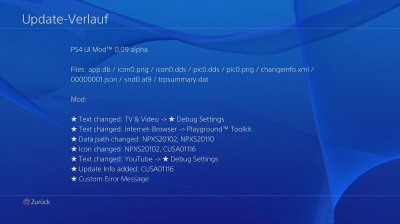
Following their previous PS4 1.76 UI Mod and PS4 Custom Home Menu updates, this weekend e✘treme updated it to PS4 UI Mod version 0.09 Alpha with some screenshots below.
To quote, roughly translated: "I worked on my 1.76 Mod further and Version 0.09 Alpha is finished.
Any changes in the user interface and the Home Menu are only visually, so debug settings are not in function."
Screenshots:
Also if you haven't already, head over to the e✘treme Downloads section and check out their PS4 PKG Database which offers Sony PlayStation 4 Games, Apps and Themes in Package (PKG) File format!
Finally, a BIG thanks to @VultraAID for the news tip!
To quote, roughly translated: "I worked on my 1.76 Mod further and Version 0.09 Alpha is finished.
Any changes in the user interface and the Home Menu are only visually, so debug settings are not in function."
Screenshots:
Finally, a BIG thanks to @VultraAID for the news tip!
PS4 1.76 System Dump on Firmware 1.76 via FTP and File Analysis
Since the PS4 Filesystem Root Dump, today eXtreme posted a PlayStation 4 Model CUH-1116A Firmware 1.760.001 System Dump done via PS4 FTP complete with a File Analysis for developers to examine with the previously released Tools Package.
To quote: PS4 1.76 DUMP
PlayStation 4 - Firmware 1.76 - System Dump - Dumped Filesystem for everyone to look at it or to examine. Should be complete apart from the Sandbox directory. Dumped on FW 1.76 via FTP.
PS4 Model: CUH-1116A
Firmware: 1.760.001
Dumped: 26-04-16
Files: 1.546
Size: 789 MB
To quote from the e✘treme File Analysis page, roughly translated:
System Information (settings / System) -> name / IP address
system_data/settings/system.dat
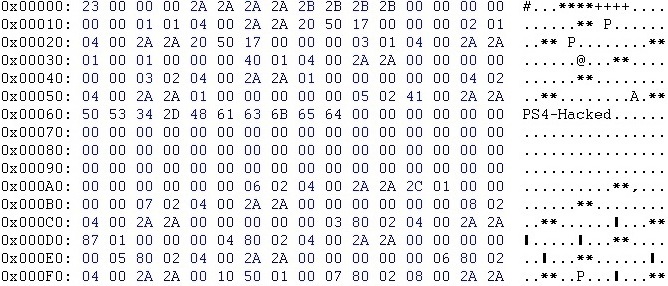
Profile -> User
user/home/10000000/username.dat

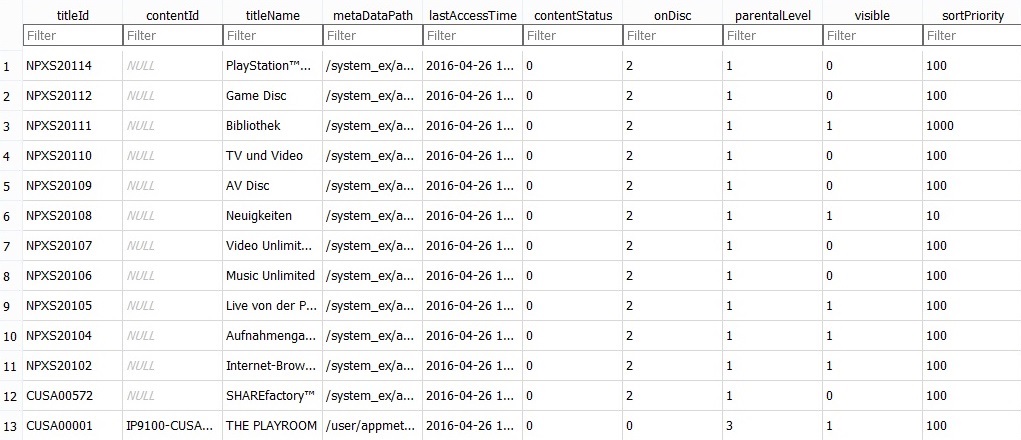
Database -> Home Screen
system_data/priv/mms/app.db
User Application -> Icon
user / appmeta / CUSAXXXXX / icon0.png
System Application -> Icon
system_ex / app / NPXSXXXXX / sce_sys / icon0.png
Trophies -> Number
user / home / user_number / trophy / data / sce_trop / trpsummary.dat
Font
preinst / common / font / DFHEI5-SONY.ttf
Update History
user / appmeta / CUSAXXXXX / change info / changeinfo.xml
Home Menu Sound
preinst / priv / systembgm / bgm_main.at9
Login Sound
preinst / priv / systembgm / bgm_login.at9
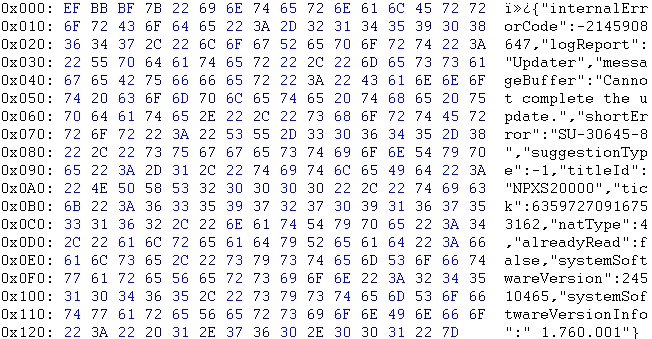
Fault History (Settings / Control)
system_data / priv / error / history / 00000001.json
User Authentication
system_data / priv / home / 10000000 / np / auth.dat
EULA (Settings / Control)
update / eula.xml
[ATTACH type="full" alt="PS4...
To quote: PS4 1.76 DUMP
PlayStation 4 - Firmware 1.76 - System Dump - Dumped Filesystem for everyone to look at it or to examine. Should be complete apart from the Sandbox directory. Dumped on FW 1.76 via FTP.
PS4 Model: CUH-1116A
Firmware: 1.760.001
Dumped: 26-04-16
Files: 1.546
Size: 789 MB
To quote from the e✘treme File Analysis page, roughly translated:
System Information (settings / System) -> name / IP address
system_data/settings/system.dat
Profile -> User
user/home/10000000/username.dat
Database -> Home Screen
system_data/priv/mms/app.db
User Application -> Icon
user / appmeta / CUSAXXXXX / icon0.png
System Application -> Icon
system_ex / app / NPXSXXXXX / sce_sys / icon0.png
Trophies -> Number
user / home / user_number / trophy / data / sce_trop / trpsummary.dat
Font
preinst / common / font / DFHEI5-SONY.ttf
Update History
user / appmeta / CUSAXXXXX / change info / changeinfo.xml
Home Menu Sound
preinst / priv / systembgm / bgm_main.at9
Login Sound
preinst / priv / systembgm / bgm_login.at9
Fault History (Settings / Control)
system_data / priv / error / history / 00000001.json
User Authentication
system_data / priv / home / 10000000 / np / auth.dat
EULA (Settings / Control)
update / eula.xml
[ATTACH type="full" alt="PS4...
Wii U Jailbreak Method to Run Game Backups via Modding Tickets
Similar to the PS4 Brazilian Game Sharing Method (not to be confused with the PlayStation 4 Russian Jailbreak Method) and following the recent Wii-U ROP / OTP Hacks, today BurningDesire documented the Brazilian Team's Wii U Jailbreak Method to install and run game backups by modifying Nintendo eShop Tickets using internal memory or USB loading! 


Here is his compilation, to quote: Wii U USB loading - Install WiiU Games to USB or Internal Memory
Important Info
Here is his compilation, to quote: Wii U USB loading - Install WiiU Games to USB or Internal Memory
Important Info
- If you want to install on HDD, you need to format your HDD to WiiU format. Attention it will DELETE everything on that drive. DO NOT USE THE DRIVE YOU USE FOR vWII!
- In order to get your HDD to be recognized you may need to use a split USB cable
- The downloaded games need to be the region of your Wii U.
- The games will be playable online!
- You can install only ONE game at a time. You can of course have many installed games at the same time on your HDD or WiiU, but the installation process is done one by one!
- Purchased DLC and updates work fine
- You can transfer games installed to you Hard drive to your internal storage and it will run fine
- You can install games to internal storage without installing to USB
- If you have an existing savegame for your game on your internal storage, move it to you USB before installing the game to USB or you'll lose it!
- To install your Loadiine save into the console, use Saviine homebrew. Guide available here
- Get the game from NUS, do not decrypt. Be sure it's the same region than your console!
- Put the game files (.app, .h3, etc.) on your SD card, in SD:/Install/ folder
- Get the ticket for your game (extracted from a WUD file). Be sure it's the same region than your console!
- Edit the ticket (title.tik...
Nintendo Switch (NX) Preview Trailer Video, Coming in March 2017
Today Nintendo of America tweeted news that their upcoming NX console is now officially called the Nintendo Switch which arrives in March 2017 with a preview trailer video below!
To quote from the video's caption: Introducing Nintendo Switch! In addition to providing single and multiplayer thrills at home, the Nintendo Switch system also enables gamers to play the same title wherever, whenever and with whomever they choose.
The mobility of a handheld is now added to the power of a home gaming system to enable unprecedented new video game play styles.
And for Sony PlayStation fans, here's the PS Switch version:
Thanks to @ArthurBishop for sharing the Nintendo Switch video link in the Shoutbox!
To quote from the video's caption: Introducing Nintendo Switch! In addition to providing single and multiplayer thrills at home, the Nintendo Switch system also enables gamers to play the same title wherever, whenever and with whomever they choose.
The mobility of a handheld is now added to the power of a home gaming system to enable unprecedented new video game play styles.
And for Sony PlayStation fans, here's the PS Switch version:
Thanks to @ArthurBishop for sharing the Nintendo Switch video link in the Shoutbox!
- PS4 Fake PKG (FPKG) Sharing Guide
- 6.XX Webkit / 6.72 PS4 Jailbreak
- 7.00-7.02 Webkit Exploit
- 7.02 Webkit / 7.02 Kernel / PS4JB
- 7.50 Kernel Exploit / PS4JB 7.55
- 7.55 / 8.00 Payloads / PS4JB2 7.55
- 9.00 PS4 Webkit Exploit
- 9.00 PS4 Payloads / GoldHEN (Latest)
- 9.00 PS4 Jailbreak Kernel Exploit
- 11.00 PS4 Jailbreak Kernel Exploit
- 13.00 PS4 Kernel Exploit / 13.02 BD-J Bug
- 4.03 PS5 Webkit Exploit
- PS5 Kernel Exploit (ExFAT Bug)
- PS5 Root Keys Obtained
- 4.03 PS5 Kernel Build String
- 4.03 PS5 Webkit Execution
- 4.03 PS5 Kernel Vulnerability
- 4.03 PS5 Filesystem Dumps
- 4.51 PS5 BD-JB Sandbox Escape
- PS5 BD-JB Exploit Hack Source Code
- Mast1c0re PS5 Userland Exploit
- PS5 Kernel Access via PS4 Exploit
- PS5 exFAT Vulnerability Disclosed
- 4.03 PS5 Kernel Exploit Webkit ROP
- 4.50 PS5 Kernel Exploit Webkit ROP
- 4.51 PS5 Kernel Exploit Webkit ROP
- 4.xx PS5 Kernel Exploit v1.01
- 4.xx PS5 Kernel Exploit v1.02 / v1.03
- PS5 1.00-6.50 Firmware Webkit
- Native PS5 ROP Chain Execution
- Mast1c0re PS5 Compiler Attack
- PS5 FreeBSD Kernel Bug & WebKit
- PS5 UMTX 2 Exploit & PS5 Jailbreak
- Byepervisor PS5 Hypervisor Exploit
- Lua Lapse PS5 Kxploit & Laps3c0re / Y2JB
- 12.00 / 12.70 PS5 Kernel Exploit