PSXHAX.COM website and domain for sale. Contact Us with your offer!

You are using an out of date browser. It may not display this or other websites correctly.
You should upgrade or use an alternative browser.
You should upgrade or use an alternative browser.
How to Upload a Custom PS4 Playground Into ESP8266 Guide by Nzie
So here is a tutorial by me (nzie aka @pearlxcore) to upload your custom PS4 Playground into ESP8266 (I use treyjazz's file as sample).
WARNING : THIS TUTORIAL IS FULL OF IMAGES FOR YOUR UNDERSTANDING
What you need :
Instruction :
WARNING : THIS TUTORIAL IS FULL OF IMAGES FOR YOUR UNDERSTANDING
What you need :
Instruction :
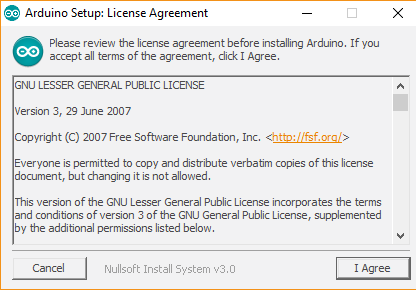
- Install Arduino IDE
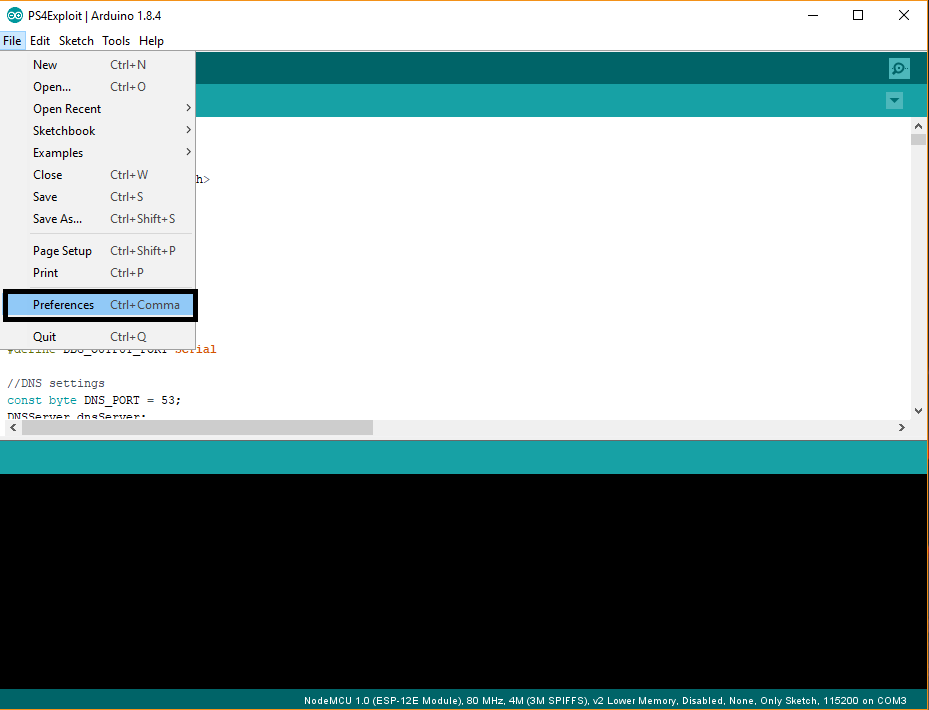
- Once installation is done, go to File -> Preferences
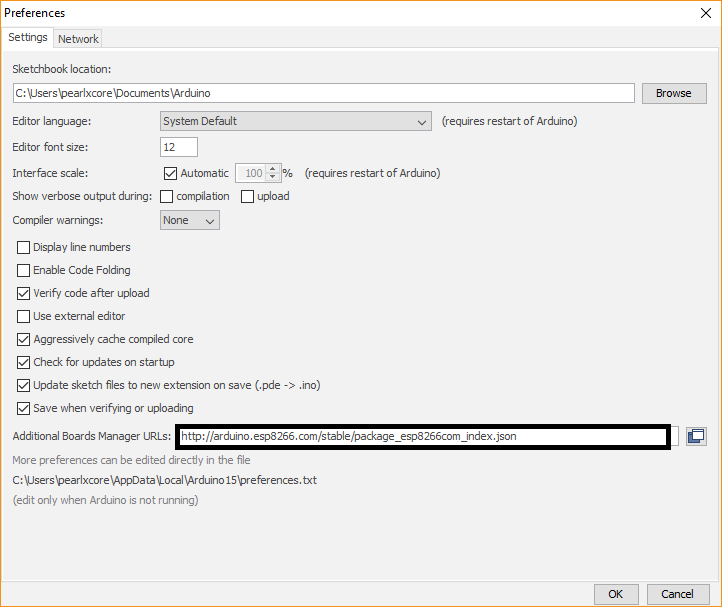
- Insert 'http://arduino.esp8266.com/stable/package_esp8266com_index.json' into Additional Boards Manager URL
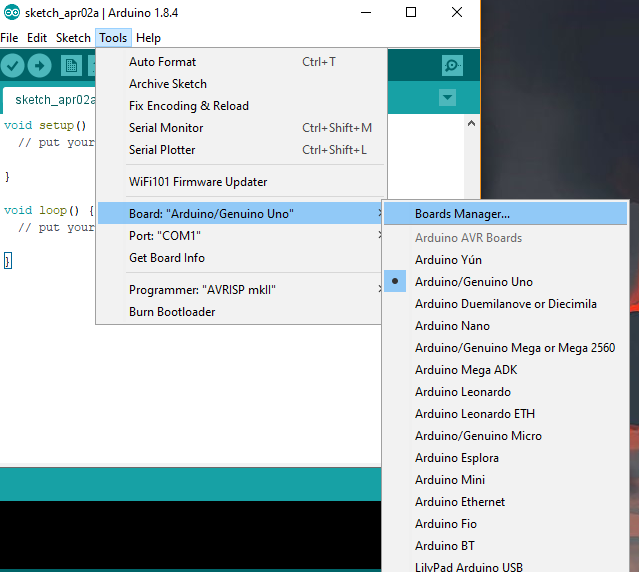
- Go to tools -> Board -> Boards Manager
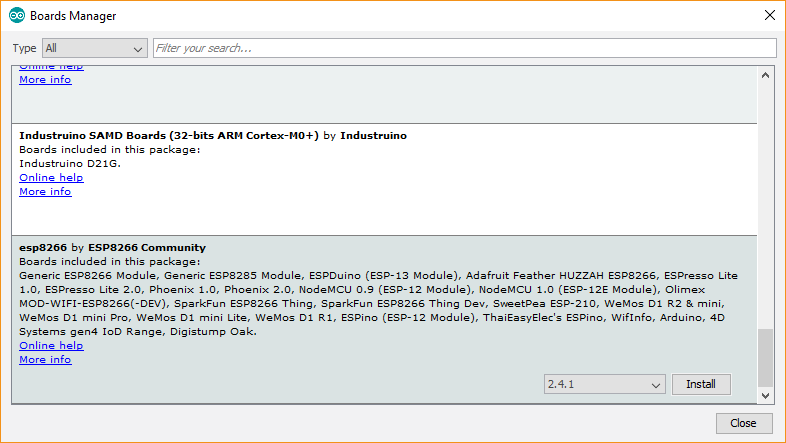
- Scroll down until you see ESP8266 and click install
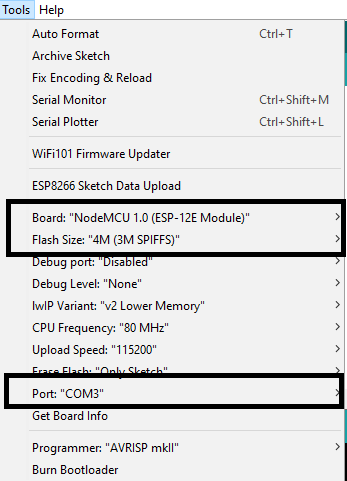
- Make sure you selected 'NodeMCU 1.0 (ESP-12E module)
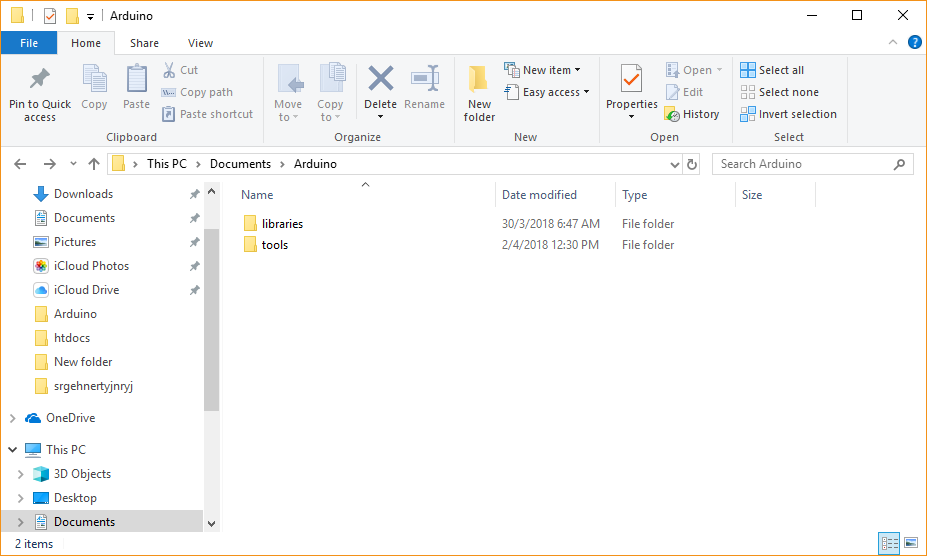
- Navigate to C:/Users/you-username/Documents/Arduino, make a new folder named 'tools'
- Inside 'tools' folder, extract 'ESP8266FS-0.2.0.zip' content so the directory will be like this -> C:\Users\your-usename\Documents\Arduino\tools\ESP8266FS\tool\esp8266fs.jar
- Now you have installed ESP8266 library and sketch uploader
- Restart Arduino IDE
- Extract treyjazz's PS4Exploit files somewhere in your pc
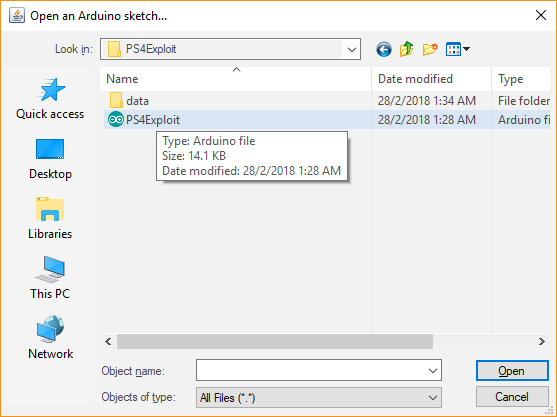
- Go to Files -> Open -> navigate to the extracted files folder and select PS4Exploit.ino
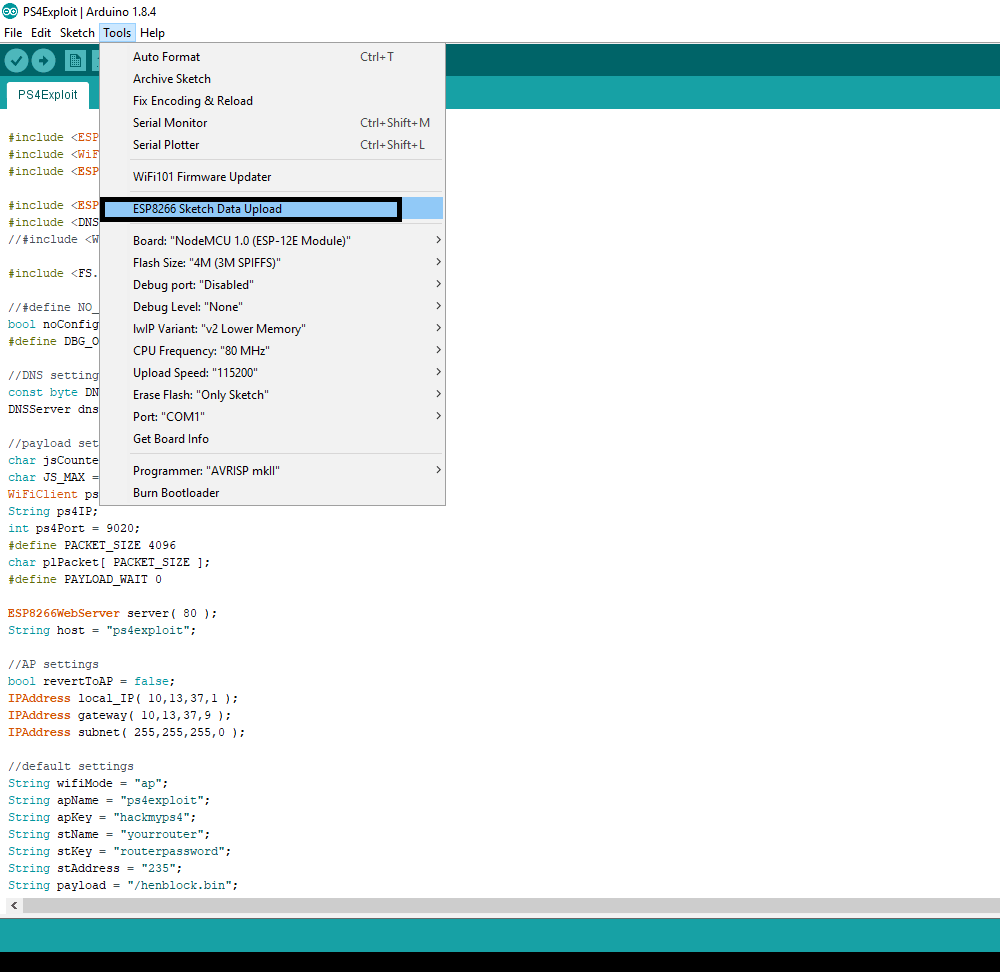
- Make sure you select the right board, flash and port in 'Tools' tab
- Now click on 'ESP8266 Sketch Data Upload'
- It will compile the code and files. Wait until the progress reach 100%
- Go to 'Sketch' and click on 'Upload'. Wait until the progress reach 100%
- Once done you can take out ESP8266 and reinsert back to USB port.
- Now you can test the...
Making a PS4 Theme PKG for 4.05 / 4.55 Tutorial by Mangekyou222
Previously we saw some PS4 Custom BGM and Theme PKG Files followed by the PS4 Custom Theme Preview Image Creation Method for PS4 Theme Editor, and today following my fully functional MGS V Theme (and a Blonde Theme by diegoshark  ) here's the guide I made:
How to Make a PS4 Theme PKG for 4.05 / 4.55 Tutorial:
Needed Tools
Download the images you need for the "background" folder (recommended to be jpeg because you need PNG 24bits and i found that you can't convert PNG 32bits to PNG 24bits for some reason it stays on 32bits so converting jpeg to png using Photoshop will do the trick, more on that below)
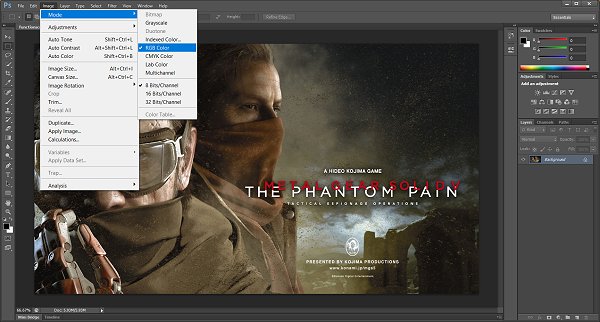
After that save as PNG and copy the file to the background folder
Next folder is content_icon (those...
) here's the guide I made:How to Make a PS4 Theme PKG for 4.05 / 4.55 Tutorial:
Needed Tools
- Theme sample (my theme sample if you need one): Metal gear solid V TPP.7z (7.94 MB)
- PS4_Theme_Editor_0-1-3beta
- Fake_PKG_Tools_v1.3
- Photoshop (or other advanced photo editing tools)
- AT9_AT3_Converter_V2.3 (Mirror)
- Audacity
- A brain
Download the images you need for the "background" folder (recommended to be jpeg because you need PNG 24bits and i found that you can't convert PNG 32bits to PNG 24bits for some reason it stays on 32bits so converting jpeg to png using Photoshop will do the trick, more on that below)
- homescreen (resolution 1920x1080)
- functionscreen (resolution 1920x1080)
- functionareabar (resolution 1920x164)
After that save as PNG and copy the file to the background folder
Next folder is content_icon (those...
Manjaro Linux PS4 V1: Gnome on PS4 Pro OFW 4.55 Guide by Tikilou
A few days back we saw some nice PS4 Linux progress by eeply, and today tikilou made available guide for Gnome on PS4 Pro Firmware 4.55 (Manjaro Linux) with a demonstration video below! 
Here it is from French site Logic-Sunrise.com, roughly translated for those interested: PS4 Manjaro Linux PS4 V1 Available
Hello everyone, as you had to follow recently, Eeply has made a contribution to the Linux kernel with the Display Port Bridge driver => HDMI Panasonic MN864729, this advanced allows us finally to enjoy the video output of PS4 Slim and Pro on Linux.
In these conditions, I got to work, and despite some setbacks, I was able to draw small things, that's why I bring you a distribution ready to use, based on ArchLinux, but with the accessibility of an Ubuntu.
Here is a short video of the boot of Manjaro Linux Gnome, on a PS4 Pro with Firmware 4.55:
Gnome On PS4 Pro firmware 4.55 (Manjaro Linux)
Why Manjaro? Because it is both simple to handle, accessible, but also very flexible, and size advantage, rolling release, which means that it is updated in real time as the release of all its system components (no update to all X times like Ubuntu or Fedora), but also because, based on ArchLinux, it brings its share of tools including the community filing of scripts AUR.
The Aur system, Community, is very interesting, it could be the entry point for anyone to contribute easily for Linux on PS4 software side, via this repository, whoever can propose a script, who will pack automatically any file / software from pre-compiled sources or binaries. It is thus possible to offer applications, games, configuration files, or even ... A customized Linux kernel, custom drivers, etc. And the repository is already teeming with emulators, so it is very easy to compile automatically, the latest revisions from github many emulators (including RPCS3.).
The AMD x86_64 processor is also a very big advantage of compatibility with the PC universe, with Linux running on PS4.
You can contribute to the community repository here: https://aur.archlinux.org
Here's what...
Here it is from French site Logic-Sunrise.com, roughly translated for those interested: PS4 Manjaro Linux PS4 V1 Available
Hello everyone, as you had to follow recently, Eeply has made a contribution to the Linux kernel with the Display Port Bridge driver => HDMI Panasonic MN864729, this advanced allows us finally to enjoy the video output of PS4 Slim and Pro on Linux.
In these conditions, I got to work, and despite some setbacks, I was able to draw small things, that's why I bring you a distribution ready to use, based on ArchLinux, but with the accessibility of an Ubuntu.
Here is a short video of the boot of Manjaro Linux Gnome, on a PS4 Pro with Firmware 4.55:
Gnome On PS4 Pro firmware 4.55 (Manjaro Linux)
Why Manjaro? Because it is both simple to handle, accessible, but also very flexible, and size advantage, rolling release, which means that it is updated in real time as the release of all its system components (no update to all X times like Ubuntu or Fedora), but also because, based on ArchLinux, it brings its share of tools including the community filing of scripts AUR.
The Aur system, Community, is very interesting, it could be the entry point for anyone to contribute easily for Linux on PS4 software side, via this repository, whoever can propose a script, who will pack automatically any file / software from pre-compiled sources or binaries. It is thus possible to offer applications, games, configuration files, or even ... A customized Linux kernel, custom drivers, etc. And the repository is already teeming with emulators, so it is very easy to compile automatically, the latest revisions from github many emulators (including RPCS3.).
The AMD x86_64 processor is also a very big advantage of compatibility with the PC universe, with Linux running on PS4.
You can contribute to the community repository here: https://aur.archlinux.org
Here's what...
Running Fake / Custom Package (PKG) Files from USB / HDD Guide
Following his last guide, today PlayStation 4 developer @MODDEDWARFARE let us know on Twitter that he's posted a new video tutorial on his YouTube Channel covering How to Run Fake / Custom Package (PKG) Files from USB / HDD on jailbroken PS4 4.05 and 4.55 consoles. 
Here's a summary from the video's description, to quote: How to run custom/fake package files such as PS4 backup games, homebrew apps and PS2 games on a 4.55 PS4.
This video also covers how to run the package files from a USB device instead of the internal hard drive.
Download Links:
Here's a summary from the video's description, to quote: How to run custom/fake package files such as PS4 backup games, homebrew apps and PS2 games on a 4.55 PS4.
This video also covers how to run the package files from a USB device instead of the internal hard drive.
Download Links:
ESP Host: Serve PS4 Payloads Using the ESP8266 Guide by Codsworth
Today @Codsworth let us know about an ESP Host project he's been working on, and shared a guide on a simple way to serve PS4 payloads using the ESP8266 Wifi Module board with at least 4 MB flash. 
Download: esphost.bin / esphostmulti.bin / esphostmulti405.bin / GIT
Here's all the details from the README.md: ESP Host
Today I show you a simple way to serve payload using the ESP8266.
Benefits of using the ESP8266:
Instructions:
Flash esphost.bin using the following command:
NOTE2: Users can optionally flash using the GUI version of ESPTool...
Download: esphost.bin / esphostmulti.bin / esphostmulti405.bin / GIT
Here's all the details from the README.md: ESP Host
Today I show you a simple way to serve payload using the ESP8266.
Benefits of using the ESP8266:
- Extremely low cost hardware, available worldwide
- Ability to run 24/7 via USB, self-hosted payload, no external apps or programs required
- Completely block all updates
- No need for custom DNS server or settings, features automatic redirect
- Easy to program and update via USB
- Very low power consumption
- esptool.py
- ESP8266 Wifi Module with at least 4M flash
- PS4 Firmware 4.55 or 4.05
- esphost.bin or esphostmulti.bin or esphostmulti405.bin
- VORTEX HEN 1.4
- HEN
- HEN+VR
- FTP
- DUMPER
- BACKUP
Instructions:
Flash esphost.bin using the following command:
Code:
sudo esptool.py --port /dev/ttyUSB0 write_flash 0x00000 0x400000 ./esphost.bin- After flashing completes, connect to "PS4-WIFI" using "easy setting" then go to [Settings] > [User Guide]
NOTE2: Users can optionally flash using the GUI version of ESPTool...
- PS4 Fake PKG (FPKG) Sharing Guide
- 6.XX Webkit / 6.72 PS4 Jailbreak
- 7.00-7.02 Webkit Exploit
- 7.02 Webkit / 7.02 Kernel / PS4JB
- 7.50 Kernel Exploit / PS4JB 7.55
- 7.55 / 8.00 Payloads / PS4JB2 7.55
- 9.00 PS4 Webkit Exploit
- 9.00 PS4 Payloads / GoldHEN (Latest)
- 9.00 PS4 Jailbreak Kernel Exploit
- 11.00 PS4 Jailbreak Kernel Exploit
- 13.00 PS4 Kernel Exploit / 13.02 BD-J Bug
- 4.03 PS5 Webkit Exploit
- PS5 Kernel Exploit (ExFAT Bug)
- PS5 Root Keys Obtained
- 4.03 PS5 Kernel Build String
- 4.03 PS5 Webkit Execution
- 4.03 PS5 Kernel Vulnerability
- 4.03 PS5 Filesystem Dumps
- 4.51 PS5 BD-JB Sandbox Escape
- PS5 BD-JB Exploit Hack Source Code
- Mast1c0re PS5 Userland Exploit
- PS5 Kernel Access via PS4 Exploit
- PS5 exFAT Vulnerability Disclosed
- 4.03 PS5 Kernel Exploit Webkit ROP
- 4.50 PS5 Kernel Exploit Webkit ROP
- 4.51 PS5 Kernel Exploit Webkit ROP
- 4.xx PS5 Kernel Exploit v1.01
- 4.xx PS5 Kernel Exploit v1.02 / v1.03
- PS5 1.00-6.50 Firmware Webkit
- Native PS5 ROP Chain Execution
- Mast1c0re PS5 Compiler Attack
- PS5 FreeBSD Kernel Bug & WebKit
- PS5 UMTX 2 Exploit & PS5 Jailbreak
- Byepervisor PS5 Hypervisor Exploit
- Lua Lapse PS5 Kxploit & Laps3c0re / Y2JB
- 12.00 / 12.70 PS5 Kernel Exploit