PSXHAX.COM website and domain for sale. Contact Us with your offer!

You are using an out of date browser. It may not display this or other websites correctly.
You should upgrade or use an alternative browser.
You should upgrade or use an alternative browser.
BIN2JS Guide to Convert PS4 Payload.bin to Payload.js Files
Recently mtnjustme let us know about a utility called BIN2JS (Binary 2 JavaScript) to convert PlayStation 4 v4.05 / v4.55 payload.bin files into payload.js files used when creating Web / USB wifi versions.
Below is a BIN2JS Github repository by @cfwprophet alongside a compiled version from RetroGamer_74 with a roughly translated guide by @fabrebatalla18 for those interested.
Download: WEB Base 4.05.zip / WEB Base 4.55.zip (Confirmed working) /
bin2js.py (Bin2js 6.72 Al Azif script via Red-J)
Spoiler: Depreciated
Previously we've seen both a Setting Up & Building Payload.bin and a Building PlayStation 4 Payloads tutorial for those who missed them.
From the ReadMe.md: Binary 2 JavaScript
A simple tool to convert a binary file which will be mostly a payload, to a unsigned integer 32 Array, embeded into a JavaScript function call. The application is ready to use for the PS4 OpenSource Hacking Community.
And here's the tutorial from...
Below is a BIN2JS Github repository by @cfwprophet alongside a compiled version from RetroGamer_74 with a roughly translated guide by @fabrebatalla18 for those interested.
Download: WEB Base 4.05.zip / WEB Base 4.55.zip (Confirmed working) /
bin2js.py (Bin2js 6.72 Al Azif script via Red-J)
Spoiler: Depreciated
Previously we've seen both a Setting Up & Building Payload.bin and a Building PlayStation 4 Payloads tutorial for those who missed them.
From the ReadMe.md: Binary 2 JavaScript
A simple tool to convert a binary file which will be mostly a payload, to a unsigned integer 32 Array, embeded into a JavaScript function call. The application is ready to use for the PS4 OpenSource Hacking Community.
- Fixed a bug on the bin conversion routine.
- Added a second format for the .js to write. Simple use any flag to trigger it. Added Vortex Payload Format.
- Added back conversion support for all 3 formats.
Code:
Flags: -1 = Foramt1 u32[] -2 = Format2 p.write4addr.add(... -3 = Format3 payload = [.... -4 = js2binAnd here's the tutorial from...
How to Get PS4 Game Updates on a 4.05 / 4.55 Jailbroken Console
Here's a handy guide covering how to get PS4 game updates on a jailbroken 4.05 OFW or 4.55 OFW console from PlayStation 4 developer @MODDEDWARFARE on his YouTube Channel via Twitter. 
This comes following a related tutorial on Adding PS4 Game Updates in Packages (PKGs) for those who missed it.
From the video's description, to quote: How to Get Game Updates on a 4.05/4.55 PS4 (4.05/4.55 Jailbreak)
How to update your games on a 4.05 or 4.55 Jailbroken PS4.
 This method is for official games only! It will not work with game backups, only the original disc games.
Update Sites:
Spoiler
Download links:
How To Merge PKGs & Update Games For 4.05 & 4.55 (PS4 Jailbreak)
How to install update PKG files for your PS4 Disc based games using PS4 PKG Update Database! by NagatoRevenge
How to Install Older PS4 Game Updates on Any PS4 7.02/7.50 by @MODDEDWARFARE
This comes following a related tutorial on Adding PS4 Game Updates in Packages (PKGs) for those who missed it.
From the video's description, to quote: How to Get Game Updates on a 4.05/4.55 PS4 (4.05/4.55 Jailbreak)
How to update your games on a 4.05 or 4.55 Jailbroken PS4.
This method is for official games only! It will not work with game backups, only the original disc games.Update Sites:
Spoiler
Download links:
How To Merge PKGs & Update Games For 4.05 & 4.55 (PS4 Jailbreak)
How to install update PKG files for your PS4 Disc based games using PS4 PKG Update Database! by NagatoRevenge
How to Install Older PS4 Game Updates on Any PS4 7.02/7.50 by @MODDEDWARFARE
PS4HEN with USB Stick (Non-Wifi) and Router Without OpenWRT Guide
Following the PS4HEN Android Guide, PS4 Exploit Host for OpenWRT, PS4HEN Wifi USB Drive Guide, PS4HEN Wifi Card Reader Guide and PS4HEN Airdisk iOS iPhone Guide today we have another PS4HEN tutorial from @FrogDR who sent it via the Contact link for those interested in trying out, to quote:
How to Host PS4HEN with USB Stick (not Wifi) and Router (without OpenWRT)
Hello,
I want to share with other my method to Host a Exploit and PS4HEN using USB stick (not Wifi stick) and router (without OpenWRT) with USB Port
What I've got and how i use it:
What we need : Router Netgear Nighthawk X4S R7800 (any router with usb port and storage sharing?) and Kingston 8GB USB STICK (any USB stick) and usb_455_vr_hen.zip from @stooged
1. Format USB Stick on a FAT32 and create a folder (i create exploit) then copy files from usb_455_vr_hen.zip to this folder.
2. Plug USB Stick to router and go to yours routers menu to ReadySHARE Settings and make sure you have check Basic USB Storage. In Advance Settings check Network Neighborhood and HTTP Access Method.
3. On PS4 go to Web Browser and Add Bookmark. I add Bookmark "Exploit USB" with address: http://readyshare.routerlogin.net/shares/USB_Storage/exploit/index.html
4. Thats all !
After this you do not have to commit additional devices like PC or Phone and Host PS4HEN is available all the time. You just need to run a Web Browser on your PS4 and open Your Bookmark with...
How to Host PS4HEN with USB Stick (not Wifi) and Router (without OpenWRT)
Hello,
I want to share with other my method to Host a Exploit and PS4HEN using USB stick (not Wifi stick) and router (without OpenWRT) with USB Port
What I've got and how i use it:
What we need : Router Netgear Nighthawk X4S R7800 (any router with usb port and storage sharing?) and Kingston 8GB USB STICK (any USB stick) and usb_455_vr_hen.zip from @stooged
1. Format USB Stick on a FAT32 and create a folder (i create exploit) then copy files from usb_455_vr_hen.zip to this folder.
2. Plug USB Stick to router and go to yours routers menu to ReadySHARE Settings and make sure you have check Basic USB Storage. In Advance Settings check Network Neighborhood and HTTP Access Method.
3. On PS4 go to Web Browser and Add Bookmark. I add Bookmark "Exploit USB" with address: http://readyshare.routerlogin.net/shares/USB_Storage/exploit/index.html
4. Thats all !
After this you do not have to commit additional devices like PC or Phone and Host PS4HEN is available all the time. You just need to run a Web Browser on your PS4 and open Your Bookmark with...
How to Host PS4HEN for Airdisk iOS iPhone Guide by Leslie84
Okay Guuuuuuuuys thx flys out @zeus2000
Since we saw the Android PS4HEN Guide, I have done now PS4HEN works on my iPhone 6s Plus (iOS 10.3.1)
For all peoples have use iOS:
Setup on Airdisk:
1. Airdisk install and start on Iphone
2. Middle of the top, where stays "use desktop browser" push here on touch your iphone
3. Web server is running here we gooo and you see the IP here 
Start PS4 on TV and go to www. and write the homepage from airdisk stay on the middle of the top
Have fun for all my peoples too will use it with iOS it works for , HEN , FTP and Dumper.
Make for every application a Folder (look the category from wifi usb cardreader) files you need to download VTX HEN MASTER 1.3 , VTX FTP MASTER 1.4 , VTX DUMPER MASTER 1.6.
greets
Leslie84
thx flys out @zeus2000Since we saw the Android PS4HEN Guide, I have done now PS4HEN works on my iPhone 6s Plus (iOS 10.3.1)
For all peoples have use iOS:
- On PS4 Network Custom Setup !
- You are not using a proxy
- You don't enter a port number anywhere
Code:
1. IP of PS4                               192.x.x.x
2. subnetz                                 255.255.255.0
3. gateway (your router)                   192.x.x.x
4. dns 1 (iphone look airdisk)             192.xxx.x.xx
5. dns 2 (al azif if use: https://github.com/Al-Azif/ps4-exploit-host/releases/latest)1. Airdisk install and start on Iphone
2. Middle of the top, where stays "use desktop browser" push here on touch your iphone
3. Web server is running
here we gooo and you see the IP here Start PS4 on TV and go to www. and write the homepage from airdisk stay on the middle of the top
Have fun for all my peoples too will use it with iOS it works for , HEN , FTP and Dumper.
Make for every application a Folder (look the category from wifi usb cardreader) files you need to download VTX HEN MASTER 1.3 , VTX FTP MASTER 1.4 , VTX DUMPER MASTER 1.6.
greets
Leslie84
Host PS4HEN for PS4 4.05 OFW with a Wifi Card Reader Guide
Last week we saw a guide on hosting PS4 HEN files on Wifi USB drives.
So I decided to making another guide with zsun wifi adaptor, because it is cheaper and cheaper is always better
For this guide, I borrowed zsun from my friend, but I already ordered for myself, you can find it around 10 dollars.
First you need a micro sd card, smaller is better, because we will use it for hosting required files. I have an old 4 gb micro sd for that.
First put your micro sd card to zsun and connect it to your PC. It will work like a card reader and copy all required exploit files:
Go to the PS4 wifi network settings and look for the zsun ssid and setup the connection using the auto settings, there is no need to set DNS and stuff.
Now for seeing folders on PS4 web browser we have 3 options;
Option 1;
Download zsun apk from Google store. Connect zsun wifi with your phone and on zsun apk, choose wifi mode from mode switch option. You can change your ssid name and password with this apk. On every start up, you must do same things. When power down zsun will stop working as wifi
Option 2;
On PS4 web browser write this:
you will see {"status":"0"} on your screen now save it as bookmarks because you must run this page on every start up
Option 3;
We need to flash zsun for everytime starting webpage mode, here is simple guide for that;
https://wiki.hackerspace.pl/projects:zsun-wifi-card-reader:factory-update
after you doing one of 3 options, on ps4 web browser type this page;
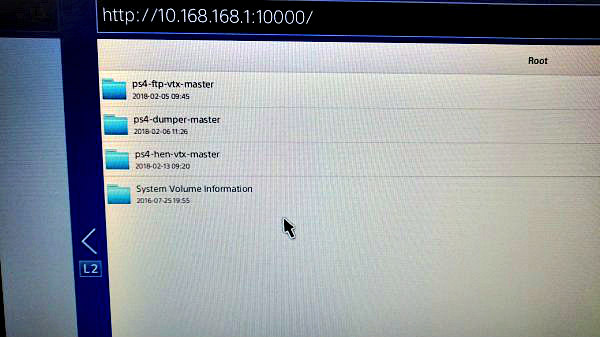
this page will show you all folders on web page, and if you get error, just refresh your page.
When you see all folders, all of them have exploit folders.
now you can add that page to bookmarks and directly run exploit from...
So I decided to making another guide with zsun wifi adaptor, because it is cheaper and cheaper is always better
For this guide, I borrowed zsun from my friend, but I already ordered for myself, you can find it around 10 dollars.
First you need a micro sd card, smaller is better, because we will use it for hosting required files. I have an old 4 gb micro sd for that.
First put your micro sd card to zsun and connect it to your PC. It will work like a card reader and copy all required exploit files:
Go to the PS4 wifi network settings and look for the zsun ssid and setup the connection using the auto settings, there is no need to set DNS and stuff.
Now for seeing folders on PS4 web browser we have 3 options;
Option 1;
Download zsun apk from Google store. Connect zsun wifi with your phone and on zsun apk, choose wifi mode from mode switch option. You can change your ssid name and password with this apk. On every start up, you must do same things. When power down zsun will stop working as wifi
Option 2;
On PS4 web browser write this:
Code:
http://10.168.168.1:8080/goform/Setcardworkmode?workmode=0you will see {"status":"0"} on your screen now save it as bookmarks because you must run this page on every start up
Option 3;
We need to flash zsun for everytime starting webpage mode, here is simple guide for that;
https://wiki.hackerspace.pl/projects:zsun-wifi-card-reader:factory-update
after you doing one of 3 options, on ps4 web browser type this page;
Code:
http://10.168.168.1:10000/this page will show you all folders on web page, and if you get error, just refresh your page.
When you see all folders, all of them have exploit folders.
Code:
..../ps4-hen-vtx-master/exploit/index.htmlnow you can add that page to bookmarks and directly run exploit from...
- PS4 Fake PKG (FPKG) Sharing Guide
- 6.XX Webkit / 6.72 PS4 Jailbreak
- 7.00-7.02 Webkit Exploit
- 7.02 Webkit / 7.02 Kernel / PS4JB
- 7.50 Kernel Exploit / PS4JB 7.55
- 7.55 / 8.00 Payloads / PS4JB2 7.55
- 9.00 PS4 Webkit Exploit
- 9.00 PS4 Payloads / GoldHEN (Latest)
- 9.00 PS4 Jailbreak Kernel Exploit
- 11.00 PS4 Jailbreak Kernel Exploit
- 13.00 PS4 Kernel Exploit / 13.02 BD-J Bug
- 4.03 PS5 Webkit Exploit
- PS5 Kernel Exploit (ExFAT Bug)
- PS5 Root Keys Obtained
- 4.03 PS5 Kernel Build String
- 4.03 PS5 Webkit Execution
- 4.03 PS5 Kernel Vulnerability
- 4.03 PS5 Filesystem Dumps
- 4.51 PS5 BD-JB Sandbox Escape
- PS5 BD-JB Exploit Hack Source Code
- Mast1c0re PS5 Userland Exploit
- PS5 Kernel Access via PS4 Exploit
- PS5 exFAT Vulnerability Disclosed
- 4.03 PS5 Kernel Exploit Webkit ROP
- 4.50 PS5 Kernel Exploit Webkit ROP
- 4.51 PS5 Kernel Exploit Webkit ROP
- 4.xx PS5 Kernel Exploit v1.01
- 4.xx PS5 Kernel Exploit v1.02 / v1.03
- PS5 1.00-6.50 Firmware Webkit
- Native PS5 ROP Chain Execution
- Mast1c0re PS5 Compiler Attack
- PS5 FreeBSD Kernel Bug & WebKit
- PS5 UMTX 2 Exploit & PS5 Jailbreak
- Byepervisor PS5 Hypervisor Exploit
- Lua Lapse PS5 Kxploit & Laps3c0re / Y2JB
- 12.00 / 12.70 PS5 Kernel Exploit