PSXHAX.COM website and domain for sale. Contact Us with your offer!

You are using an out of date browser. It may not display this or other websites correctly.
You should upgrade or use an alternative browser.
You should upgrade or use an alternative browser.
GenGP4 (Replaces PKG Kitchen) by XVortex, PS4 FTP via Webpage
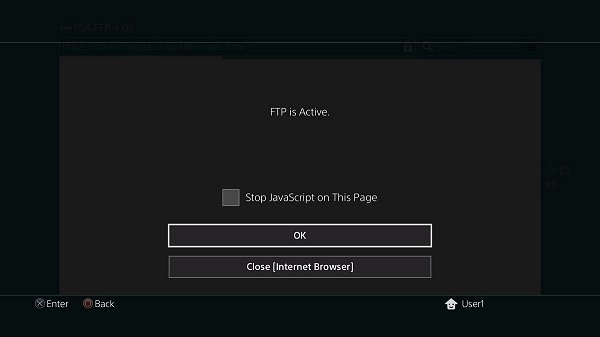
Today PlayStation 4 developer @XVortex kicked us out of the kitchen by announcing that his PKG Kitchen is no longer needed, and introduced his latest GP4 Generator all-in-one utility called GenGP4 which combined with the FTP server is everything you need to dump PlayStation 4 games including a more reliable tree-decrypting method alongside shorter instructions below! 
Download: gengp4.exe / gengp4.zip (641 KB) / ps4-dumper.bin / GIT
To quote: "No more .pkg extraction, .pfs extraction, file merging etc. FTP server dumps the game to HDD folder, then gp4gen sanitizes this folder and generates the .gp4."
To quote from @XVortex's condensed guide on using GenGP4:
1) Turn on the console, insert disc (or run psn title), install all game patches;
2) Plug-in the USB stick, run the ps4-dumper payload (.bin or standalone);
3) Run your game, make sure to get main menu, minimize game (PS Button);
4) Wait till completion. When the process is finished the lights stop blinking
and console will shutdown automatically (it is normal, not a panic shutdown);
5) Turn on your console, remove disc, uninstall the game (for further testing);
6) On PC: Plug-in the USB Stick, then open gengp4.exe, point into CUSAxxxxx dir
and press Generate .GP4, You should get the 'Done.', then press Save .GP4;
7) Open .gp4 in the orbis-pub-gen and build .pkg file
(You can get the orbis-pub-gen tool via PKG_Fake_Generator);
8) Run PS4HEN payload, install and test your .pkg;
9) Enjoy.
Download: gengp4.exe / gengp4.zip (641 KB) / ps4-dumper.bin / GIT
To quote: "No more .pkg extraction, .pfs extraction, file merging etc. FTP server dumps the game to HDD folder, then gp4gen sanitizes this folder and generates the .gp4."
To quote from @XVortex's condensed guide on using GenGP4:
1) Turn on the console, insert disc (or run psn title), install all game patches;
2) Plug-in the USB stick, run the ps4-dumper payload (.bin or standalone);
3) Run your game, make sure to get main menu, minimize game (PS Button);
4) Wait till completion. When the process is finished the lights stop blinking
and console will shutdown automatically (it is normal, not a panic shutdown);
5) Turn on your console, remove disc, uninstall the game (for further testing);
6) On PC: Plug-in the USB Stick, then open gengp4.exe, point into CUSAxxxxx dir
and press Generate .GP4, You should get the 'Done.', then press Save .GP4;
7) Open .gp4 in the orbis-pub-gen and build .pkg file
(You can get the orbis-pub-gen tool via PKG_Fake_Generator);
8) Run PS4HEN payload, install and test your .pkg;
9) Enjoy.
Adding PS4 Game Updates in Packages (PKGs) Tutorial by Lush78
Here is a quick guide I made for bundling PS4 game updates into PKGs. PKG Kitchen 1.3 is used and all thanks to the toolmakers...
Game Update PKG
Needed: PKG Kitchen 1.3, Offline Update PKG ≤4.05
1: Insert game disc and install
2: Exploit idc, xvortex ftp payload
3: Dump 4 files from system_data/priv/appmeta/CUSAxxxxx/* to dump\appmeta\ (Must get these files before update)
4: Exit title/ftp, reboot, exploit xvortex, install sony game update pkg (This will be the hardest step, obtaining offline 4.05 updates)
5: Check for update to game on information screen
6: Reboot, exploit idc, xvortex ftp payload, minimize, load game, connect ftp
7: Dump /user/app/CUSAxxxxx/app.pkg -> dump\pkg
/mnt/sandbox/pfsmnt/CUSAxxxxx-app0-nest/pfs_image.dat -> dump\pfs\
/mnt/sandbox/pfsmnt/CUSAxxxxx-app0/sce_module/* -> dump\app\sce_module\
/mnt/sandbox/pfsmnt/CUSAxxxxx-patch0-nest/pfs_image.dat, RENAME pfs_image2.dat -> dump\pfs\
/mnt/sandbox/pfsmnt/CUSAxxxxx-patch0/eboot.bin -> dump\app\
/mnt/sandbox/pfsmnt/CUSAxxxxx-patch0/sce_module/* -> dump\app\sce_module\ (Overwrite if prompted, update may not contain this folder and/or all files)
8: Reboot, remove disc, and delete game and all game data
9: Run _extract_pkg.bat and wait for success
10: Open /tools ArchiveExplorer.exe and open dump\pfs\pfs_image.dat and extract all to \app\
11: Open dump\pfs\pfs_image2.dat and extract all and overwrite to \app\
12: Copy and overwrite dump\app\* to \app\
13: Copy and overwrite dump\appmeta\* to \app\sce_sys\
14: Run _gen_gp4.bat and wait for success
15: Open CUSAxxxxx.gp4 with /tools/orbis-pub-gen.exe and go to Command, Build Image, select save location and build.
16: Turn on PS4, load xvortex exploit, install new PKG with bundled update.
How to Install Older PS4 Game Updates on Any PS4 7.02/7.50
Installing PS4 Games, DLC & Updates (PS4 6.72 Jailbreak)
Installing Retail Updates on a Jailbroken PS4 (6.72 or Lower!)
...
Game Update PKG
Needed: PKG Kitchen 1.3, Offline Update PKG ≤4.05
1: Insert game disc and install
2: Exploit idc, xvortex ftp payload
3: Dump 4 files from system_data/priv/appmeta/CUSAxxxxx/* to dump\appmeta\ (Must get these files before update)
4: Exit title/ftp, reboot, exploit xvortex, install sony game update pkg (This will be the hardest step, obtaining offline 4.05 updates)
5: Check for update to game on information screen
6: Reboot, exploit idc, xvortex ftp payload, minimize, load game, connect ftp
7: Dump /user/app/CUSAxxxxx/app.pkg -> dump\pkg
/mnt/sandbox/pfsmnt/CUSAxxxxx-app0-nest/pfs_image.dat -> dump\pfs\
/mnt/sandbox/pfsmnt/CUSAxxxxx-app0/sce_module/* -> dump\app\sce_module\
/mnt/sandbox/pfsmnt/CUSAxxxxx-patch0-nest/pfs_image.dat, RENAME pfs_image2.dat -> dump\pfs\
/mnt/sandbox/pfsmnt/CUSAxxxxx-patch0/eboot.bin -> dump\app\
/mnt/sandbox/pfsmnt/CUSAxxxxx-patch0/sce_module/* -> dump\app\sce_module\ (Overwrite if prompted, update may not contain this folder and/or all files)
8: Reboot, remove disc, and delete game and all game data
9: Run _extract_pkg.bat and wait for success
10: Open /tools ArchiveExplorer.exe and open dump\pfs\pfs_image.dat and extract all to \app\
11: Open dump\pfs\pfs_image2.dat and extract all and overwrite to \app\
12: Copy and overwrite dump\app\* to \app\
13: Copy and overwrite dump\appmeta\* to \app\sce_sys\
14: Run _gen_gp4.bat and wait for success
15: Open CUSAxxxxx.gp4 with /tools/orbis-pub-gen.exe and go to Command, Build Image, select save location and build.
16: Turn on PS4, load xvortex exploit, install new PKG with bundled update.
How to Install Older PS4 Game Updates on Any PS4 7.02/7.50
Installing PS4 Games, DLC & Updates (PS4 6.72 Jailbreak)
Installing Retail Updates on a Jailbroken PS4 (6.72 or Lower!)
...
How to Create Emulated PS2 PS4 Packages (PKGs) Guide by G991!
This is a user-friendly tutorial on how to play your favorite PlayStation 2 games on your jailbroken PlayStation 4 as can be seen HERE. I am not going to go into specifics here; but if you need help or have a question, feel free to reply and I will answer.

1. Download the ps2emu.rar and Fake PKG Tools_1v1.rar (look above)
2. Extract both archives (as you would...)
3. Put your favorite PlayStation 2 game ISO in the ps2emu\image\ folder
4. Rename the iso to 'disc01.iso' (the emulator can take multiple discs, but this is more advanced and you have to specify things in lua or the command line arguments)
5. Go to sce_sys and edit 'param.sfo' with 'orbis-pub-sfo.exe'
a. Change content ID to (UP9000-CUSAXXXXX_00-SCUS974900000001) where XXXXX is any string of numbers
b. The content ID can be somewhat random, but has to be in the enforced format. Who really cares what you do, but the original emulated game (Rogue Galaxy) was like this and I just decided to change the title ID portion.
c. Go to Title Text tab and change the text to the title of your game (ex. Ratchet & Clank, Crash Bandicoot)
6. Save the param.sfo
7. In Fake PKG Tools, rename 'orbis-pub-cmd-ps2.exe' to 'orbis-pub-cmd.exe' (delete or rename original 'orbis-pub-cmd.exe')
8. Open 'orbis-pub-gen.exe'
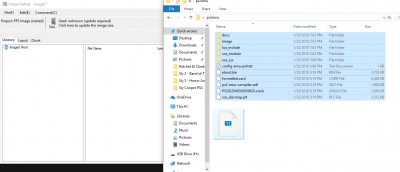
9. Double click on 'Image0' (we are going to add the files from ps2emu, including disc01.iso/disc0X.iso)
10. Drag and drop all the files from ps2emu into the Image0 Root (right side is files, left is directory view)
 [ATTACH...
- ps2emu (2.36 MB)
- Fake PKG Tools (Someone please make a better Fake PKG Tools! This is aids to work with...)
- Custom configuration files for PS2 emulator used in PS4
1. Download the ps2emu.rar and Fake PKG Tools_1v1.rar (look above)
2. Extract both archives (as you would...)
3. Put your favorite PlayStation 2 game ISO in the ps2emu\image\ folder
4. Rename the iso to 'disc01.iso' (the emulator can take multiple discs, but this is more advanced and you have to specify things in lua or the command line arguments)
5. Go to sce_sys and edit 'param.sfo' with 'orbis-pub-sfo.exe'
a. Change content ID to (UP9000-CUSAXXXXX_00-SCUS974900000001) where XXXXX is any string of numbers
b. The content ID can be somewhat random, but has to be in the enforced format. Who really cares what you do, but the original emulated game (Rogue Galaxy) was like this and I just decided to change the title ID portion.
c. Go to Title Text tab and change the text to the title of your game (ex. Ratchet & Clank, Crash Bandicoot)
6. Save the param.sfo
7. In Fake PKG Tools, rename 'orbis-pub-cmd-ps2.exe' to 'orbis-pub-cmd.exe' (delete or rename original 'orbis-pub-cmd.exe')
8. Open 'orbis-pub-gen.exe'
9. Double click on 'Image0' (we are going to add the files from ps2emu, including disc01.iso/disc0X.iso)
10. Drag and drop all the files from ps2emu into the Image0 Root (right side is files, left is directory view)
[ATTACH...
PKG KitchenAID for PS4 Packages by NORATIO
Following the release of PKG Kitchen by @XVortex, here is a ALL-IN-ONE script/tools I call PKG KitchenAID to dump/rip your own games and backup them into a PKG.
Download: PKG_KitchenAID-NORATIO-V1.0.zip (3.9 MB) / PKG_KitchenAID-NORATIO-V1.1.zip (3.9 MB) / PKG_KitchenAID-NORATIO-V1.2.zip (4.8 MB) / PKG KitchenAID_V1_3-NORATIO.zip (13.0 MB) via NORATIO
PKG KitchenAID is super easy, you have one batch file to run and just follow the onscreen instructions. You can't go wrong. No need of a FTP client or to download separated tools. All you need is in the package and easy to use (will help some newbies).
1) On your PS4, delete any files/traces of the game you want to rip on your PS4 to ensure a proper rip
2) On your computer, execute file "DUMP.bat" at the root of your installation to begin the process and follow onscreen instructions
Download the package and just extract the files where you want on your computer.
Download: PKG_KitchenAID-NORATIO-V1.0.zip (3.9 MB) / PKG_KitchenAID-NORATIO-V1.1.zip (3.9 MB) / PKG_KitchenAID-NORATIO-V1.2.zip (4.8 MB) / PKG KitchenAID_V1_3-NORATIO.zip (13.0 MB) via NORATIO
PKG KitchenAID is super easy, you have one batch file to run and just follow the onscreen instructions. You can't go wrong. No need of a FTP client or to download separated tools. All you need is in the package and easy to use (will help some newbies).
- All the improvements/automated process in based on @XVortex FTP Payload and its own scripts and other freewares included.
- Anyone is free to use this code and improve it as well (I might update it here and there based on changes, but so far, all the dumps tested are 100% working)
- An SSD is suggested to facilitate/speed up the process
1) On your PS4, delete any files/traces of the game you want to rip on your PS4 to ensure a proper rip
2) On your computer, execute file "DUMP.bat" at the root of your installation to begin the process and follow onscreen instructions
Download the package and just extract the files where you want on your computer.
How to Host PS4HEN for 4.05 PS4 OFW on Android Phone Guide
Here's a guide on how to host PS4HEN using exploited 4.05 PS4 OFW on an Android Phone for those interested!
How to host PS4HEN on Android Phone
Requirements:
~HomeDope
How to host PS4HEN on Android Phone
Requirements:
- kWS (or any other web server application)
- PS4-HEN-VTX
- Install kWS in to your Android phone.
- Extract .zip file to your Android phone (Ex. sdcard\)
- Adjust kWS settings so "Home Directory" will point to your extracted PS4-HEN-VTS folder. (Ex. sdcard\PS4-HEN-VTX)
- [OPTIONAL] Change port number (Default: 8080)
- [OPTIONAL] Make your android phone have static IP. (Via Android settings or by assigning IP Address to MAC Address via router)
- Start kWS server
- Open PS4 browser and browse to your kWS server (Ex. http://192.168.0.100:8080)
- [OPTIONAL] Save it as bookmark for fast access.
~HomeDope
- PS4 Fake PKG (FPKG) Sharing Guide
- 6.XX Webkit / 6.72 PS4 Jailbreak
- 7.00-7.02 Webkit Exploit
- 7.02 Webkit / 7.02 Kernel / PS4JB
- 7.50 Kernel Exploit / PS4JB 7.55
- 7.55 / 8.00 Payloads / PS4JB2 7.55
- 9.00 PS4 Webkit Exploit
- 9.00 PS4 Payloads / GoldHEN (Latest)
- 9.00 PS4 Jailbreak Kernel Exploit
- 11.00 PS4 Jailbreak Kernel Exploit
- 13.00 PS4 Kernel Exploit / 13.02 BD-J Bug
- 4.03 PS5 Webkit Exploit
- PS5 Kernel Exploit (ExFAT Bug)
- PS5 Root Keys Obtained
- 4.03 PS5 Kernel Build String
- 4.03 PS5 Webkit Execution
- 4.03 PS5 Kernel Vulnerability
- 4.03 PS5 Filesystem Dumps
- 4.51 PS5 BD-JB Sandbox Escape
- PS5 BD-JB Exploit Hack Source Code
- Mast1c0re PS5 Userland Exploit
- PS5 Kernel Access via PS4 Exploit
- PS5 exFAT Vulnerability Disclosed
- 4.03 PS5 Kernel Exploit Webkit ROP
- 4.50 PS5 Kernel Exploit Webkit ROP
- 4.51 PS5 Kernel Exploit Webkit ROP
- 4.xx PS5 Kernel Exploit v1.01
- 4.xx PS5 Kernel Exploit v1.02 / v1.03
- PS5 1.00-6.50 Firmware Webkit
- Native PS5 ROP Chain Execution
- Mast1c0re PS5 Compiler Attack
- PS5 FreeBSD Kernel Bug & WebKit
- PS5 UMTX 2 Exploit & PS5 Jailbreak
- Byepervisor PS5 Hypervisor Exploit
- Lua Lapse PS5 Kxploit & Laps3c0re / Y2JB
- 12.00 / 12.70 PS5 Kernel Exploit