PSXHAX.COM website and domain for sale. Contact Us with your offer!

You are using an out of date browser. It may not display this or other websites correctly.
You should upgrade or use an alternative browser.
You should upgrade or use an alternative browser.
PlayStation 4 (SAC-001) PS4 UART For Dummies Tutorial, E4 Flasher Development
Let me start by saying I'm writing this because a lot of people don't know how to setup UART (Universal Asynchronous Receiver / Transmitter) for their PS4, this tutorial is only for those who have a SAC-001 Motherboard following the previous SAA-001 board details.
Tools you would need:
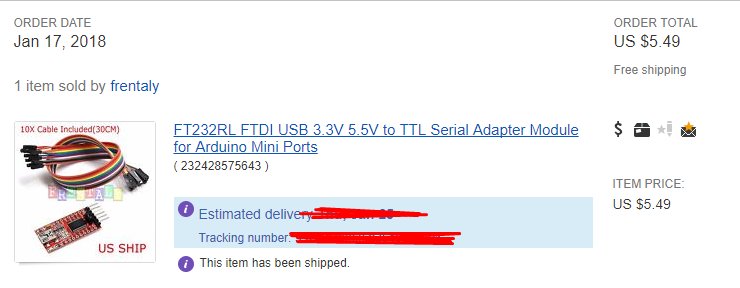
After you have your tools buy any cheap FTDI USB to TTL Serial Adapter I bought this one.
Step 2:
Open up your PS4
Video:
Step 3:
Got some wire and strip some of both ends
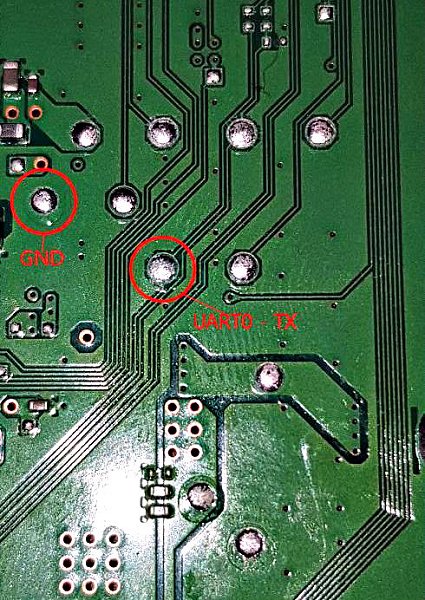
Then solder 1 end to these points
Step 4:
MAKE SURE THE WIRES ARE STICKING OUT of the console
(Optional) Hot glue the wires to the motherboard so they dont come un-done when you put the PS4 back together
Step 5:
Put the console back together WITH THE WIRES HANGING OUT
Step 6:
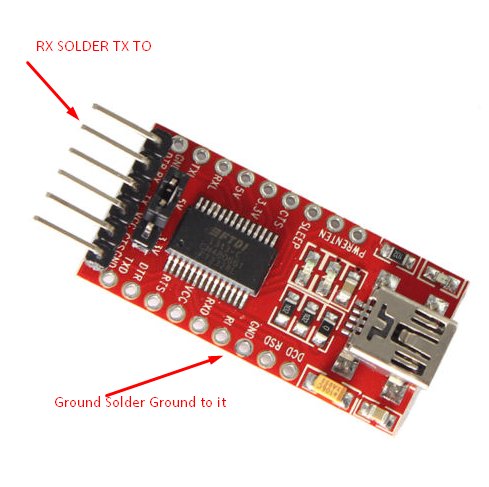
Solder the ground wire to Ground on the device and the TX Wire from the PS4 to the RX Pad on the FTDI Device (Pic of the one i bought0
Step 7:
Hook it up to your PC with the micro-USB Cabel
Step 8:
Download: arduino-1.8.5-windows.exe
INSTALL IT DONT USE PS WATSON.. PS WATSON DOESNT WORK!!
Step 9:
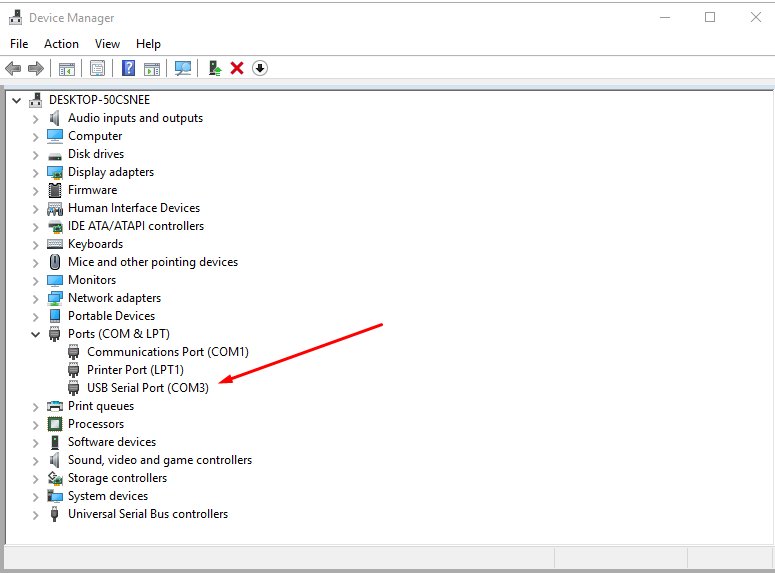
MAKE SURE ITS YOU COM PORT
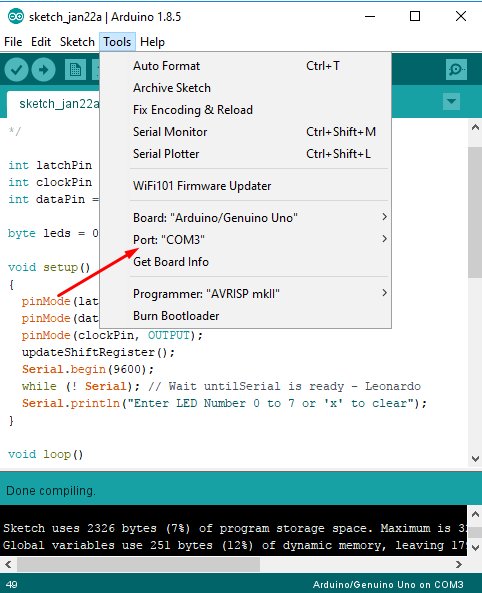
LAST STEP:...
Tools you would need:
- A set of screw Drivers to open up the PS4
- Soldering station $30-$150 (depends what you get)
- Solder 0.7mm - $7
- Flux - $5 - $15
- Kynair Wire- $7
- Wire cutters - $12
- (Optional) Hot Glue and Glue gun - $15
- Tip cleaner - $10
- ANY Cheap FTDI USB to TTL Serial Adapter
- Micro-USB Cable
- etc
After you have your tools buy any cheap FTDI USB to TTL Serial Adapter I bought this one.
Step 2:
Open up your PS4
Video:
Step 3:
Got some wire and strip some of both ends
Then solder 1 end to these points
Step 4:
MAKE SURE THE WIRES ARE STICKING OUT of the console
(Optional) Hot glue the wires to the motherboard so they dont come un-done when you put the PS4 back together
Step 5:
Put the console back together WITH THE WIRES HANGING OUT
Step 6:
Solder the ground wire to Ground on the device and the TX Wire from the PS4 to the RX Pad on the FTDI Device (Pic of the one i bought0
Step 7:
Hook it up to your PC with the micro-USB Cabel
Step 8:
Download: arduino-1.8.5-windows.exe
INSTALL IT DONT USE PS WATSON.. PS WATSON DOESNT WORK!!
Step 9:
MAKE SURE ITS YOU COM PORT
LAST STEP:...
PKG Kitchen - PS4 Guides, Tools and Scripts for Fake PKG Creation
Ok, guys, let me introduce the PKG Kitchen - the toolset for the easy creation of PS4 packages.
First sorry for my ugly English. I hope you understand me
Toolset does not use flat_z method to assume gp4 package structure and (probably) has a issues, but it allows you to create more or less working packages and use it as a base for experiments.
Related Files:
Brief Instructions:
0) Extract Fake PKG Generator into the tools folder;
1) Clean the kitchen environment (run _clean.bat);
2) Turn on the console;
3) Insert disc, make sure it is fully installed/copied (skip for PSN title);
4) Run the ps4-ftp-vtx payload, connect into the ps4 by FTP client;
5) Minimize (PS Button), but do not close the WWW Browser;
6) Run your game, make sure to get main menu, minimize game (PS Button);
7) Copy files:
8) Restart your console, remove disc, uninstall the game (for further testing);
9) Run the _extract_pkg.bat script. You should get the 'Image extract succeeded' message;
10) Run the tools\ArchiveExplorer.exe, open pfs_image.dat in dump\pfs dir,
select all files, and extract selected files into the app folder.
Wait until the end of the process (this can take a long time)!
11) Copy (overwrite) dump\app\* files into the app folder...
First sorry for my ugly English. I hope you understand me
Toolset does not use flat_z method to assume gp4 package structure and (probably) has a issues, but it allows you to create more or less working packages and use it as a base for experiments.
Related Files:
Brief Instructions:
0) Extract Fake PKG Generator into the tools folder;
1) Clean the kitchen environment (run _clean.bat);
2) Turn on the console;
3) Insert disc, make sure it is fully installed/copied (skip for PSN title);
4) Run the ps4-ftp-vtx payload, connect into the ps4 by FTP client;
5) Minimize (PS Button), but do not close the WWW Browser;
6) Run your game, make sure to get main menu, minimize game (PS Button);
7) Copy files:
Code:
   a) /mnt/sandbox/pfsmnt/CUSAxxxxx-app0-nest/pfs_image.dat --> dump\pfs
      (please note your Title ID - CUSAxxxxx)
   b) /user/app/CUSAxxxxx/app.pkg --> dump\pkg
   c) /mnt/sandbox/pfsmnt/CUSAxxxxx-app0/eboot.bin    --> dump\app
      /mnt/sandbox/pfsmnt/CUSAxxxxx-app0/sce_module/* --> dump\app\sce_module\*
      /mnt/sandbox/pfsmnt/CUSAxxxxx-app0/???          --> dump\app\???
      (??? is other prx modules, if any, depends on title)
d) /system_data/priv/appmeta/CUSAxxxxx/* --> dump\appmeta9) Run the _extract_pkg.bat script. You should get the 'Image extract succeeded' message;
10) Run the tools\ArchiveExplorer.exe, open pfs_image.dat in dump\pfs dir,
select all files, and extract selected files into the app folder.
Wait until the end of the process (this can take a long time)!
11) Copy (overwrite) dump\app\* files into the app folder...
How to Fake Sign Libraries and Packages (PKGs) for PS4HEN Tutorial
Today we have a video tutorial from @DarkElementPL via Twitter on fake signing PlayStation 4 game libraries and packages (PKGs) for use with the recently released PS4HEN Homebrew ENabler on exploited PS4 4.05 consoles. 
Also below are links to some PS4 4.05 game dump packages that have recently been updated in the PS4 1.76 / 4.05 Game Dump Thread Repository to work as PKG files on 4.05 OFW.
How to Fake Sign Libraries and Packages (PKGs) for PS4HEN Tutorial
Tutorial for how to fake sign libraries and packages for use with PS4HEN payload.
Note: The param.sfo file on PS4 disc games is located in /mnt/disc/bd
 Related Files
 PS4 Game Dump PKG's for 4.05 Firmware
Also below are links to some PS4 4.05 game dump packages that have recently been updated in the PS4 1.76 / 4.05 Game Dump Thread Repository to work as PKG files on 4.05 OFW.
How to Fake Sign Libraries and Packages (PKGs) for PS4HEN Tutorial
Tutorial for how to fake sign libraries and packages for use with PS4HEN payload.
Note: The param.sfo file on PS4 disc games is located in /mnt/disc/bd
Related Files- Fake PKG Generator (includes full docs)
- make_fself.py
- Python
- [PLAIN]HXD[/PLAIN]
- PS4HEN payload
PS4 Game Dump PKG's for 4.05 Firmware
Fake PKG Generator for PS4 to Generate Fake Packages for Homebrew
Hot on the heels of yesterday's PS4 Fake 4.05 updates, today PlayStation 4 developer @cfwprophet shared on Twitter a Fake PKG Generator for PS4 with documentation to generate fake packages which will support homebrew once the ShellCore patches (for fake PKG support) are implemented. 
Download: Fake_PKG_Generator.rar (2.85 MB - v2.89) / Fake_PKG_Generator.rar (429.72 MB - Documentation) / make_fself.py (0.2 MB) / make_fself.py (Mirror) / make_fself.py (Mirror #2) / sc.exe_hack.rar (0.28 MB) / Fake PKG Generator 3.12 hotfix.zip / Fake PKG Generator 3.12 hotfix2.zip / Fake PKG Generator 3.38.zip (4 MB) / Fake PKG Generator 3.38.zip (Mirror) / Fake PKG Generator 3.38.zip (Mirror #2 - includes orbis-pub-sfo.exe) / Mirror #3 / PS4_Fake_PKG_Tools_v3.87.rar (3.35 MB) / PS4 Fake PKG Tools with Fake PKG Generator 3.87 Patched for FPKGs by CyB1K
Note: Use '00000000000000000000000000000000' for the PKG Gen password in case others need to...
Download: Fake_PKG_Generator.rar (2.85 MB - v2.89) / Fake_PKG_Generator.rar (429.72 MB - Documentation) / make_fself.py (0.2 MB) / make_fself.py (Mirror) / make_fself.py (Mirror #2) / sc.exe_hack.rar (0.28 MB) / Fake PKG Generator 3.12 hotfix.zip / Fake PKG Generator 3.12 hotfix2.zip / Fake PKG Generator 3.38.zip (4 MB) / Fake PKG Generator 3.38.zip (Mirror) / Fake PKG Generator 3.38.zip (Mirror #2 - includes orbis-pub-sfo.exe) / Mirror #3 / PS4_Fake_PKG_Tools_v3.87.rar (3.35 MB) / PS4 Fake PKG Tools with Fake PKG Generator 3.87 Patched for FPKGs by CyB1K
Note: Use '00000000000000000000000000000000' for the PKG Gen password in case others need to...
PS4 Linux 4.05 Fedora with Steam and Emulators Guide by Markus95
Following his PS4 Playground 4.05 Port and the initial announcement of PS4 Linux on 4.05 this past New Year's Eve alongside a PS4 Linux on Slim 4.05 OFW guide, today PlayStation 4 scene developer @Markus95 shared a guide and video demo of PS4 Linux Fedora on 4.05 Firmware with Steam and an emulators pack for those interested!
To quote from his blog article on Logic-Sunrise.com, roughly translated: PS4 Linux Fedora + Steam + Emulator Pack for 4.05
Thanks to @valentinbreiz who has released all the necessary tools to boot a Linux distribution on our PS4 4.05.
After several days of tests and a lot of galleys, I finally managed to run Fedora on my PS4 in 4.05.
Why did you choose Fedora and not another, all because this distro is compiled with some rather interesting surprises. Indeed, it already includes the 3D drivers of the team Failoverflow, a pack of functional emulators (Snes9x, PCSXR, and Dolphin) but also and especially Steam (PS4 DS4 Controller on Steam Tutorial).
You can play some retro games but also some games Steam (provided you have an account for the latter). It is possible to add other emulators or software (Paintown for example works ^^) and even your own ROMs.
Only one small problem, you will not have its unfortunately, but for a start it is already really excellent.
Fedora on PS4 4.05
Tutorial:
You need:
To quote from his blog article on Logic-Sunrise.com, roughly translated: PS4 Linux Fedora + Steam + Emulator Pack for 4.05
Thanks to @valentinbreiz who has released all the necessary tools to boot a Linux distribution on our PS4 4.05.
After several days of tests and a lot of galleys, I finally managed to run Fedora on my PS4 in 4.05.
Why did you choose Fedora and not another, all because this distro is compiled with some rather interesting surprises. Indeed, it already includes the 3D drivers of the team Failoverflow, a pack of functional emulators (Snes9x, PCSXR, and Dolphin) but also and especially Steam (PS4 DS4 Controller on Steam Tutorial).
You can play some retro games but also some games Steam (provided you have an account for the latter). It is possible to add other emulators or software (Paintown for example works ^^) and even your own ROMs.
Only one small problem, you will not have its unfortunately, but for a start it is already really excellent.
Fedora on PS4 4.05
Tutorial:
You need:
- PS4 Fake PKG (FPKG) Sharing Guide
- 6.XX Webkit / 6.72 PS4 Jailbreak
- 7.00-7.02 Webkit Exploit
- 7.02 Webkit / 7.02 Kernel / PS4JB
- 7.50 Kernel Exploit / PS4JB 7.55
- 7.55 / 8.00 Payloads / PS4JB2 7.55
- 9.00 PS4 Webkit Exploit
- 9.00 PS4 Payloads / GoldHEN (Latest)
- 9.00 PS4 Jailbreak Kernel Exploit
- 11.00 PS4 Jailbreak Kernel Exploit
- 13.00 PS4 Kernel Exploit / 13.02 BD-J Bug
- 4.03 PS5 Webkit Exploit
- PS5 Kernel Exploit (ExFAT Bug)
- PS5 Root Keys Obtained
- 4.03 PS5 Kernel Build String
- 4.03 PS5 Webkit Execution
- 4.03 PS5 Kernel Vulnerability
- 4.03 PS5 Filesystem Dumps
- 4.51 PS5 BD-JB Sandbox Escape
- PS5 BD-JB Exploit Hack Source Code
- Mast1c0re PS5 Userland Exploit
- PS5 Kernel Access via PS4 Exploit
- PS5 exFAT Vulnerability Disclosed
- 4.03 PS5 Kernel Exploit Webkit ROP
- 4.50 PS5 Kernel Exploit Webkit ROP
- 4.51 PS5 Kernel Exploit Webkit ROP
- 4.xx PS5 Kernel Exploit v1.01
- 4.xx PS5 Kernel Exploit v1.02 / v1.03
- PS5 1.00-6.50 Firmware Webkit
- Native PS5 ROP Chain Execution
- Mast1c0re PS5 Compiler Attack
- PS5 FreeBSD Kernel Bug & WebKit
- PS5 UMTX 2 Exploit & PS5 Jailbreak
- Byepervisor PS5 Hypervisor Exploit
- Lua Lapse PS5 Kxploit & Laps3c0re / Y2JB
- 12.00 / 12.70 PS5 Kernel Exploit