PSXHAX.COM website and domain for sale. Contact Us with your offer!

You are using an out of date browser. It may not display this or other websites correctly.
You should upgrade or use an alternative browser.
You should upgrade or use an alternative browser.
Obtaining PlayStation Package (PKG) Files via SEN by Al Azif Guide
Here's a brief guide based on what PlayStation 4 developer @Al Azif shared in the PSXHAX Shoutbox recently for those seeking Sony URL links to download PS4 Packages (PKG Files) for apps, games, etc to include in databases such as those from Octolus and OrbisModding similar to community projects like PSDLE, NoNpDrm Dump and NoPayStation.
He notes that this method will only allow you to get your legitimate PKG's back and not the licenses, however, once further details are available on Flat_z's Method along with PS4 IDX Generator which makes IDX files allowing the PlayStation 4 to see the RIF (Activation File) for apps and games everything should come together similar to what we've seen in the Custom / Repacked PS4 Package (PKG) Files demo video.
Steps:
1. Sign into Account.SonyEntertainmentNetwork.com (or Store.SonyEntertainmentNetwork.com) with your PSN account.
Tip: Make sure you have always accept 3rd party cookies set on your browser, and try and access your "Account Settings" from the PS store before you try the URL in Step 2.
2. Then go HERE noting the number where it says total_results.
3. Replace the size=1 in the URL with a number larger than that number (for example, if you have 943 items in there change size=1 to size=1000) and then save (CTRL+S) the resulting .json...
He notes that this method will only allow you to get your legitimate PKG's back and not the licenses, however, once further details are available on Flat_z's Method along with PS4 IDX Generator which makes IDX files allowing the PlayStation 4 to see the RIF (Activation File) for apps and games everything should come together similar to what we've seen in the Custom / Repacked PS4 Package (PKG) Files demo video.
Steps:
1. Sign into Account.SonyEntertainmentNetwork.com (or Store.SonyEntertainmentNetwork.com) with your PSN account.
Tip: Make sure you have always accept 3rd party cookies set on your browser, and try and access your "Account Settings" from the PS store before you try the URL in Step 2.
2. Then go HERE noting the number where it says total_results.
3. Replace the size=1 in the URL with a number larger than that number (for example, if you have 943 items in there change size=1 to size=1000) and then save (CTRL+S) the resulting .json...
PS4 4.05 Full Root FTP Access Video Tutorial by Spoofayy
Yesterday the PlayStation 4 v4.05 scene saw a windfall of PS4 FTP 4.05 Payloads for use with the recent Kernel Exploit 4.05, and with help from @DarkElementPL and @raedoob alongside @Al Azif's Easy PS4 Exploit Hosting Tool it didn't take long for even @Fimo to obtain PS4 4.05 Full FTP Access. 
Today @Spoofayy, who can also be found on Twitter, added a video tutorial to his YouTube Channel detailing the process to get PS4 4.05 Full Root FTP access for those on exploited PlayStation 4 Firmware 4.05.. check it out below!
PS4 Full Root FTP Access Tutorial *4.05 Only*

Follow me and request DM Here: https://twitter.com/Spoofay
Downloads:
Today @Spoofayy, who can also be found on Twitter, added a video tutorial to his YouTube Channel detailing the process to get PS4 4.05 Full Root FTP access for those on exploited PlayStation 4 Firmware 4.05.. check it out below!
PS4 Full Root FTP Access Tutorial *4.05 Only*
- Shout out to Simple Person for original help & DarkElement for Porting.
- Any Questions: Spoofayy
Follow me and request DM Here: https://twitter.com/Spoofay
Downloads:
- Python
- Local Exploit Host Tool: ps4-exploit-host.rar (227.58 KB - Mirror - Easy PS4 Exploit Hosting Tool)
- Payload for FTP: hello.bin (1 MB - Mirror - Mirror #2)
- NetCat GUI...
How to Disable / Remove Ads From Appearing on PS4 Homepage Screen
If you've recently noticed ads appearing on the PlayStation 4 homepage screen (PS4 User Interface) you're not alone, as it seems Sony has now enabled them as can be seen in the advertisement for Destiny 2 pictured below. 
Luckily Kotaku.com discovered how to disable / remove these Sony video game ads in fairly short order!
This is what you have to do to get rid of them, to quote: Here’s an easy way to stop that from happening:
1) On your home screen, select “Settings”
2) Select “System”
3) Select “Automatic Downloads”
4) Uncheck “Featured Content”
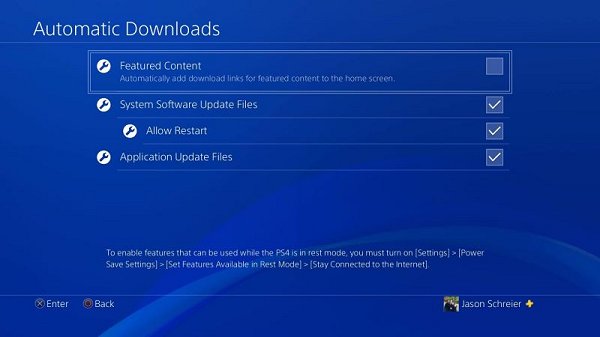
That’s it!
Luckily Kotaku.com discovered how to disable / remove these Sony video game ads in fairly short order!
This is what you have to do to get rid of them, to quote: Here’s an easy way to stop that from happening:
1) On your home screen, select “Settings”
2) Select “System”
3) Select “Automatic Downloads”
4) Uncheck “Featured Content”
That’s it!
PS4 4.05 JailbreakME PlayStation 4 Jailbreak Noobs Tutorial
So at last after many years of waiting for a new PlayStation 4 exploit to come out since the last 1.76 jailbreak came out we finally have one for version 4.05!
@SpecterDev did deliver what he promised to the PS4 scene and released his PS4 4.05 Exploit and everyone is going crazy.
But anyways, this is a noob tutorial for all them P$N Users who are fresh to the PS4 Modding Setup unless you're from the 1.76 era and you know what to do.
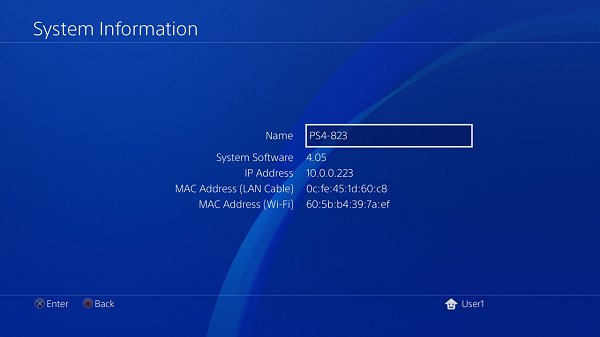
What You Need:
1) Grab the required latest files above and extract to desktop after download.
2) Download Python and Install (Make sure to add Python.exe to path when shown in setup)
3) Open the extracted folder "ps4-exploit-host" that you extracted earlier on the desktop
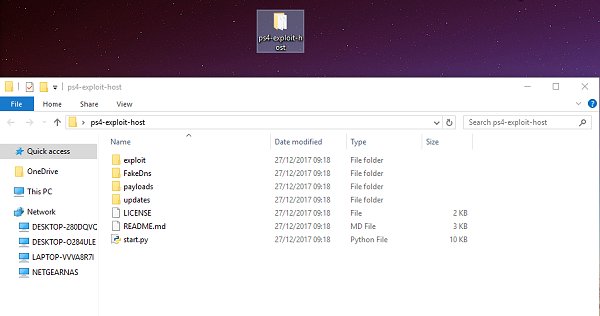
4) Open the Following folder ""ps4-exploit-host/payloads" and copy over the debug-settings.bin into the folder

5) Go back to the root folder off "ps4-exploit-host" and double click start.py
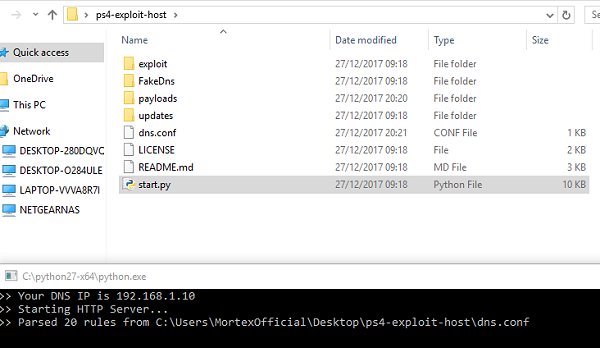
6) With the following DNS IP on your PS4 (use this Tutorial for DNS Setup)
Note: Use the DNS In the Server as primary and keep secondary as 0.0.0.0
7) Once Finished and your showing Requests on the Python Server, Go to Settings and load up userguide
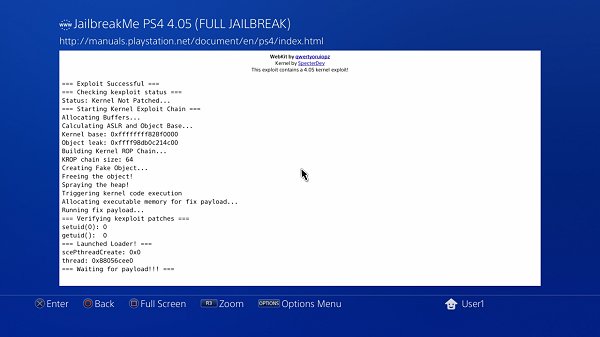
The following webpage will show and if success it will say waiting for payload, please note the python script will automatically send the Debug_Settings.bin to the JailbreakMe Exploit so no need to manual Netcat send
8) Press PSN Button on Controller Not (O) button, Then go to settings and...
@SpecterDev did deliver what he promised to the PS4 scene and released his PS4 4.05 Exploit and everyone is going crazy.
But anyways, this is a noob tutorial for all them P$N Users who are fresh to the PS4 Modding Setup unless you're from the 1.76 era and you know what to do.
What You Need:
- ps4-exploit-host (Easy PS4 Exploit Hosting Tool) by @Al Azif
- 4.05 Debug Settings from @SpecterDev
- Python 2.7.14
- and a brain

1) Grab the required latest files above and extract to desktop after download.
2) Download Python and Install (Make sure to add Python.exe to path when shown in setup)
3) Open the extracted folder "ps4-exploit-host" that you extracted earlier on the desktop
4) Open the Following folder ""ps4-exploit-host/payloads" and copy over the debug-settings.bin into the folder
5) Go back to the root folder off "ps4-exploit-host" and double click start.py
6) With the following DNS IP on your PS4 (use this Tutorial for DNS Setup)
Note: Use the DNS In the Server as primary and keep secondary as 0.0.0.0
7) Once Finished and your showing Requests on the Python Server, Go to Settings and load up userguide
The following webpage will show and if success it will say waiting for payload, please note the python script will automatically send the Debug_Settings.bin to the JailbreakMe Exploit so no need to manual Netcat send
8) Press PSN Button on Controller Not (O) button, Then go to settings and...
Backup / Decrypt PS4 Games & Run on HDD Guide by Modded Warfare
Last month we saw a Building PS4 v1.76 Payloads Tutorial from him, and today PlayStation 4 Modder @MODDEDWARFARE returns with a guide on his YouTube Channel covering how to backup / decrypt PS4 disc games and run them from the hard drive on 1.76 consoles.
From the video's caption, to quote: Backup / Decrypt PS4 Disc Games & Run them from the Hard Drive
How to backup and decrypt your PS4 disc games and run them from the hard drive without the original disc.
You can also use this to backup a game and send it to someone so they can run the game without the disc. This only works on 1.76 PS4's for now.
Download Links:
From MODDED WARFARE on Discord, to quote: A few people were requesting I post the links to my Watch Dogs dump from my latest video. Couldn't post it in the description of the video for obvious reasons but if anyone wants it here's the download.
Interview by MrMario2011 guesting Kiwidog/ParanoidCoder: 36:30 - 59:30 (PS4/PS3 Hacking: 4.05/5.01 & PS3 WebKit+)
Free PS4 Games Tutorial (4.05 Jailbreak)
Cheers to both @ArthurBishop and @dodolover in the...
From the video's caption, to quote: Backup / Decrypt PS4 Disc Games & Run them from the Hard Drive
How to backup and decrypt your PS4 disc games and run them from the hard drive without the original disc.
You can also use this to backup a game and send it to someone so they can run the game without the disc. This only works on 1.76 PS4's for now.
Download Links:
From MODDED WARFARE on Discord, to quote: A few people were requesting I post the links to my Watch Dogs dump from my latest video. Couldn't post it in the description of the video for obvious reasons but if anyone wants it here's the download.
Interview by MrMario2011 guesting Kiwidog/ParanoidCoder: 36:30 - 59:30 (PS4/PS3 Hacking: 4.05/5.01 & PS3 WebKit+)
Free PS4 Games Tutorial (4.05 Jailbreak)
Cheers to both @ArthurBishop and @dodolover in the...
- PS4 Fake PKG (FPKG) Sharing Guide
- 6.XX Webkit / 6.72 PS4 Jailbreak
- 7.00-7.02 Webkit Exploit
- 7.02 Webkit / 7.02 Kernel / PS4JB
- 7.50 Kernel Exploit / PS4JB 7.55
- 7.55 / 8.00 Payloads / PS4JB2 7.55
- 9.00 PS4 Webkit Exploit
- 9.00 PS4 Payloads / GoldHEN (Latest)
- 9.00 PS4 Jailbreak Kernel Exploit
- 11.00 PS4 Jailbreak Kernel Exploit
- 13.00 PS4 Kernel Exploit / 13.02 BD-J Bug
- 4.03 PS5 Webkit Exploit
- PS5 Kernel Exploit (ExFAT Bug)
- PS5 Root Keys Obtained
- 4.03 PS5 Kernel Build String
- 4.03 PS5 Webkit Execution
- 4.03 PS5 Kernel Vulnerability
- 4.03 PS5 Filesystem Dumps
- 4.51 PS5 BD-JB Sandbox Escape
- PS5 BD-JB Exploit Hack Source Code
- Mast1c0re PS5 Userland Exploit
- PS5 Kernel Access via PS4 Exploit
- PS5 exFAT Vulnerability Disclosed
- 4.03 PS5 Kernel Exploit Webkit ROP
- 4.50 PS5 Kernel Exploit Webkit ROP
- 4.51 PS5 Kernel Exploit Webkit ROP
- 4.xx PS5 Kernel Exploit v1.01
- 4.xx PS5 Kernel Exploit v1.02 / v1.03
- PS5 1.00-6.50 Firmware Webkit
- Native PS5 ROP Chain Execution
- Mast1c0re PS5 Compiler Attack
- PS5 FreeBSD Kernel Bug & WebKit
- PS5 UMTX 2 Exploit & PS5 Jailbreak
- Byepervisor PS5 Hypervisor Exploit
- Lua Lapse PS5 Kxploit & Laps3c0re / Y2JB
- 12.00 / 12.70 PS5 Kernel Exploit