PSXHAX.COM website and domain for sale. Contact Us with your offer!

You are using an out of date browser. It may not display this or other websites correctly.
You should upgrade or use an alternative browser.
You should upgrade or use an alternative browser.
Create PS4 / PC Local Server to Launch WebKit Exploits by Markus95
Today PlayStation 4 developer @Markus95 shared a guide on how to create a PS4 / PC local server to launch the various PS4 WebKit Exploits from for those seeking to learn. 
Check it out below with a PS4 3.50-4.07 WebKit Exploit video demo, to quote from the French console modding site ModConsoles.fr roughly translated:
Hello everyone, With the great advances of the last few days on PS4, many are wondering how to launch exploits (html) from their console.
There are several possibilities, either go directly through the browser and enter in the search bar the address corresponding to the future hack, either by creating a local server and host or even the exploits.
It is the latter that will interest us here. We will see how to create his own local server between his PS4 and his PC, in order to host me the feats to come (playground or otherwise).
This is very simple to do and allows some advantages:
Then, go under [Settings]> [System]> [Automatic Downloads], and then uncheck the boxes next to [System Software Update Files] and [Automatic Install].
Check it out below with a PS4 3.50-4.07 WebKit Exploit video demo, to quote from the French console modding site ModConsoles.fr roughly translated:
Hello everyone, With the great advances of the last few days on PS4, many are wondering how to launch exploits (html) from their console.
There are several possibilities, either go directly through the browser and enter in the search bar the address corresponding to the future hack, either by creating a local server and host or even the exploits.
It is the latter that will interest us here. We will see how to create his own local server between his PS4 and his PC, in order to host me the feats to come (playground or otherwise).
This is very simple to do and allows some advantages:
- Host even exploits, no worries about HS sites or maintenance preventing you from launching exploits
- Choose the versions of the exploits, do not depend on the bad updates of the exploits.
- Have control over executed exploits, be able to modify them if necessary ...
- A PS4
- A PC
- Python installed on your PC here
- fakedns.py here
- A text editor (Notepad or other)
- Xampp here
- An exploit (webkit for this tutorial) exploit webkit 3.50-4.07
- First and foremost, you need to uncheck automatic updates in your console
Then, go under [Settings]> [System]> [Automatic Downloads], and then uncheck the boxes next to [System Software Update Files] and [Automatic Install].
- Then set up a valid internet...
Modifying PlayStation 4 Trophies on PS4 1.76 OFW Tutorial by Kudge
We've seen Unlocking PS4 Trophies, Modded PS4 Trophies, DevKit / TestKit Trophies, a PS4 Trophy Resigner, Resigning PS4 Trophies guide, PS4 Trophy RTM and Modding Profile PS4 Trophies and this weekend @kudge (Twitter) shared a tutorial on modifying PlayStation 4 Trophies on PS4 1.76 OFW.
Check it out below, to quote from his guide on SCE.Party: Tutorial: Modifying Trophies On PS4 1.76
Today I will explain how to modify your trophies on a retail PS4.
Requirements:
Original:
Modified:
Now save the file and head back to the PS4 to see your new Trophies!
Cheers!
Also making rounds on Twitter today of interest:
...
Check it out below, to quote from his guide on SCE.Party: Tutorial: Modifying Trophies On PS4 1.76
Today I will explain how to modify your trophies on a retail PS4.
Requirements:
- PS4 1.76
- Windows PC
- FTP Client (Filezilla)
- Power on PS4
- Go to your internet browser and head to http://sce.party/ps4/playground/
- Enable FTP + Debug settings
- Open Filezilla on your desktop and connect to your PS4
- On the bottom right frame for the PS4 files head to User > Home > 10000000 > Trophy > Data > SCE_TROP
- Once your in SCE_TROP file you will se a TRPSUMMARY.DAT file
- Right click this file and select view/edit
Original:
Code:
{“format”:1,”earnedTrophies”:{“platinum”:0,”gold”:0,”silver”0,”bronze:0}}
Code:
{“format”:1,”earnedTrophies”:{“platinum”:10000,”gold”:10000,”silver”10000,”bronze:10000}}Cheers!
Also making rounds on Twitter today of interest:
...
PS4 UI Mod Alpha 0.12 and Installation Tutorial by eXtreme
Since their Alpha 0.11 Update the folks at e✘treme-Modding.de put together both PS4 UI Mod Custom Home Menu Alpha 0.12 with a PlayStation 4 UI Mod Installation Tutorial and 1.76 Homebrew Sample on their YouTube Channel. 
To quote from their Blog: PS4 UI Mod alpha 0.12 – Custom Home Menu by e✘treme
Since we can load Backups / Homebrew on PS4 Firmware 1.76 a Custom Home Menu is useful now. In version 0.12 Alpha you see a installed Disc Game as GAME Launcher and OMSK as HOMEBREW Loader.
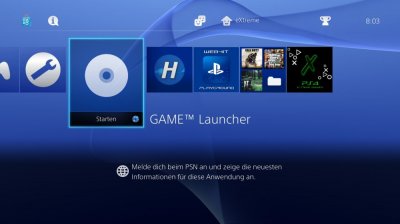
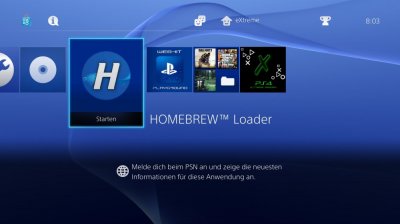

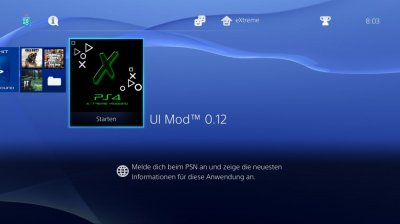
And here's the corresponding PS4 UI Mod Tutorial from their Blog, to quote: Installation of the UI Mod TUT
* If you are going to install this UI Mod you must initialize your PS4 first. *
Requirements:
1. PS4 1.76
2. Extreme Modding UI Mod RAR.
3. Windows PC
4. FTP Client
5. Call of Duty AW and GTAV installed *OPTIONAL
On your PS4:
1. Boot your PS4
2. If you have the PS4 initialized, you can now install the COD AW and GTAV games, no need to run them just let the applications install to the UI. If you do not have these games continue to step 3.
3. Go to your Internet browser and head to http://sce.party/ps4/playground/
4. Enable FTP and Debug settings and stay on this page.
On your computer:
1. Extract the file to the desktop (you will be focusing on the Extra & Mod folders)
2. Open up the FTP client (I recommend FileZilla)
3. Type in your PS4 ip address at the top and in port type in 1337
4. Once connected on the left hand side look in your desktop folder and locate the two files (Extra/Mod)
5. Open the files to select the contents
6. With the Extra file open right click system_data and hit upload, then user and hit upload. (We are installing straight to the PS4 so there is no need to put them in specific folders).
7. Do the same with the files inside the Mod folder.
8. When the pop-up comes up saying overwrite, just click yes for all on the bottom left and continue.
9. Once done transferring the files reboot the...
To quote from their Blog: PS4 UI Mod alpha 0.12 – Custom Home Menu by e✘treme
Since we can load Backups / Homebrew on PS4 Firmware 1.76 a Custom Home Menu is useful now. In version 0.12 Alpha you see a installed Disc Game as GAME Launcher and OMSK as HOMEBREW Loader.
* If you are going to install this UI Mod you must initialize your PS4 first. *
Requirements:
1. PS4 1.76
2. Extreme Modding UI Mod RAR.
3. Windows PC
4. FTP Client
5. Call of Duty AW and GTAV installed *OPTIONAL
On your PS4:
1. Boot your PS4
2. If you have the PS4 initialized, you can now install the COD AW and GTAV games, no need to run them just let the applications install to the UI. If you do not have these games continue to step 3.
3. Go to your Internet browser and head to http://sce.party/ps4/playground/
4. Enable FTP and Debug settings and stay on this page.
On your computer:
1. Extract the file to the desktop (you will be focusing on the Extra & Mod folders)
2. Open up the FTP client (I recommend FileZilla)
3. Type in your PS4 ip address at the top and in port type in 1337
4. Once connected on the left hand side look in your desktop folder and locate the two files (Extra/Mod)
5. Open the files to select the contents
6. With the Extra file open right click system_data and hit upload, then user and hit upload. (We are installing straight to the PS4 so there is no need to put them in specific folders).
7. Do the same with the files inside the Mod folder.
8. When the pop-up comes up saying overwrite, just click yes for all on the bottom left and continue.
9. Once done transferring the files reboot the...
Building PlayStation 4 v1.76 Payloads Tutorial by Modded Warfare
Awhile back we shared a PS4 Payload.bin tutorial, and today following his recent How to Run Free FULL Games on PS4 1.76 video @MODDEDWARFARE returns with another guide on setting up the $DK to build payloads that can be executed on a 1.76 PS4 through the WebKit Playground. 
If you haven't done so already, drop by his YouTube Channel where you'll find many other excellent PlayStation 4 video tutorials as well as guides covering XBox One, XBox 360, PC and more!
To quote from the video's caption: How to Build Payloads in the PS4 $DK
How to setup the PS4 $DK to build payloads which can then be executed on a 1.76 PS4 through the WebKit Playground.
Download Links:
Compiling a payload and sending it via PS4 Bin Loader
Some short tutorial on how to compile and send a payload to a ps4 (goldhen also works for this but i'm using the simplest process available)
Links:
Cheers to @Bultra for this news tip (and also letting us know about Arduino PS4) in the PSXHAX Shoutbox earlier today!
If you haven't done so already, drop by his YouTube Channel where you'll find many other excellent PlayStation 4 video tutorials as well as guides covering XBox One, XBox 360, PC and more!
To quote from the video's caption: How to Build Payloads in the PS4 $DK
How to setup the PS4 $DK to build payloads which can then be executed on a 1.76 PS4 through the WebKit Playground.
Download Links:
- PS4 $DK (Click Clone or Download button and select Download ZIP)
- Virtual Box
- Ubuntu ISO
Compiling a payload and sending it via PS4 Bin Loader
Some short tutorial on how to compile and send a payload to a ps4 (goldhen also works for this but i'm using the simplest process available)
Links:
Cheers to @Bultra for this news tip (and also letting us know about Arduino PS4) in the PSXHAX Shoutbox earlier today!
Running Free FULL Games on a 1.76 PS4 Guide by Modded Warfare
Many may remember the excellent voice guide by @MODDEDWARFARE on getting free PS4 1.76 trial / demo games, well today he kicked things up a notch with a follow-up video tutorial on his YouTube Channel for running free full games for jailbroken PS4 console owners.
He clarifies this comparison (using a disc-based donor / launcher instead of the Playroom trial) in the first few minutes of the video below, and from the video's caption to quote: How to Run Free Full Games on a 1.76 PS4
How to fully run free/backup copied games on a 1.76 PS4 without the game disc.
PSXHAX game download posts:
Download Links:
He clarifies this comparison (using a disc-based donor / launcher instead of the Playroom trial) in the first few minutes of the video below, and from the video's caption to quote: How to Run Free Full Games on a 1.76 PS4
How to fully run free/backup copied games on a 1.76 PS4 without the game disc.
PSXHAX game download posts:
Download Links:
- PS4 Fake PKG (FPKG) Sharing Guide
- 6.XX Webkit / 6.72 PS4 Jailbreak
- 7.00-7.02 Webkit Exploit
- 7.02 Webkit / 7.02 Kernel / PS4JB
- 7.50 Kernel Exploit / PS4JB 7.55
- 7.55 / 8.00 Payloads / PS4JB2 7.55
- 9.00 PS4 Webkit Exploit
- 9.00 PS4 Payloads / GoldHEN (Latest)
- 9.00 PS4 Jailbreak Kernel Exploit
- 11.00 PS4 Jailbreak Kernel Exploit
- 13.00 PS4 Kernel Exploit / 13.02 BD-J Bug
- 4.03 PS5 Webkit Exploit
- PS5 Kernel Exploit (ExFAT Bug)
- PS5 Root Keys Obtained
- 4.03 PS5 Kernel Build String
- 4.03 PS5 Webkit Execution
- 4.03 PS5 Kernel Vulnerability
- 4.03 PS5 Filesystem Dumps
- 4.51 PS5 BD-JB Sandbox Escape
- PS5 BD-JB Exploit Hack Source Code
- Mast1c0re PS5 Userland Exploit
- PS5 Kernel Access via PS4 Exploit
- PS5 exFAT Vulnerability Disclosed
- 4.03 PS5 Kernel Exploit Webkit ROP
- 4.50 PS5 Kernel Exploit Webkit ROP
- 4.51 PS5 Kernel Exploit Webkit ROP
- 4.xx PS5 Kernel Exploit v1.01
- 4.xx PS5 Kernel Exploit v1.02 / v1.03
- PS5 1.00-6.50 Firmware Webkit
- Native PS5 ROP Chain Execution
- Mast1c0re PS5 Compiler Attack
- PS5 FreeBSD Kernel Bug & WebKit
- PS5 UMTX 2 Exploit & PS5 Jailbreak
- Byepervisor PS5 Hypervisor Exploit
- Lua Lapse PS5 Kxploit & Laps3c0re / Y2JB
- 12.00 / 12.70 PS5 Kernel Exploit