PSXHAX.COM website and domain for sale. Contact Us with your offer!

You are using an out of date browser. It may not display this or other websites correctly.
You should upgrade or use an alternative browser.
You should upgrade or use an alternative browser.
PS4 1.76 Guide to Use FTP with Fixed Debug Settings by Zecoxao
Since enabling PS4 Debug Mode on retail consoles, adding Debug Settings to the PS4 WebKit Playground via PS4 FTP Payloads, some PS4 1.76 UI Mods and full implementation in PS4 Debug Settings Payload v2 today PlayStation 4 developer @zecoxao shared a guide on how to use PS4 FTP with fixed Debug Settings on 1.76 jailbroken consoles to access more devices. 
To quote from zecoxao: How to Use FTP with Fixed Debug Settings Tutorial
You need:
Before sending the payload, hexedit it to add your IP. Search for 192.168.000.000
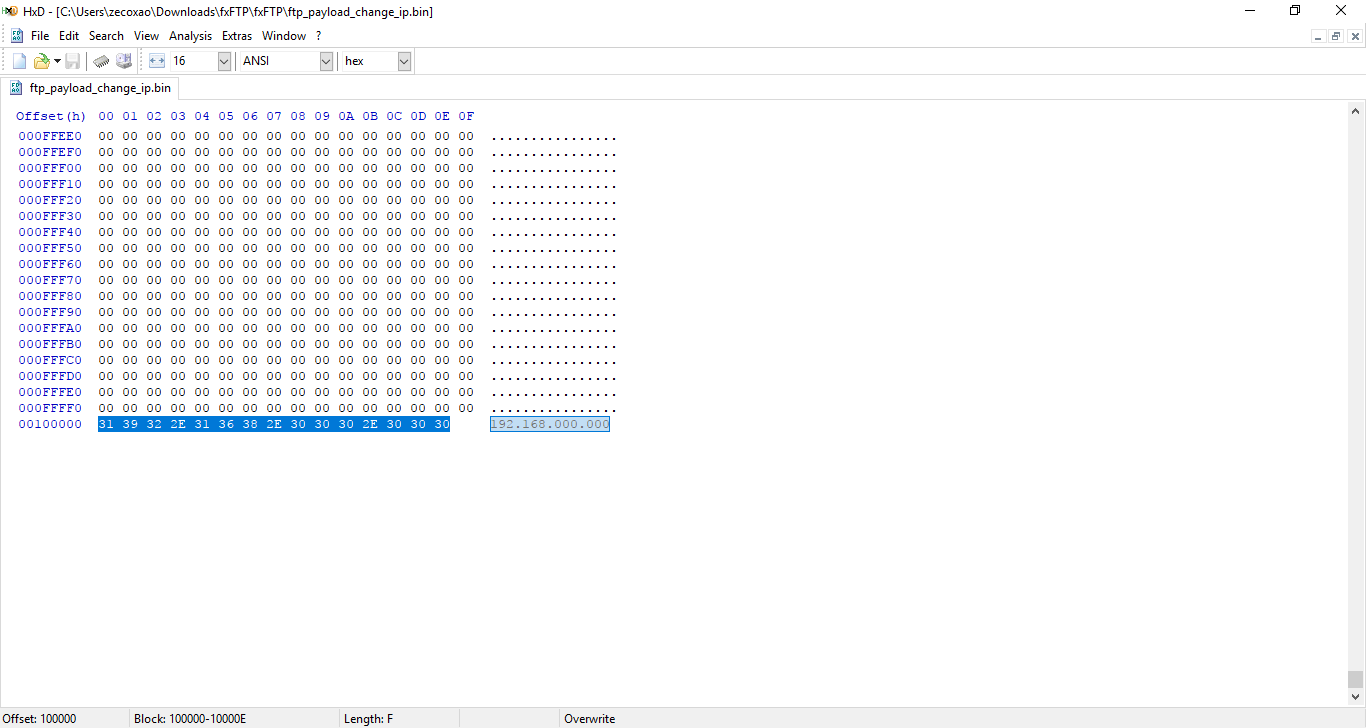
Replace it with your PS4 IP:
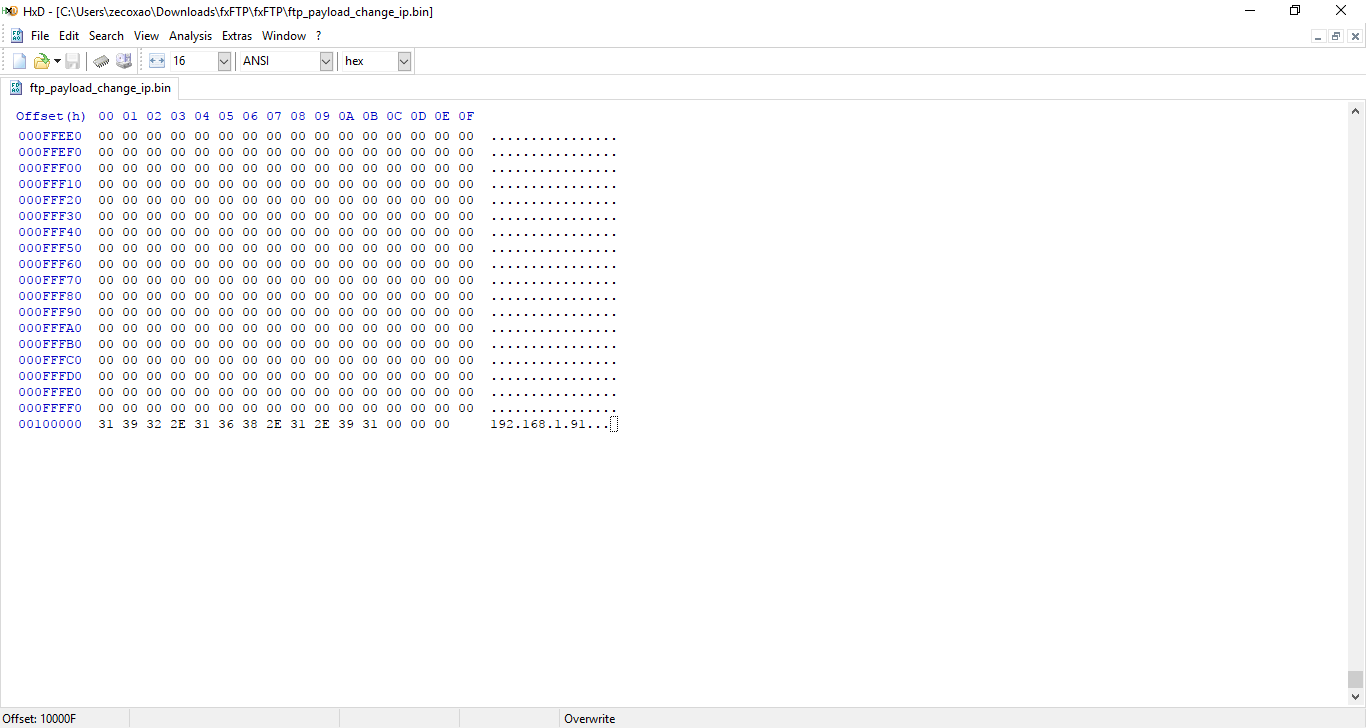
and just send it with netcat
You should have FTP working then.
Everything else is the same for CTurt payloads.
You get spoof to 5.00 firmware, FTP now allows you to dump crypt and cryptx partitions, as well as other things like iccnvs and Debug Settings are fully working (using Devkit Target ID)
Credits:
To quote from zecoxao: How to Use FTP with Fixed Debug Settings Tutorial
You need:
- Fixed FTP Payload with full debug settings
- PS4 on 1.76
- PC to send the payload
- Netcat / Netcat GUI
- [PLAIN]HXD[/PLAIN] or hexeditor of choice
Before sending the payload, hexedit it to add your IP. Search for 192.168.000.000
Replace it with your PS4 IP:
and just send it with netcat
You should have FTP working then.
Everything else is the same for CTurt payloads.
You get spoof to 5.00 firmware, FTP now allows you to dump crypt and cryptx partitions, as well as other things like iccnvs and Debug Settings are fully working (using Devkit Target ID)
Credits:
- sealab (For the full debug settings patches)
- wildcard (For the port to 1.01 payload)
- fx0day (For the original FTP payload sauce)
- flatz (For the FTP payload fixes)...
PS4 IDX Generator v0.1 and GenIDX Tool Tutorial by CrazyVoid
I've been researching PS4 License files for Games and Applications. And there is an file format called IDX. I took the time to reverse this format and document it. Even make a program to generate these files for the community.
Here is the source code to the application: CrazyVoid GenIDX PS4 Program <--- Save this file as genidx.c in ps4_tools
Here is the source code to the application: CrazyVoid GenIDX PS4 Program <--- Save this file as genidx.c in ps4_tools
Code:
/*  CrazyVoid Generate PS4 IDX File
 *  - 07/24/2017
 */

#include <sys/types.h>
#include <stdio.h>
#include <fcntl.h>
#include <unistd.h>
#include <sys/stat.h>
#include <string.h>
#include <stdarg.h>
#include <stdlib.h>
#include <zlib.h>
#include <dirent.h>
#include <assert.h>
#include <stdint.h>

#ifdef WIN32
#include "mingw_mmap.h"
#include <windows.h>
#else
#include <sys/mman.h>
#endif

#include "tools.h"

u8 magicPreset[0x9] = { 0x72, 0x69, 0x64, 0x78, 0x01, 0x00, 0x00, 0x00, 0x01 };
u8 padding1Preset[0x4] = { 0x00, 0x00, 0x00, 0x00 };
u8 unknownPreset[0x16] = { 0x00, 0x04, 0x00, 0x00, 0x00, 0x00, 0x00, 0x00, 0x00, 0x04, 0x00, 0x00, 0x00, 0x00, 0x00, 0x00 };
u8 padding2Preset[0x16] = { 0x00, 0x00, 0x00, 0x00, 0x00, 0x00, 0x00, 0x00, 0x00, 0x00, 0x00, 0x00, 0x00, 0x00, 0x00, 0x00 };

u8 outputFile[0x50];

int generateIDX(char *CONTENT_ID, char *ENTITLEMENT_LABEL)
{
    int ret;
    if(strlen(CONTENT_ID) == 19)
    {
        if(strlen(ENTITLEMENT_LABEL) == 16)
        {
            char outputFilename[30] = "fake";
            strcat(outputFilename, CONTENT_ID);
            strcat(outputFilename, ".idx");
            printf("Output : %s\n\n", outputFilename);

            memcpy(outputFile, magicPreset, 9);
            memcpy(outputFile+9, CONTENT_ID, 19);
            memcpy(outputFile+28, padding1Preset, 4);
            memcpy(outputFile+32, ENTITLEMENT_LABEL, 16);
            memcpy(outputFile+48, unknownPreset, 16);
            memcpy(outputFile+64, padding2Preset, 16);

            FILE *fp;
            fp = fopen(outputFilename, "w+");
            fwrite(outputFile, sizeof(outputFile), 1, fp);
            fclose(fp);
            ret = 0;
        }
        else
        {
            printf("[ERROR] Invalid length of ENTITLEMENT LABLE\nFailed to create IDX\n\n");
            ret = 1;
        }
    }
    else
    {
        printf("[ERROR] Invalid length of CONTENT ID\nFailed to create IDX\n\n");
        ret = 2;
    }

    return ret;
}

void help_Output()
{
    printf("====PS4 IDX Generator - CrazyVoid======\n");
    #ifdef WIN32...
How to Setup a PS4 DualShock 4 (DS4) Controller on Steam Tutorial
With Sony's PS4 DualShock 4 controller now officially supported in Valve Corporation's digital distribution platform known as Steam, here's a guide on how to use a PlayStation 4 DS4 controller as a PC gamepad on Steam! 
To quote from Tom's Guide on How to Use a PS4 Controller on Steam:
"To get your DualShock 4 set up on Steam, launch the Steam client and click the controller icon at the top right to enter Big Picture Mode, which is Steam's console-like, controller-friendly interface. From there, go to Settings > Controller Settings and make sure "PS4 Configuration Support" is toggled on.
After that, simply plug your PS4 controller in via a microUSB cable or Sony's DualShock wireless dongle. You'll be prompted with a small window for personalizing your controller, which lets you assign a name to your DualShock 4, toggle the rumble feature and set the color, brightness and saturation of the gamepad's top-facing lightbar.
Your DualShock 4 will now be registered to work on Steam, but that's just the beginning of the fun.
If you head to Settings > Base Configurations, you can create button schemes for navigating Steam in both Desktop and Big Picture mode, as well as dictate what happens when you hold down the home button in-game. You can also create game-specific control schemes by simply launching a game, pressing the PlayStation button and selecting Controller Settings.
The amount of ways you can customize your DualShock 4 on Steam is staggering, and reminds me a lot of the fine-tuning options that Valve offers for its own, less-conventional Steam Controller. In addition to remapping every button and adjusting the sensitivity of the thumbsticks, you can also take advantage of the controller's unique touchpad and gyroscope in a myriad of ways.
Want the DualShock 4's touchpad to behave like a mouse? Go for it. How about controlling the in-game camera by simply moving the controller? You can make that happen. If you like tweaking every possible parameter when setting up your controls for games, Steam's DualShock 4 features could keep you busy for hours."
From Steam's Latest Update, to quote in part: Controller
To quote from Tom's Guide on How to Use a PS4 Controller on Steam:
"To get your DualShock 4 set up on Steam, launch the Steam client and click the controller icon at the top right to enter Big Picture Mode, which is Steam's console-like, controller-friendly interface. From there, go to Settings > Controller Settings and make sure "PS4 Configuration Support" is toggled on.
After that, simply plug your PS4 controller in via a microUSB cable or Sony's DualShock wireless dongle. You'll be prompted with a small window for personalizing your controller, which lets you assign a name to your DualShock 4, toggle the rumble feature and set the color, brightness and saturation of the gamepad's top-facing lightbar.
Your DualShock 4 will now be registered to work on Steam, but that's just the beginning of the fun.
If you head to Settings > Base Configurations, you can create button schemes for navigating Steam in both Desktop and Big Picture mode, as well as dictate what happens when you hold down the home button in-game. You can also create game-specific control schemes by simply launching a game, pressing the PlayStation button and selecting Controller Settings.
The amount of ways you can customize your DualShock 4 on Steam is staggering, and reminds me a lot of the fine-tuning options that Valve offers for its own, less-conventional Steam Controller. In addition to remapping every button and adjusting the sensitivity of the thumbsticks, you can also take advantage of the controller's unique touchpad and gyroscope in a myriad of ways.
Want the DualShock 4's touchpad to behave like a mouse? Go for it. How about controlling the in-game camera by simply moving the controller? You can make that happen. If you like tweaking every possible parameter when setting up your controls for games, Steam's DualShock 4 features could keep you busy for hours."
From Steam's Latest Update, to quote in part: Controller
- ...
PS4 Multi CoD Tool 1.76 Guide by Modded Warfare and XeXSolutions
It's been awhile since his last update, but today PlayStation 4 Modder @MODDEDWARFARE is back bringing a PS4 Multi-CoD Tool 1.76 Setup Guide on his YouTube Channel with a PS4 Multi-CoD RTE Tool 1.76 Ghosts Overview from XeXSolutions. 
Download: PS4 Multi Cod Tool.zip (11.7 MB)
To quote from MODDED_WARFARE on NGU: PS4 Multi Cod Tool - Ghosts/AW 1.76 Release
So I made these tools a few months ago with help from @XeXSolutions but I was using a private PS4API which prevented me from releasing them.
I have ported it over to use the public PS4API released by Black Panther and combined them both into one tool.
How to Use:
Showcase By XexSolutions:
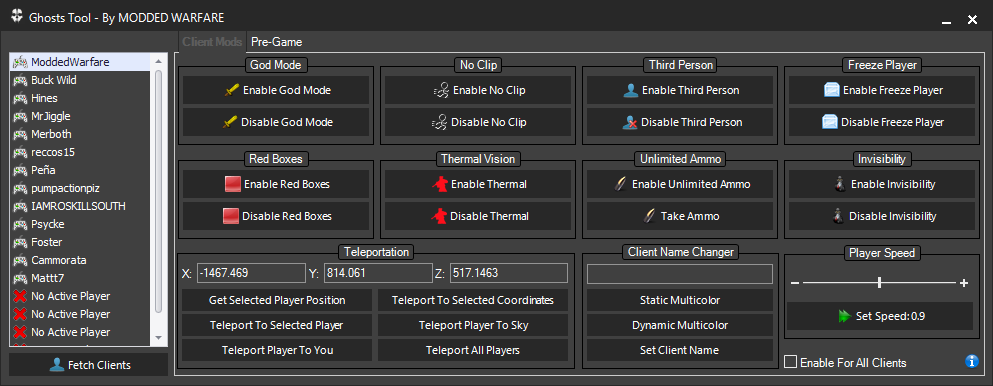
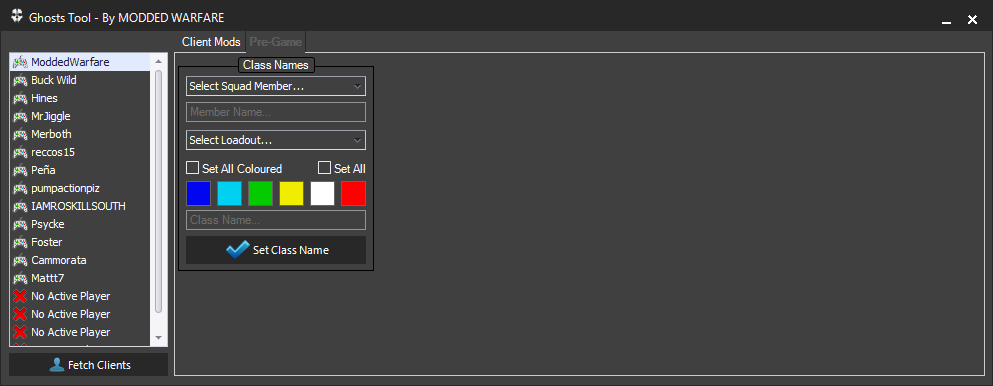
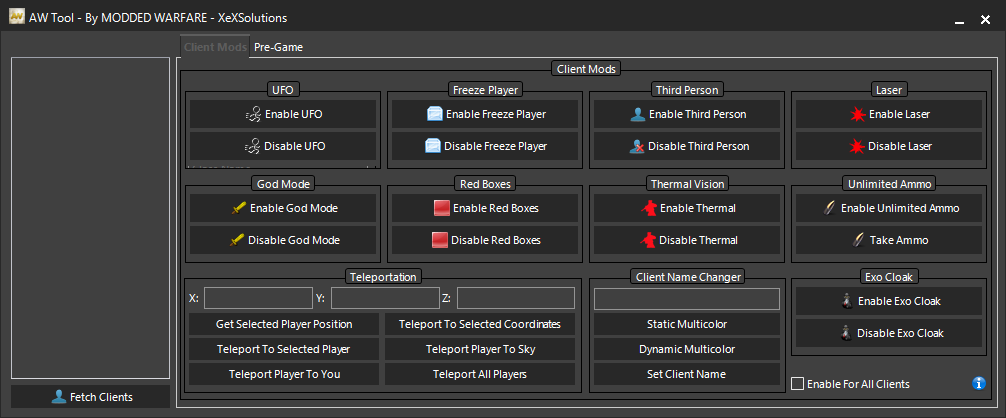
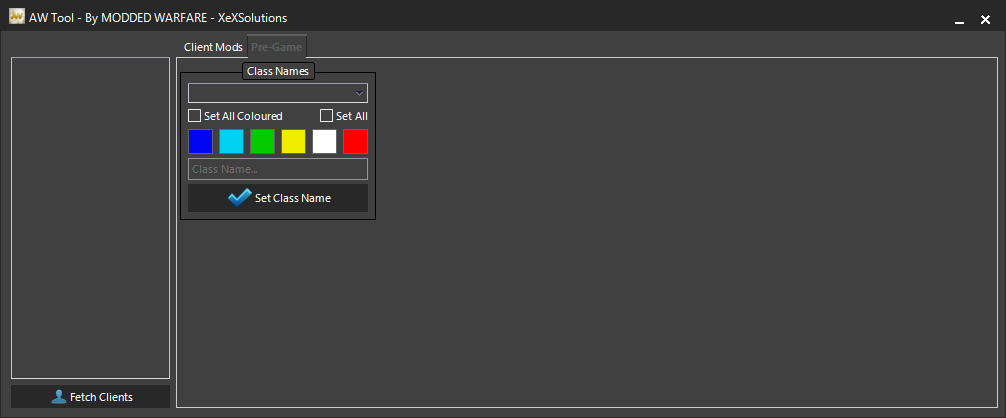
Here are some screenshots:
Ghosts:
AW:
Cheers to @HydrogenNGU for passing along the news tip on Twitter!
Download: PS4 Multi Cod Tool.zip (11.7 MB)
To quote from MODDED_WARFARE on NGU: PS4 Multi Cod Tool - Ghosts/AW 1.76 Release
So I made these tools a few months ago with help from @XeXSolutions but I was using a private PS4API which prevented me from releasing them.
I have ported it over to use the public PS4API released by Black Panther and combined them both into one tool.
How to Use:
- Open Web Kit Playground and start the code execution
- Open the mod tool and enter the IP of the PS4 then click send payload
- Wait about a minute to two minutes for it to execute then press the PS4 button to back out of the webkit and start Ghosts or AW
- Load into a multiplayer match and add bots
- Click Connect to PS4 once in game
- You can then fetch clients and start applying mods to the selected clients
Showcase By XexSolutions:
Here are some screenshots:
Ghosts:
AW:
Cheers to @HydrogenNGU for passing along the news tip on Twitter!
How to Make Your Own PS4 RTM on 1.76 Guide by ThisIsMrNameless
We've seen how to Build PS4 Payloads, and since his last tutorial PlayStation 4 developer @Thisismrnameles is back with a video guide detailing how to make your own PS4 RTM (Real-Time Modifications) for those with jailbroken consoles on 1.76 Firmware.
Download: PS4ME-Payload.bin / Netcat.exe / source.txt / Payload
From his YouTube Channel video's caption, to quote: How to make your own PS4 RTM
This video is just showing how to connect/attach to the PS4, there will be more to come but for now, its a good little head start for all the devs who want to make some tools
thanks to
j0lama for PS4ME
thanks to CTurt, kR105, flatz, SKFU, droogie, Xerpi, Hunger, Takezo, nas, Proxima for PS4 playground.
Cheers to @HydrogenNGU for passing along the video guide on Twitter just before the E3 2017 news dropped!
Download: PS4ME-Payload.bin / Netcat.exe / source.txt / Payload
From his YouTube Channel video's caption, to quote: How to make your own PS4 RTM
This video is just showing how to connect/attach to the PS4, there will be more to come but for now, its a good little head start for all the devs who want to make some tools
thanks to
j0lama for PS4ME
thanks to CTurt, kR105, flatz, SKFU, droogie, Xerpi, Hunger, Takezo, nas, Proxima for PS4 playground.
Cheers to @HydrogenNGU for passing along the video guide on Twitter just before the E3 2017 news dropped!
- PS4 Fake PKG (FPKG) Sharing Guide
- 6.XX Webkit / 6.72 PS4 Jailbreak
- 7.00-7.02 Webkit Exploit
- 7.02 Webkit / 7.02 Kernel / PS4JB
- 7.50 Kernel Exploit / PS4JB 7.55
- 7.55 / 8.00 Payloads / PS4JB2 7.55
- 9.00 PS4 Webkit Exploit
- 9.00 PS4 Payloads / GoldHEN (Latest)
- 9.00 PS4 Jailbreak Kernel Exploit
- 11.00 PS4 Jailbreak Kernel Exploit
- 13.00 PS4 Kernel Exploit / 13.02 BD-J Bug
- 4.03 PS5 Webkit Exploit
- PS5 Kernel Exploit (ExFAT Bug)
- PS5 Root Keys Obtained
- 4.03 PS5 Kernel Build String
- 4.03 PS5 Webkit Execution
- 4.03 PS5 Kernel Vulnerability
- 4.03 PS5 Filesystem Dumps
- 4.51 PS5 BD-JB Sandbox Escape
- PS5 BD-JB Exploit Hack Source Code
- Mast1c0re PS5 Userland Exploit
- PS5 Kernel Access via PS4 Exploit
- PS5 exFAT Vulnerability Disclosed
- 4.03 PS5 Kernel Exploit Webkit ROP
- 4.50 PS5 Kernel Exploit Webkit ROP
- 4.51 PS5 Kernel Exploit Webkit ROP
- 4.xx PS5 Kernel Exploit v1.01
- 4.xx PS5 Kernel Exploit v1.02 / v1.03
- PS5 1.00-6.50 Firmware Webkit
- Native PS5 ROP Chain Execution
- Mast1c0re PS5 Compiler Attack
- PS5 FreeBSD Kernel Bug & WebKit
- PS5 UMTX 2 Exploit & PS5 Jailbreak
- Byepervisor PS5 Hypervisor Exploit
- Lua Lapse PS5 Kxploit & Laps3c0re / Y2JB
- 12.00 / 12.70 PS5 Kernel Exploit