PSXHAX.COM website and domain for sale. Contact Us with your offer!

You are using an out of date browser. It may not display this or other websites correctly.
You should upgrade or use an alternative browser.
You should upgrade or use an alternative browser.
Editing PS4 Game Saves with Save Wizard on 4.70 Guide by Nitrowolf2
A few months back we saw a 4.50 Bypass Tutorial from @Niohjapan, and today he let us know he's shared an updated guide allowing those with a PlayStation Plus membership and two PS4 consoles to edit their 4.70 game saves using Save Wizard. 
To quote from Nitrowolf2 on NGU: How To Use Save Wizard On 4.70 (Requires Two PS4 and PS+), Requesting 3.XX Gamesaves
Very quick guide on how to modify gamesaves from consoles on 4.70 with Save Wizard. This is technically a bypass of the encryption process that Sony added in the latest firmware (and 4.5X).
To quote from Nitrowolf2 on NGU: How To Use Save Wizard On 4.70 (Requires Two PS4 and PS+), Requesting 3.XX Gamesaves
Very quick guide on how to modify gamesaves from consoles on 4.70 with Save Wizard. This is technically a bypass of the encryption process that Sony added in the latest firmware (and 4.5X).
How to Set Up PSProxy to Bypass 4.70 PS4 Firmware Tutorial by Cali
We've seen some guides before on how to set up PSProxy, and here's an updated tutorial by Cali to bypass 4.70 PS4 Firmware for those interested in giving it a try to connect to PSN whenever the passphrase changes. 
This version uses the modded PS4 4.55 XML files from @HydrogenNGU, and to quote from Cali: How to set up PSProxy to bypass 4.70
Down below I've written a tutorial on how to bypass the newest update and still play online, I have tested this and this is working if your console was in the previous version 4.55 and should also work on every other firmware below since this program was originally made for 3.50.
Download: PSProxy / 4.55 XML / Mirrors
First go ahead and download PSProxy and the 4.55 XML file and now install PSProxy. Go ahead and go to (C:Local Disk/Program Files(x86)/PSProxy) and drag and drop the "ps4-updatelist" XML into the PSProxy directory.
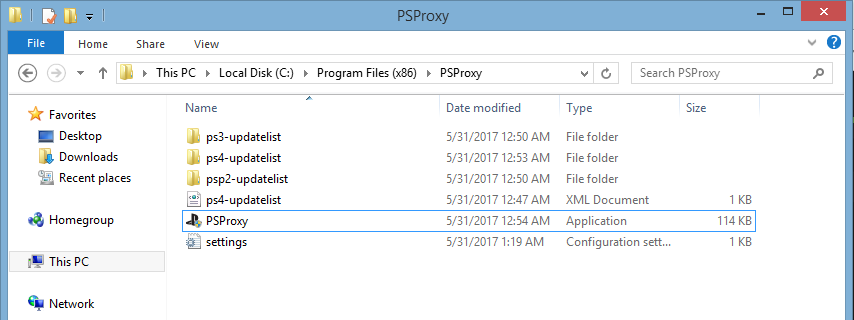
You will also see the "ps4-updatelist" folder but you'll notice there isn't a 4.55 located inside so go ahead and make the following folder directories and then drag it into the "ps4-updatelist" folder. First create a folder named "4.55" and inside that go ahead and make a folder called...
This version uses the modded PS4 4.55 XML files from @HydrogenNGU, and to quote from Cali: How to set up PSProxy to bypass 4.70
Down below I've written a tutorial on how to bypass the newest update and still play online, I have tested this and this is working if your console was in the previous version 4.55 and should also work on every other firmware below since this program was originally made for 3.50.
Download: PSProxy / 4.55 XML / Mirrors
First go ahead and download PSProxy and the 4.55 XML file and now install PSProxy. Go ahead and go to (C:Local Disk/Program Files(x86)/PSProxy) and drag and drop the "ps4-updatelist" XML into the PSProxy directory.
You will also see the "ps4-updatelist" folder but you'll notice there isn't a 4.55 located inside so go ahead and make the following folder directories and then drag it into the "ps4-updatelist" folder. First create a folder named "4.55" and inside that go ahead and make a folder called...
SceNpTrophySignature Inside PS4 Decrypted ESFM Trophy Files Guide
Here's a guide from PlayStation 4 developer @RedEyeX32 covering SceNpTrophySignature which is located inside PS4 Decrypted ESFM trophy files such as TROP.ESFM.
Download: SceNpTrophySignature.rar (83 KB)
This comes since we've seen a PS4 Trophy Resigner Makefile, Resigning PS4 Trophies Tutorial, PS4 Trophy Modding Guide, Modding PS4 Profile Trophies Demo and most recently PS4 Trophy Data Decryption Keys.
To quote from Red-EyeX32 on NGU: Hello NextGenUpdate, I was really curious and bored and decided to tinker with SceNpTrophySignature stored inside decrypted ESFM (trophy) files, specifically TROP.ESFM from Call of Duty: MWR that I released on Twitter.
The first thing I did was get the Sce-Np-Trophy-Signature tag inside the decrypted file, and created a new file and converted it to hex.
The output should be looking similar to this (will change on different file of course):
Download: SceNpTrophySignature.rar (83 KB)
This comes since we've seen a PS4 Trophy Resigner Makefile, Resigning PS4 Trophies Tutorial, PS4 Trophy Modding Guide, Modding PS4 Profile Trophies Demo and most recently PS4 Trophy Data Decryption Keys.
To quote from Red-EyeX32 on NGU: Hello NextGenUpdate, I was really curious and bored and decided to tinker with SceNpTrophySignature stored inside decrypted ESFM (trophy) files, specifically TROP.ESFM from Call of Duty: MWR that I released on Twitter.
The first thing I did was get the Sce-Np-Trophy-Signature tag inside the decrypted file, and created a new file and converted it to hex.
The output should be looking similar to this (will change on different file of course):
Code:
Offset(h) 00 01 02 03 04 05 06 07 08 09 0A 0B 0C 0D 0E 0F

00000000  4C 39 B9 8C 01 00 00 00 00 00 00 00 80 B9 E0 DE  L9¹Œ........€¹àÞ
00000010  C1 C8 ED DB D9 0C F4 5D 7E CE 2A 65 6C 9D 7F F5  ÁÈíÛÙ.ô]~Î*el..õ
00000020  96 77 C4 7D 73 52 09 B7 35 69 89 BD 5A CE 0A 82  –wÄ}sR.·5i‰½ZÎ.‚
00000030  C8 58 06 B6 22 8B 5B 26 A7 A8 AB D1 C4 62 92 6D  ÈX.¶"‹[&§¨«ÑÄb’m
00000040  5A 99 56 AD 6D 13 97 4B 2E 12 EB 23 DE A3 3D D2  Z™V.m.—K..ë#Þ£=Ò
00000050  57 25 70 00 DF D0 8F 73 83 19 84 D2 BC 56 15 FE  W%p.ßÐ.sƒ.„Ò¼V.þ
00000060  EB 39 FB D8 A9 91 BF B5 60 1F 0D D8 4C E5 F3 5B  ë9ûØ©‘¿µ`..ØLåó[
00000070  AA 52 AA 58 DB CA 0A 8D 77 B8 41 E6 DE E8 D1 5C  ªRªXÛÊ..w¸AæÞèÑ\...
PS4 Azura Mod Menu Overview & 1.76 Setup Guide by Modded Warfare
Last month he shared a Ghosts RTE Mod Tool 1.76 demo, and today PlayStation 4 Modder @MODDEDWARFARE returns with a PS4 Azura Mod Menu Overview and Setup Guide for those with a Jailbroken PS4 1.76 console on his YouTube Channel. 
This tutorial comes following the GTA5 Azura Menu 1.1 Demo over the weekend, which can be accessed from the PS4 Web browser at AzuraMenu.com.
To quote from the video's caption: PS4 Azura Mod Menu Overview & Setup Guide
Another great mod menu release by @2much4u. This new menu is much easier to install and has far more options than the previous GTA-V mod menu for PS4.
Requirements: PS4 on update 1.76 with the WebKit Exploit setup.
PlayStation 4 WebKit Tutorial:
How To Install Mod Menus On PS4 Jailbreak 5.05
This tutorial comes following the GTA5 Azura Menu 1.1 Demo over the weekend, which can be accessed from the PS4 Web browser at AzuraMenu.com.
To quote from the video's caption: PS4 Azura Mod Menu Overview & Setup Guide
Another great mod menu release by @2much4u. This new menu is much easier to install and has far more options than the previous GTA-V mod menu for PS4.
Requirements: PS4 on update 1.76 with the WebKit Exploit setup.
PlayStation 4 WebKit Tutorial:
How To Install Mod Menus On PS4 Jailbreak 5.05
How to Block PS4 Updates on Any PlayStation 4 Firmware Guide
A few weeks back we saw his PS4 Ghosts RTE Mod Tool, and now @Modded Warfare is back with a guide on how to block PS4 updates on any PlayStation 4 Firmware from his YouTube Channel. 
Those seeking a similar block list that covers more host names can also check HERE, and to quote from the video's caption: How to Block PS4 Updates On Any Firmware
How to simply block PS4 updates from being downloaded to your PS4 when you launch games or connect to the Internet.
DNS Addresses:
Those seeking a similar block list that covers more host names can also check HERE, and to quote from the video's caption: How to Block PS4 Updates On Any Firmware
How to simply block PS4 updates from being downloaded to your PS4 when you launch games or connect to the Internet.
DNS Addresses:
- fuk01.ps4.update.playstation.net
- duk01.ps4.update.playstation.net
- fus01.ps4.update.playstation.net
- al02.cdn.update.playstation.net
- a01.cdn.update.playstation.org.edgesuite.net
- playstation.sony.akadns.net
- a192.d.akamai.net
- Al Azif's PS4 Exploit Host Block List:
Code:
{
    "Debug": false,
    "Root_Check": true,
    "Public": false,
    "DNS": true,
    "HTTP": true,
    "DNS_Interface_IP": "",
    "DNS_Port": 53,
    "HTTP_Interface_IP": "",
    "HTTP_Port": 80,
    "Compression_Level": 0,
    "UA_Check": false,
    "Theme": "Default",
    "Auto_Payload": "",
    "Payload_Timeout": 60,
    "DNS_Rules": {
        "Redirect_IP": "",
        "Redirect": [
            "^the\\.gate",
            "^www\\.playstation\\.com",
            "^(manuals|update)\\.playstation\\.net",
            "^(get|post|ena|update)\\.net\\.playstation\\.net",
            "^(d|f|h)[a-z]{2}01\\.(ps4|ps5|psp2|psv)\\.update\\.playstation\\.net",
            "^ctest\\.cdn\\.nintendo\\.net",
            "^conntest\\.nintendowifi\\.net"
        ],
        "Block": [
            "^(.*\\.)?playstation\\.(com|net|org)",
            "^(.*\\.)?scea\\.com",
            "^(.*\\.)?sonyentertainmentnetwork\\.com",
            "^(.*\\.)?nintendo\\.(net|at|be|ch|co\\.jp|co\\.kr|co\\.nz|co\\.uk|co\\.za|com|com\\.au|com\\.hk|cz|de|dk|es|fi|fr|gr|hu|it|jp|nl|no|pt|ru|se|tw)",
            "^(.*\\.)?nintendo-europe\\.com",
            "^(.*\\.)?nintendoswitch.(cn|com|com\\.cn)"
        ],
        "Pass_Through_IP": []
    },
    "Valid_UA": [],
    "Update": {
"PS4_No_Update": 1.76...- PS4 Fake PKG (FPKG) Sharing Guide
- 6.XX Webkit / 6.72 PS4 Jailbreak
- 7.00-7.02 Webkit Exploit
- 7.02 Webkit / 7.02 Kernel / PS4JB
- 7.50 Kernel Exploit / PS4JB 7.55
- 7.55 / 8.00 Payloads / PS4JB2 7.55
- 9.00 PS4 Webkit Exploit
- 9.00 PS4 Payloads / GoldHEN (Latest)
- 9.00 PS4 Jailbreak Kernel Exploit
- 11.00 PS4 Jailbreak Kernel Exploit
- 13.00 PS4 Kernel Exploit / 13.02 BD-J Bug
- 4.03 PS5 Webkit Exploit
- PS5 Kernel Exploit (ExFAT Bug)
- PS5 Root Keys Obtained
- 4.03 PS5 Kernel Build String
- 4.03 PS5 Webkit Execution
- 4.03 PS5 Kernel Vulnerability
- 4.03 PS5 Filesystem Dumps
- 4.51 PS5 BD-JB Sandbox Escape
- PS5 BD-JB Exploit Hack Source Code
- Mast1c0re PS5 Userland Exploit
- PS5 Kernel Access via PS4 Exploit
- PS5 exFAT Vulnerability Disclosed
- 4.03 PS5 Kernel Exploit Webkit ROP
- 4.50 PS5 Kernel Exploit Webkit ROP
- 4.51 PS5 Kernel Exploit Webkit ROP
- 4.xx PS5 Kernel Exploit v1.01
- 4.xx PS5 Kernel Exploit v1.02 / v1.03
- PS5 1.00-6.50 Firmware Webkit
- Native PS5 ROP Chain Execution
- Mast1c0re PS5 Compiler Attack
- PS5 FreeBSD Kernel Bug & WebKit
- PS5 UMTX 2 Exploit & PS5 Jailbreak
- Byepervisor PS5 Hypervisor Exploit
- Lua Lapse PS5 Kxploit & Laps3c0re / Y2JB
- 12.00 / 12.70 PS5 Kernel Exploit