PSXHAX.COM website and domain for sale. Contact Us with your offer!

You are using an out of date browser. It may not display this or other websites correctly.
You should upgrade or use an alternative browser.
You should upgrade or use an alternative browser.
PSX Download Helper: Transfer PS4 Game Data via PC Guide
What if some users got slow download speed when downloading from Sony's sever (even when downloading from another servers than Sony are faster) !!
So I made this tut for people like myself whom prefer downloading from PC!
In this method we are gonna grab the game data from Sony's server with a computer specially with IDM for better speed downloading... as if you notice some people are not very easy with PS4's downloading speed.
Tools You Need:
1. PSX Download Helper LINK: (psx.zip / Mirror - 897.28 KB)
2. A PC/LAPTOP
3. LAN Cable (ONE = FAST TRANSFER for NORMAL DOWNLOAD | TWO = FAST TRANSFER for FASTER DOWNLOAD)
4. PSX Link Generator LINK: (lgn.zip / Mirror - 201.1 KB)
5. A USB Ethernet Kit with drivers installed (ONLY IF USING TWO LAN CABLE METHOD)
6. A Working Internet Connection And A Modem
I. PREPARING THE REQUIREMENTS
TWO CABLE MODE (BETTER)
1. Connect the modem with cable to usb controller (or the internal Ethernet hub of your laptop).
2. Connect another cable to PS4 from Laptop.
3. In your laptop go to Internet connection settings and then go to change adaptor settings.
4. In this section go to the properties of adaptor that have the internet (that's connected to the modem)
5. Go to sharing tab and enable sharing for adapter thats connected to PS4 console.
If you use "one cable mode" you should use wifi adaptor and wireless connectivity to use the wifi network adapter as sharing adapter to the Ethernet hub that connected to the PS4... but remember downloading the games from Sony server is faster with lan cable than wifi (for all)
6. Run PSX download helper and write the IP address that showed up here and dont press nothing. (check off that it should be the ipv4's of adapter that connected to PS4)
PREPARING THE PS4 CONSOLE
1. Go to settings and then network.
2. Go to connect to internet and chose lan cable.
3. Use automatic in whole questions except *** PROXY *** and set the PROXY value to IP address that showed in PSX download helper in PC.
4. Save the settings and sit back for next episode
PREPARING THE PSX DOWNLOAD HELPER
1. Go to PSX download helper and press the big white button.
2. The program is Chinese and we all prefer english (not if we...
So I made this tut for people like myself whom prefer downloading from PC!
In this method we are gonna grab the game data from Sony's server with a computer specially with IDM for better speed downloading... as if you notice some people are not very easy with PS4's downloading speed.
Tools You Need:
1. PSX Download Helper LINK: (psx.zip / Mirror - 897.28 KB)
2. A PC/LAPTOP
3. LAN Cable (ONE = FAST TRANSFER for NORMAL DOWNLOAD | TWO = FAST TRANSFER for FASTER DOWNLOAD)
4. PSX Link Generator LINK: (lgn.zip / Mirror - 201.1 KB)
5. A USB Ethernet Kit with drivers installed (ONLY IF USING TWO LAN CABLE METHOD)
6. A Working Internet Connection And A Modem
I. PREPARING THE REQUIREMENTS
1. Connect the modem with cable to usb controller (or the internal Ethernet hub of your laptop).
2. Connect another cable to PS4 from Laptop.
3. In your laptop go to Internet connection settings and then go to change adaptor settings.
4. In this section go to the properties of adaptor that have the internet (that's connected to the modem)
5. Go to sharing tab and enable sharing for adapter thats connected to PS4 console.
If you use "one cable mode" you should use wifi adaptor and wireless connectivity to use the wifi network adapter as sharing adapter to the Ethernet hub that connected to the PS4... but remember downloading the games from Sony server is faster with lan cable than wifi (for all)
6. Run PSX download helper and write the IP address that showed up here and dont press nothing. (check off that it should be the ipv4's of adapter that connected to PS4)
PREPARING THE PS4 CONSOLE
1. Go to settings and then network.
2. Go to connect to internet and chose lan cable.
3. Use automatic in whole questions except *** PROXY *** and set the PROXY value to IP address that showed in PSX download helper in PC.
4. Save the settings and sit back for next episode
PREPARING THE PSX DOWNLOAD HELPER
1. Go to PSX download helper and press the big white button.
2. The program is Chinese and we all prefer english (not if we...
PS4 Save Wizard Guide to Edit PlayStation 4 Game Saves by Nitrowolf2
Earlier this week we reported on the Save Wizard for PS4 MAX with some source code, and today Nitrowolf2 made available a PS4 Save Wizard guide for those considering getting it to edit PlayStation 4 game saves. 
To quote: PS4 Save Wizard Tutorial
I see a lot of people are having some issues with this so I figured lets start a tutorial thread. Down below is a step-by-step tutorial on how to use the Save Wizard Editor.
PLEASE DO NOT REQUEST ME TO MOD YOUR SAVE, I WILL NOT DO THIS. Also buy at own risk, I can't promise you that you won't get banned for using this. Also the product is in a pretty early stage it seems, a lot of issues with EU saves it seems.
Step 1: Purchase and Download The Save Wizard
This is an obvious step, don't be expecting a crack version of it either as all the application is, is a client. The work is done on the server end of things, which is why an internet connection is required.
Step 2: Look at the Capability list of Games
On the official website, Save Wizard, you can view a full list of supported titles. More will be added as time goes on. It's also to take notice that the advance editor mode ONLY WORKS ON SUPPORTED TITLES, meaning if its not on the list it won't work with it.
Step 3: Copy a Supported Gamesave From The PS4 Console Onto A USB Drive
If you don't know how to copy a gamesave, on the PS4 go to Settings then Application Save Data Managment, Save Date On System Storage, and then Copy To USB.
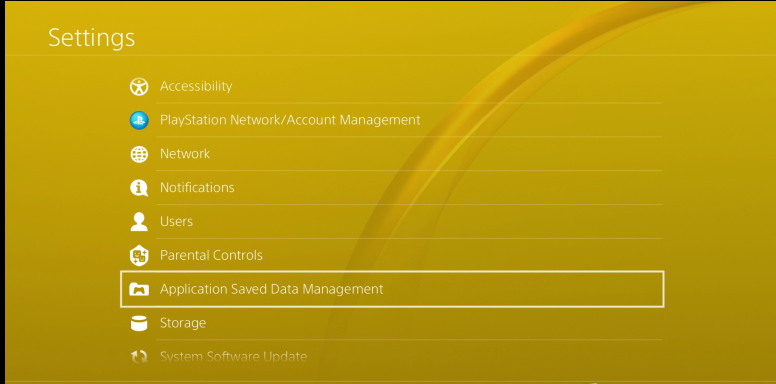
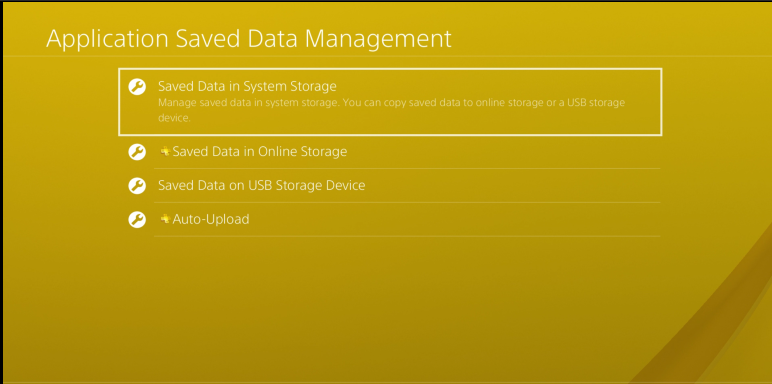
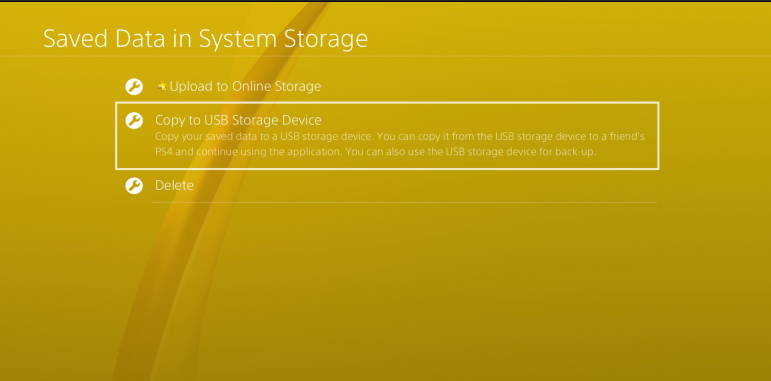
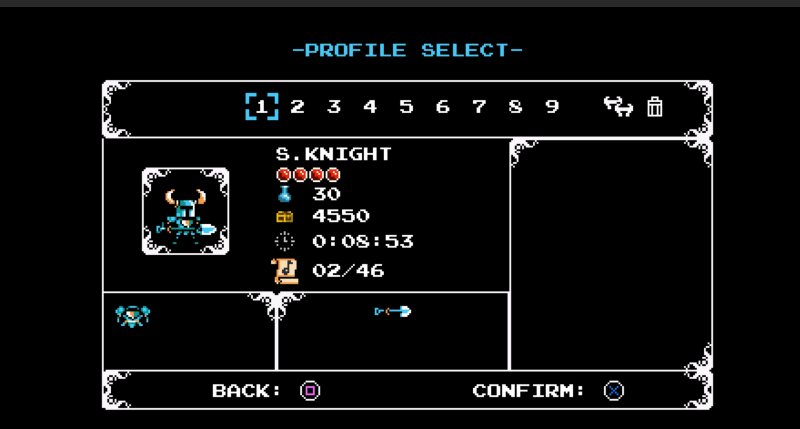
In this example we are gonna use Shovel Knight
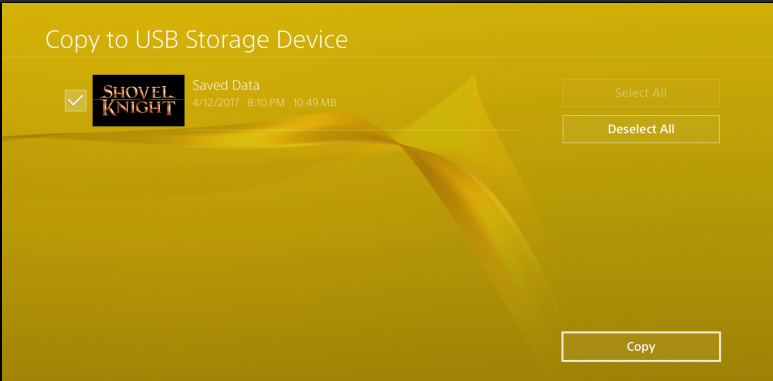
This image below is proof that my save was unedited before hand
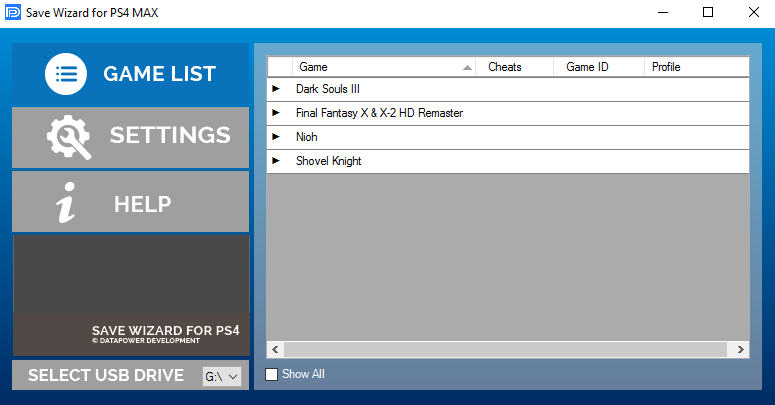
Step 4: Plug In The USB Into The Computer And Open Up Save Wizard
If for whatever reason it doesn't auto-detect the USB Drive, unmount it (unplug) and reMount (plug back in) while the app is open. You should have a screen like this.
Step 5: Go To Settings And Assign The...
To quote: PS4 Save Wizard Tutorial
I see a lot of people are having some issues with this so I figured lets start a tutorial thread. Down below is a step-by-step tutorial on how to use the Save Wizard Editor.
PLEASE DO NOT REQUEST ME TO MOD YOUR SAVE, I WILL NOT DO THIS. Also buy at own risk, I can't promise you that you won't get banned for using this. Also the product is in a pretty early stage it seems, a lot of issues with EU saves it seems.
Step 1: Purchase and Download The Save Wizard
This is an obvious step, don't be expecting a crack version of it either as all the application is, is a client. The work is done on the server end of things, which is why an internet connection is required.
Step 2: Look at the Capability list of Games
On the official website, Save Wizard, you can view a full list of supported titles. More will be added as time goes on. It's also to take notice that the advance editor mode ONLY WORKS ON SUPPORTED TITLES, meaning if its not on the list it won't work with it.
Step 3: Copy a Supported Gamesave From The PS4 Console Onto A USB Drive
If you don't know how to copy a gamesave, on the PS4 go to Settings then Application Save Data Managment, Save Date On System Storage, and then Copy To USB.
In this example we are gonna use Shovel Knight
This image below is proof that my save was unedited before hand
Step 4: Plug In The USB Into The Computer And Open Up Save Wizard
If for whatever reason it doesn't auto-detect the USB Drive, unmount it (unplug) and reMount (plug back in) while the app is open. You should have a screen like this.
Step 5: Go To Settings And Assign The...
1.76 PS4 UI Editor: Changing Home Screen Images UI Mod Guide
After his Installing PS4 1.76 OMSK / Demo Mode guide, PlayStation 4 developer @MODDEDWARFARE returns on his YouTube Channel with both a 1.76 PS4 UI Editor and UI Mod tutorial for changing the PS4 home screen images. 
Download: PS4 UI Editor.zip (9.7 MB) / FileZilla / Paint.NET
To quote: PS4 UI Mod Tutorial Changing Home Screen Images
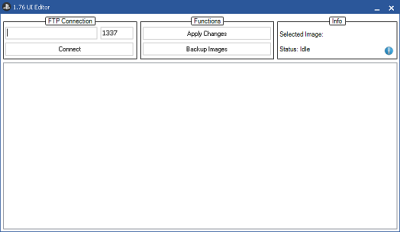 How to swap out the application launch and background images on the PS4 home screen through FTP using the WebKit exploit.
The required file downloads for PS4 UI Editor, FileZilla and Paint.NET are linked above.
Thanks to @Figure03 for passing along the news in the PSXHAX Shoutbox today!
Download: PS4 UI Editor.zip (9.7 MB) / FileZilla / Paint.NET
To quote: PS4 UI Mod Tutorial Changing Home Screen Images
How to swap out the application launch and background images on the PS4 home screen through FTP using the WebKit exploit.The required file downloads for PS4 UI Editor, FileZilla and Paint.NET are linked above.
Thanks to @Figure03 for passing along the news in the PSXHAX Shoutbox today!
Copying PS4 Game Saves to USB 3.0 External PS4 Hard Drives Guide
Since Sasuke PS4 4.50 OFW went live, we've seen How to Set Up a PS4 USB 3.0 HDD, PS4 External Hard Disk Drive Restrictions, PSN Account Factors, PS4 Apps / Games via External HDD and now thenextslash shared a guide on copying PS4 game saves to a USB 3.0 external PS4 hard disk drive. 
Check out the tutorial below, to quote: How to Copy a PS4 Game Save to an External Drive
You will need:
Step 2: Insert External Drive
There are 2 USB ports on the front of the PS4.
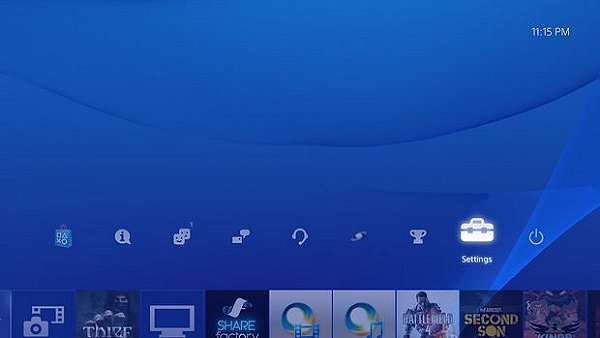
Step 3: In the Main Menu, Go to "Settings"
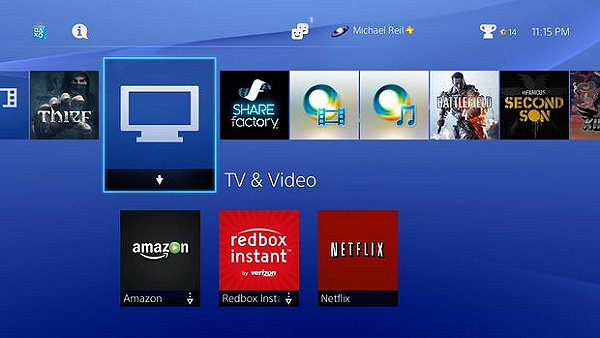
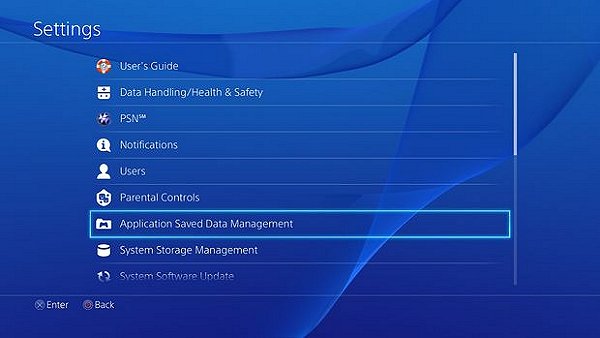
Step 4: Click on "Application Saved Data Management"
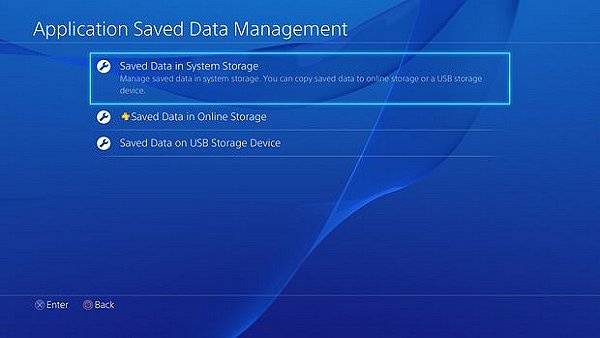
Step 5: Select "Saved Data in System Storage"
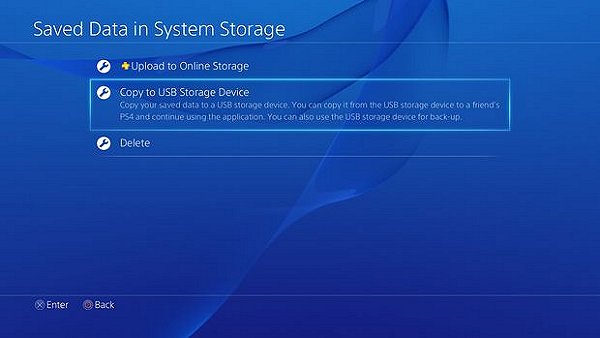
Step 6: Select "Copy to USB Storage Device"
Step 7: Select Game to Copy
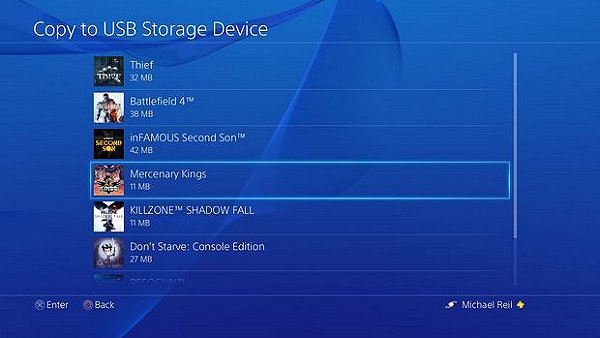
Step 8: Wait Until Transfer Is Complete
Repeat steps 4-8 for multiple games.
Step 9: Remove External Drive
That's it! Cheers to windrider42 for the heads up on this guide!
Check out the tutorial below, to quote: How to Copy a PS4 Game Save to an External Drive
You will need:
- PS4
- External Drive
- TV
- Cords
Step 2: Insert External Drive
There are 2 USB ports on the front of the PS4.
Step 3: In the Main Menu, Go to "Settings"
Step 4: Click on "Application Saved Data Management"
Step 5: Select "Saved Data in System Storage"
Step 6: Select "Copy to USB Storage Device"
Step 7: Select Game to Copy
Step 8: Wait Until Transfer Is Complete
Repeat steps 4-8 for multiple games.
Step 9: Remove External Drive
That's it! Cheers to windrider42 for the heads up on this guide!
How to Install PS4 OMSK / Demo Mode Tutorial by Modded Warfare
Previously we saw a PS4 PKG File Installation overview with the OMSK Client application, and following his PS4 Trophies Profile Mod Guide today PlayStation 4 developer @MODDEDWARFARE updated his YouTube Channel with a tutorial covering how to install OMSK / Demo Mode on a 1.76 PS4 console. 
From the video's caption: How to Install OMSK / Demo Mode on a PS4
How to install OMSK which is a mode used for Demo Unit PS4's at game stores for demoing different games.

Activating OMSK Demon in 5.55 (OFW) and Online
From the README.md: OMSK5.55
OMSK For PS4 5.55 OFW
Warning
This method will format your hdd and will lose everything use with caution.
Will freeze on "Updating From Server" but you will have omsk installed (sadly IDU Mode will be needed in-order for it to download).
How to install
1) Copy backup data from pc to usb under "Root USB -> PS4 -> EXPORT -> BACKUP -> 201807020206_00 -> archive.dat
2) Plug USB into PS4 and Go to [Settings] > [System] > [Back Up and Restore].
3) Select Restore PS4
4) Select the back-up file "OSMK For 5.55"
5) You'll see a screen that tells you that the system will restart and initialize whether or not the back up process is completed. Choose [Yes] to continue
6) After XMB has Shown you can start OMSK
Download
PS4.zip (1.15 GB) /...
From the video's caption: How to Install OMSK / Demo Mode on a PS4
How to install OMSK which is a mode used for Demo Unit PS4's at game stores for demoing different games.
Activating OMSK Demon in 5.55 (OFW) and Online
From the README.md: OMSK5.55
OMSK For PS4 5.55 OFW
Warning
This method will format your hdd and will lose everything use with caution.
Will freeze on "Updating From Server" but you will have omsk installed (sadly IDU Mode will be needed in-order for it to download).
How to install
1) Copy backup data from pc to usb under "Root USB -> PS4 -> EXPORT -> BACKUP -> 201807020206_00 -> archive.dat
2) Plug USB into PS4 and Go to [Settings] > [System] > [Back Up and Restore].
3) Select Restore PS4
4) Select the back-up file "OSMK For 5.55"
5) You'll see a screen that tells you that the system will restart and initialize whether or not the back up process is completed. Choose [Yes] to continue
6) After XMB has Shown you can start OMSK
Download
PS4.zip (1.15 GB) /...
- PS4 Fake PKG (FPKG) Sharing Guide
- 6.XX Webkit / 6.72 PS4 Jailbreak
- 7.00-7.02 Webkit Exploit
- 7.02 Webkit / 7.02 Kernel / PS4JB
- 7.50 Kernel Exploit / PS4JB 7.55
- 7.55 / 8.00 Payloads / PS4JB2 7.55
- 9.00 PS4 Webkit Exploit
- 9.00 PS4 Payloads / GoldHEN (Latest)
- 9.00 PS4 Jailbreak Kernel Exploit
- 11.00 PS4 Jailbreak Kernel Exploit
- 13.00 PS4 Kernel Exploit / 13.02 BD-J Bug
- 4.03 PS5 Webkit Exploit
- PS5 Kernel Exploit (ExFAT Bug)
- PS5 Root Keys Obtained
- 4.03 PS5 Kernel Build String
- 4.03 PS5 Webkit Execution
- 4.03 PS5 Kernel Vulnerability
- 4.03 PS5 Filesystem Dumps
- 4.51 PS5 BD-JB Sandbox Escape
- PS5 BD-JB Exploit Hack Source Code
- Mast1c0re PS5 Userland Exploit
- PS5 Kernel Access via PS4 Exploit
- PS5 exFAT Vulnerability Disclosed
- 4.03 PS5 Kernel Exploit Webkit ROP
- 4.50 PS5 Kernel Exploit Webkit ROP
- 4.51 PS5 Kernel Exploit Webkit ROP
- 4.xx PS5 Kernel Exploit v1.01
- 4.xx PS5 Kernel Exploit v1.02 / v1.03
- PS5 1.00-6.50 Firmware Webkit
- Native PS5 ROP Chain Execution
- Mast1c0re PS5 Compiler Attack
- PS5 FreeBSD Kernel Bug & WebKit
- PS5 UMTX 2 Exploit & PS5 Jailbreak
- Byepervisor PS5 Hypervisor Exploit
- Lua Lapse PS5 Kxploit & Laps3c0re / Y2JB
- 12.00 / 12.70 PS5 Kernel Exploit