
You are using an out of date browser. It may not display this or other websites correctly.
You should upgrade or use an alternative browser.
You should upgrade or use an alternative browser.
Live in Your World, HAX in Ours!

Live in Your World, HAX in Ours!
Hello World! I've been reporting on Sony PlayStation hacking news since 2000 and started PSXHAX in 2014 to cover PlayStation (PSX), PlayStation 2 (PS2), PlayStation 3 (PS3), PlayStation 4 (PS4), PlayStation Portable (PSP), PlayStation Vita (PS Vita), PlayStation TV (PS TV) and next-gen PlayStation 5 (PS5) platforms along with anything else of interest.
Click on my UserName author link above and you'll be able to view a curated list of all the articles I've contributed thus far to PSXHAX.COM!
Click on my UserName author link above and you'll be able to view a curated list of all the articles I've contributed thus far to PSXHAX.COM!
Kernel_Hooks.elf Update: Load PS4 Game Backups & Homebrew on USB
If you're one of the few lucky enough to have a PlayStation 4 1.76 console then you may be spending some time with the recent method on How to Run PS4 Backup Games, and today @zecoxao shared on Twitter an updated payload for those who prefer to load their games or PS4 homebrew from USB Stick. 
Essentially what it does is implements the necessary directory path changes from /data/CUSAXXXXX to /mnt/usb0/XXXXX in the payload, easy peasy right?!
Download: kernel_hooks.elf (466.69 KB)
He also notes in his Tweets (below) that only fat32 and exfat are supported at this time.
And some recent Tweets:
Thanks to @hyndrid for the news tip in the PSXHAX Shoutbox earlier tonight!
Essentially what it does is implements the necessary directory path changes from /data/CUSAXXXXX to /mnt/usb0/XXXXX in the payload, easy peasy right?!
Download: kernel_hooks.elf (466.69 KB)
He also notes in his Tweets (below) that only fat32 and exfat are supported at this time.
And some recent Tweets:
Thanks to @hyndrid for the news tip in the PSXHAX Shoutbox earlier tonight!
How to Play PS4 Game Backups on Retail 1.76 OFW Guide by BurtE
Over the weekend we saw a P.T. Game Backup Running on PS4 1.76 OFW, and similar to Zecoxao's Tutorial here's another by BurtE of the NGU FAM that may be easier for those struggling to follow. 
Download: socat-windows-master.rar (1.7 MB) / NETCAT.rar (13 KB) / elf-loader-master.rar (82 KB)
To quote from BurtE on: How to play your game backups on retail 1.76!
Hi guys, Today I have a little tutorial for you 1.76 users shared by a friend of mine, in this tutorial you'll learn how to run you own game backups via The Playroom.
What you will require:
2. Turn on your PS4 and enable FTP Payload
3. Go to data and make a folder called CUSAXXXXX
4. Drag and drop the game filesystem that you're using with the decrypted modules into CUSAXXXXX
5. Once it has finished switch off console to clean memory
6. Switch on PS4
7. Start ELF loader on PC
8. Open cmd and cd to socat directory
9. Open the browser on PS4 and go to ELF loader
10. Once it has got to stage 5 and its stabilized then execute this command in your socat cmd window
11. If it executes correctly without out of memory error then run listener with
12. If a cmd window comes up and says started successfully at the bottom then minimize browser with ps button and run the playroom
List of games for firmware 1.76 by...
Download: socat-windows-master.rar (1.7 MB) / NETCAT.rar (13 KB) / elf-loader-master.rar (82 KB)
To quote from BurtE on: How to play your game backups on retail 1.76!
Hi guys, Today I have a little tutorial for you 1.76 users shared by a friend of mine, in this tutorial you'll learn how to run you own game backups via The Playroom.
What you will require:
- 1.76 console
- socat
- elf loader
- cmd
- filezilla
- ftp payload
- netcat
- decrypted game modules of the game you're using
- filesystem of the game you're using
- kernel hooks patch
2. Turn on your PS4 and enable FTP Payload
3. Go to data and make a folder called CUSAXXXXX
4. Drag and drop the game filesystem that you're using with the decrypted modules into CUSAXXXXX
5. Once it has finished switch off console to clean memory
6. Switch on PS4
7. Start ELF loader on PC
8. Open cmd and cd to socat directory
9. Open the browser on PS4 and go to ELF loader
10. Once it has got to stage 5 and its stabilized then execute this command in your socat cmd window
Code:
socat -u FILE:kernel_hooks TCP:ps4ip:5054 (example socat -u FILE:kernel_hooks TCP:192.168.137.69:5054)
Code:
netcat nc ps4ip 5088 (example nc 192.168.137.69 5088)List of games for firmware 1.76 by...
PS4 Advanced WebKit Playground for 1.76 Redesign by 0x199
Recently Sony blocked the PS4 WebKit Playground on 1.76 consoles for those not using a proxy, and since the initial release through more recent revisions PlayStation 4 developers continue to adapt and update it with the latest being the PS4 Advanced WebKit Playground for 1.76 redesign from 0x199. 
Check it out here: PS4 Advanced WebKit Playground for 1.76 / ELF Loader
Among @0x199's other work is a PS4 Firmware Version Detection JS / PHP Script and more recently a PKG Merge compiled version of Tustin's original PS4 Tool.
Cheers to @raedoob and @X41 in the PSXHAX Shoutbox for the news tip!
Check it out here: PS4 Advanced WebKit Playground for 1.76 / ELF Loader
Among @0x199's other work is a PS4 Firmware Version Detection JS / PHP Script and more recently a PKG Merge compiled version of Tustin's original PS4 Tool.
Cheers to @raedoob and @X41 in the PSXHAX Shoutbox for the news tip!
PKG2Zip by MMOZeiko for Decrypting / Zipping PS Vita PKG Files
Those seeking an alternative to PKGDecrypt may want to check out PKG2Zip by mmozeiko, which decrypts PlayStation Vita PKG files and creates zip packages optionally embedding a NoNpDrm license into the work.bin file. 
Download: pkg2zip (32bit / 64bit) / GIT / pkg2zip.exe / Yoti GIT Fork / NoPayStation / NoPayStation Database / FckPSSE / FckPSSE.suprx / GameMaker Studio Hacked (Homebrew GM:S Export Tool) / GMS.vpk (18.1 MB) / GMS1.4.9999-Cracked.zip (306 MB - GMStudio + Crack 1.4.9999.zip and Unlock Modules 1.4.9999.exe) / GayMaker-Studio.1.1.zip / GIT via KuromeSan
From the README.md, to quote: pkg2zip
Utility that decrypts PlayStation Vita pkg file and creates zip package.
Optionally embeds NoNpDrm license into work.bin file. You must provide license key.
Features
Download: pkg2zip (32bit / 64bit) / GIT / pkg2zip.exe / Yoti GIT Fork / NoPayStation / NoPayStation Database / FckPSSE / FckPSSE.suprx / GameMaker Studio Hacked (Homebrew GM:S Export Tool) / GMS.vpk (18.1 MB) / GMS1.4.9999-Cracked.zip (306 MB - GMStudio + Crack 1.4.9999.zip and Unlock Modules 1.4.9999.exe) / GayMaker-Studio.1.1.zip / GIT via KuromeSan
From the README.md, to quote: pkg2zip
Utility that decrypts PlayStation Vita pkg file and creates zip package.
Optionally embeds NoNpDrm license into work.bin file. You must provide license key.
Features
- portable, written in cross-platform C code, runs on Windows, GNU/Linux, macOS (system dependent functionality is isolated in sys.c file).
- small, uses zero dynamic memory allocations and has no external library dependencies.
- fast, uses AESNI hardware accelerated AES decryption if...
P.T. (Playable Teaser) on PS4 1.76 Retail Demo, Homebrew Coming!
Using the Minecraft Trial on Retail PS4 Tutorial as a base after Playable Teaser was decrypted and extracted uncovering PT's resource files, PlayStation 4 developer @zecoxao announced on Twitter that P.T. is now running on PS4 1.76 Retail Firmware with a demonstration video via José Coixão on YouTube and a grid screenshot of the first graphical PS4 homebrew! 
Zecoxao also confirmed that games don't require patches anymore, the payload below enables P.T. and should allow other games (check the PS4 Games List Minimal FW List) to run noting that this was tested in 3 games thus far: P.T., Angry Birds and MGS: Ground Zeroes.
Spoiler
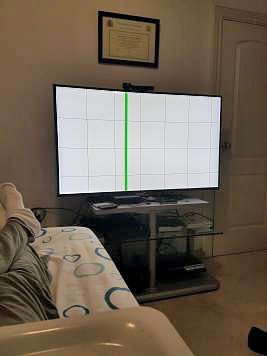 He also reiterates the file structure is /data/CUSAXXXXX/<game structure with decrypted eboot and modules> and to run the backup games simply set them up with the kernel hooks following the guide, and when you see "started successfully" in the netcat command line you'll know the payload was ran successfully.
 Finally, he stresses that ALL save games will be redirected to the Playroom...
Zecoxao also confirmed that games don't require patches anymore, the payload below enables P.T. and should allow other games (check the PS4 Games List Minimal FW List) to run noting that this was tested in 3 games thus far: P.T., Angry Birds and MGS: Ground Zeroes.
Spoiler
He also reiterates the file structure is /data/CUSAXXXXX/<game structure with decrypted eboot and modules> and to run the backup games simply set them up with the kernel hooks following the guide, and when you see "started successfully" in the netcat command line you'll know the payload was ran successfully. Finally, he stresses that ALL save games will be redirected to the Playroom...- PS4 Fake PKG (FPKG) Sharing Guide
- 6.XX Webkit / 6.72 PS4 Jailbreak
- 7.00-7.02 Webkit Exploit
- 7.02 Webkit / 7.02 Kernel / PS4JB
- 7.50 Kernel Exploit / PS4JB 7.55
- 7.55 / 8.00 Payloads / PS4JB2 7.55
- 9.00 PS4 Webkit Exploit
- 9.00 PS4 Payloads / GoldHEN (Latest)
- 9.00 PS4 Jailbreak Kernel Exploit
- 11.00 PS4 Jailbreak Kernel Exploit
- 13.00 PS4 Kernel Exploit / 13.02 BD-J Bug
- 4.03 PS5 Webkit Exploit
- PS5 Kernel Exploit (ExFAT Bug)
- PS5 Root Keys Obtained
- 4.03 PS5 Kernel Build String
- 4.03 PS5 Webkit Execution
- 4.03 PS5 Kernel Vulnerability
- 4.03 PS5 Filesystem Dumps
- 4.51 PS5 BD-JB Sandbox Escape
- PS5 BD-JB Exploit Hack Source Code
- Mast1c0re PS5 Userland Exploit
- PS5 Kernel Access via PS4 Exploit
- PS5 exFAT Vulnerability Disclosed
- 4.03 PS5 Kernel Exploit Webkit ROP
- 4.50 PS5 Kernel Exploit Webkit ROP
- 4.51 PS5 Kernel Exploit Webkit ROP
- 4.xx PS5 Kernel Exploit v1.01
- 4.xx PS5 Kernel Exploit v1.02 / v1.03
- PS5 1.00-6.50 Firmware Webkit
- Native PS5 ROP Chain Execution
- Mast1c0re PS5 Compiler Attack
- PS5 FreeBSD Kernel Bug & WebKit
- PS5 UMTX 2 Exploit & PS5 Jailbreak
- Byepervisor PS5 Hypervisor Exploit
- Lua Lapse PS5 Kxploit & Laps3c0re / Y2JB
- 12.00 / 12.70 PS5 Kernel Exploit