PSXHAX.COM website and domain for sale. Contact Us with your offer!

You are using an out of date browser. It may not display this or other websites correctly.
You should upgrade or use an alternative browser.
You should upgrade or use an alternative browser.
PS4 1.76 Database Mod by eXtreme to Run Installed PKG's on USB HDD
Following their recent updates, the PlayStation 4 modders at e✘treme-Modding.de shared a PS4 1.76 database modification today for running installed PS4 Package (PKG) files on a USB HDD. 
To quote: You can run your installed Apps and Games from USB HDD
I have tested it with OMSK, it’s simple. Install OMSK PKG (OMSK PKG / OMSK Debug PKG / OMSK RIF), copy user/app/NPXS29005 on your USB device (FAT32/exFAT) and delete the folder (NPXS29005) on your PS4 HDD afterwards.
With the Database we can mod a few things in our Home Menu, so you have to edit table tbl_appinfo and search for the title_Id (NPXS29005). Change _org_path to /mnt/usb0/user/app/NPXS29005, that’s all. Now you can run the App only if you plug in your USB device.
Just a solution for people who have a small hard drive in their PS4
Thanks to @HydrogenNGU for the news tip on Twitter!
 Update: Here's one more 1.76 database mod from e✘treme for those following, to quote: PS4 1.76 Database Mod – Add your installed PKG’s to Games Folder
Soon we can create custom PKGs to install Games without license. It’s recommended to add your installed PKGs to Games folder in the Home Menu if you have installed a lot of Games.
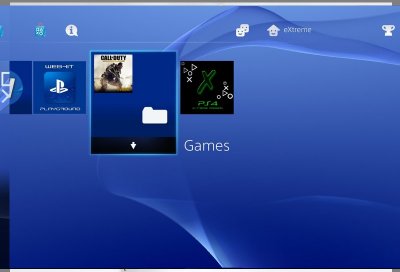
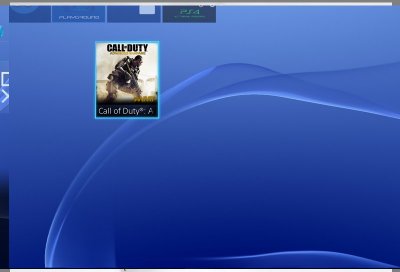
The Database Mod is very simple. Just edit 'dispLocation' -> 2 in app.db to add the Games to the folder. TV & Video is the Games folder, edit 'visible' -> 1.

To quote: You can run your installed Apps and Games from USB HDD
I have tested it with OMSK, it’s simple. Install OMSK PKG (OMSK PKG / OMSK Debug PKG / OMSK RIF), copy user/app/NPXS29005 on your USB device (FAT32/exFAT) and delete the folder (NPXS29005) on your PS4 HDD afterwards.
With the Database we can mod a few things in our Home Menu, so you have to edit table tbl_appinfo and search for the title_Id (NPXS29005). Change _org_path to /mnt/usb0/user/app/NPXS29005, that’s all. Now you can run the App only if you plug in your USB device.
Just a solution for people who have a small hard drive in their PS4
Thanks to @HydrogenNGU for the news tip on Twitter!
Update: Here's one more 1.76 database mod from e✘treme for those following, to quote: PS4 1.76 Database Mod – Add your installed PKG’s to Games FolderSoon we can create custom PKGs to install Games without license. It’s recommended to add your installed PKGs to Games folder in the Home Menu if you have installed a lot of Games.
PS4 1.76 UI Mods: Custom PSN User Avatar & Alpha 0.11 by eXtreme
Since reporting on the Avatar Grabber, PS4 1.76 UI Mod with Full Debug Settings demo and recent Activate / Deactivate PS4 Apps Entitlement Control the modders at e✘treme-Modding.de continue their PS4 1.76 UI Mods development with a Custom PSN User Avatar and Alpha 0.11 demonstration video below! 
Download: PS4 UI Mod Custom PSN User Avatar.rar (364 KB)
To quote from e✘treme on their PS4 UI Mod Custom PSN User Avatar:
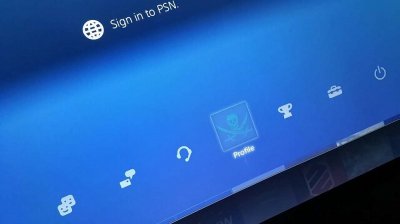
"After examine some user data files of @Ginsor's 1.76 PS4, I have found a way to change the User Avatar in the Home Menu. It’s very simple, I have only edited the online.json with a other link and created .dds files.
Sadly it will only work on your 1.76 PS4 if it was connected to PSN and you already have installed a Avatar on your hdd.
You just need to copy the files via FTP in system_data/priv/cache/profile/0x10000000 (choose your PSN User Account). Special Thanks to @Ginsor for testing!"
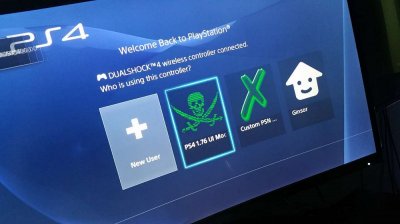
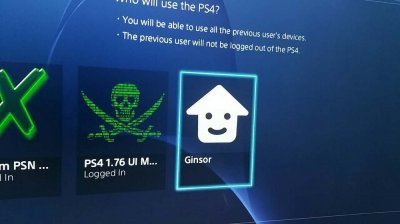
And to quote from e✘treme on their PS4 UI Mod alpha 0.11 Visual Debug Home Menu:
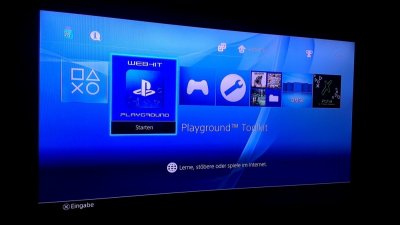
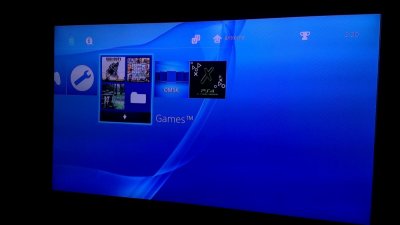
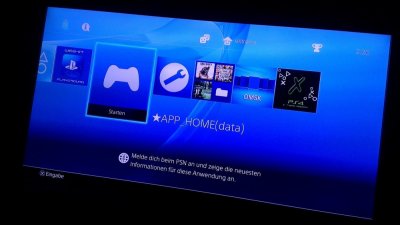
"I had the idea to add my PS4 Games in a folder on Home Menu I have just changed the Database to show up my Disc Games in the folder. This is version 0.11 alpha of a Custom Home Menu.
Still no function for ★APP_Home and ★Debug Settings. PS4 UI Mod alpha is just a visual Home Menu Mod for 1.76."
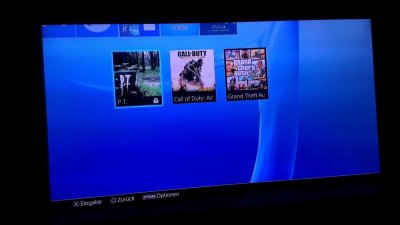
PS4 UI Mod alpha 0.11 by e✘treme
How To Change Your Avatars & Profile Pictures On 4.05 & 4.55
Update: Also from their...
Download: PS4 UI Mod Custom PSN User Avatar.rar (364 KB)
To quote from e✘treme on their PS4 UI Mod Custom PSN User Avatar:
"After examine some user data files of @Ginsor's 1.76 PS4, I have found a way to change the User Avatar in the Home Menu. It’s very simple, I have only edited the online.json with a other link and created .dds files.
Sadly it will only work on your 1.76 PS4 if it was connected to PSN and you already have installed a Avatar on your hdd.
You just need to copy the files via FTP in system_data/priv/cache/profile/0x10000000 (choose your PSN User Account). Special Thanks to @Ginsor for testing!"
"I had the idea to add my PS4 Games in a folder on Home Menu
I have just changed the Database to show up my Disc Games in the folder. This is version 0.11 alpha of a Custom Home Menu.Still no function for ★APP_Home and ★Debug Settings. PS4 UI Mod alpha is just a visual Home Menu Mod for 1.76."
How To Change Your Avatars & Profile Pictures On 4.05 & 4.55
Update: Also from their...
PSA: Accessing Sony URLs or Updating New PS4 Removes Special Data
Recently VVildCard777 tweeted a PSA out letting those with a stock PS4 1.76 and below console who haven't updated their Firmware know not to ever allow any of THESE Sony URLs to connect to it because when they do a special piece of data in the operating system is removed. 

This comes after zecoxao's virgin PS4 OS backup comparison of the normal / JIG bank encrypted area inside the chunk at 0x9C0000.
Sony also removes the 'special piece of data' whenever a new PlayStation 4 console (regardless of OFW version) is updated from the stock version or accesses those URLs, however, currently scene developers are interested in those with untouched PlayStation 4 consoles on 1.76 and below.
He notes: "to those misunderstanding, the act of UPDATING a NEW PS4 OR letting those urls connect to a NEW PS4 removes the data."
Further detailing: "no you need virgin PS4, isolated on a network to access enc sflash data through FTP with a kernel exploit. ->/dev/sflash0s1.cryptx3b"
Here are the Sony PS4 Block URLs to never allow to access your stock / virgin PlayStation 4 from Paste.Ubuntu.com:
...
This comes after zecoxao's virgin PS4 OS backup comparison of the normal / JIG bank encrypted area inside the chunk at 0x9C0000.
Sony also removes the 'special piece of data' whenever a new PlayStation 4 console (regardless of OFW version) is updated from the stock version or accesses those URLs, however, currently scene developers are interested in those with untouched PlayStation 4 consoles on 1.76 and below.
He notes: "to those misunderstanding, the act of UPDATING a NEW PS4 OR letting those urls connect to a NEW PS4 removes the data."
Further detailing: "no you need virgin PS4, isolated on a network to access enc sflash data through FTP with a kernel exploit. ->/dev/sflash0s1.cryptx3b"
Here are the Sony PS4 Block URLs to never allow to access your stock / virgin PlayStation 4 from Paste.Ubuntu.com:
Code:
post.net.playstation.net
get.net.playstation.net
fus01.ps4.update.playstation.net
feu01.ps4.update.playstation.net
deu01.ps4.update.playstation.net
ps4updptl.eu.np.community.playstation.net
tmdb.np.dl.playstation.net
themis.dl.playstation.net
sf.api.np.km.playstation.net
asm.np.community.playstation.net
artcdnsecure.ribob01.net
api-p014.ribob01.net
apicdn-p014.ribob01.net
t-prof.np.community.playstation.net
ps4updptl.eu.np.community.playstation.net
ps4.updptl.sp-int.community.playstation.net
ps4updptl.jp.sp-int.community.playstation.net
ps4-eb.ww.np.dl.playstation.net
ps4-eb.ww.np.dl.playstation.net
Activate / Deactivate PS4 Apps via DevKit Debug Settings by eXtreme
We've seen a PS4 OMSK App Overview, Install Demo and a Fixed Debug Settings guide, and today e✘treme-Modding.de shared a PS4 1.76 Activate / Deactivate App Test demonstration video on their YouTube Channel from @Ginsor's recent findings with PlayStation 4 developers.
There's also another PS4 MEME in the Shoutbox MOTD from them, with details from the video's caption below.
PS4 1.76 - Activate/Deactivate App Test
Test - Activating/Deactivating Apps via DevKit Debug Settings
Visit Extreme-Modding.de and see more PS4 Stuff.
Also @HydrogenNGU reminds us of the following via Twitter, to quote: Thank you for eXtreme for pointing that out.
 Those running on new DevKit Debug Settings. DO NOT change "Boot Mode". It *may* BRICK YOUR PS4!
PS4 App.pkg offset 0x04:
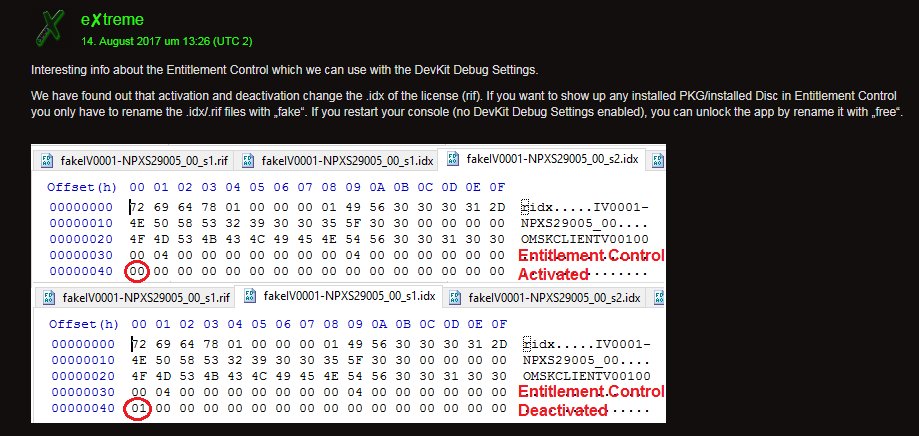
And from Extreme-Modding.de, to quote: PS4 1.76 – Activate/Deactivate App Test – Entitlement Control Info
Over the last week, Ginsor and I have talked about a method to unlock installed PKGs on a 1.76 Retail PS4 via the Content Manger (Debug Settings). We have tested a lot of stuff but we don’t have managed to run any PKG on my 1.76 PS4 which never was connected to PSN. His 1.76 PS4 has 2 user accounts which has information from PSN in the act.dat file.
It’s not easy but we found a few things. It doesn’t work just to copy a rif (license) from one PS4 to another one. If your PS4 never was connected to PSN, you will not have the act.dat on your hdd...
There's also another PS4 MEME in the Shoutbox MOTD from them, with details from the video's caption below.
PS4 1.76 - Activate/Deactivate App Test
Test - Activating/Deactivating Apps via DevKit Debug Settings
Visit Extreme-Modding.de and see more PS4 Stuff.
Also @HydrogenNGU reminds us of the following via Twitter, to quote: Thank you for eXtreme for pointing that out.
Those running on new DevKit Debug Settings. DO NOT change "Boot Mode". It *may* BRICK YOUR PS4!PS4 App.pkg offset 0x04:
- 00 - dev/non-finalized
- 81 - IDU/kiosk
- 83 - retail/finalized
And from Extreme-Modding.de, to quote: PS4 1.76 – Activate/Deactivate App Test – Entitlement Control Info
Over the last week, Ginsor and I have talked about a method to unlock installed PKGs on a 1.76 Retail PS4 via the Content Manger (Debug Settings). We have tested a lot of stuff but we don’t have managed to run any PKG on my 1.76 PS4 which never was connected to PSN. His 1.76 PS4 has 2 user accounts which has information from PSN in the act.dat file.
It’s not easy but we found a few things. It doesn’t work just to copy a rif (license) from one PS4 to another one. If your PS4 never was connected to PSN, you will not have the act.dat on your hdd...
PS4 Extreme 1.76 RTM Tool (WIP) with Source Code by Vultra
Welcome to PS4Extreme
Here is an all-in-one Tool that I have been working on in my own time, with this source people can adapt to it with its open source code allowing to add more features to it, also this is using DevExpress which was cracked but shows the trial promote before each run some odd reason.
Features
COD: AW
COD: Ghosts
Offset Changer
IP Changer
+ More
Some off the elements don't have a code to it as like i said its half baked and I don't really have the time to adapt to it that's why I am releasing the source.
Questions:
1Q: How do i edit the offsets?
1A: By Going to "Tools" and then clicking on "Offsets Changer" Which will show a notepad window.
The offsets are stored in the Config.ini File which can be adapted to add more offsets or just update

2Q: How can i change the ip on the Tool?
2A: There is Three ways off editing it, either going to the tools Menu on the tool and click "PS4 IP Settings" This will prompt a IP Form for you to fell out that will auto update the Config.ini.
Second Option: you can just go into the root directory off where you have saved the RTM Tool and just edit the config.ini.
Third Option: "Tools" then Click "Offset Changer"
3Q: How to Write/Read from .ini file?
3A: ini.IniReadValue is only for Buttons as its reading from the offsets located in the config.ini and not actually writing to it.
ini.IniWriteValue is only needed for the "PS4 IP Settings" as it will write the chosen IP you wanted into config.ini automatically
Example Reading an offset from config.ini:
ini.IniReadValue("ghostsoffsets", "uav"), "0xFF"); <- This will read from the config.ini file under Tab "ghostsoffsets" then the following offsets it looking for.
The Value after UAV Represents the on and off byte which don't read from the config.ini and has to be manual added to the code due to the way PS4Me.dll Is configured.
Code:
if (ghostsuavcheck.Checked)
            {
                PS4.writeMemory(ini.IniReadValue("ghostsoffsets", "uav"), "0xFF");
            }
            else
            {
                PS4.writeMemory(ini.IniReadValue("ghostsoffsets", "uav"), "0x00");
            }
Writing IP to...
- PS4 Fake PKG (FPKG) Sharing Guide
- 6.XX Webkit / 6.72 PS4 Jailbreak
- 7.00-7.02 Webkit Exploit
- 7.02 Webkit / 7.02 Kernel / PS4JB
- 7.50 Kernel Exploit / PS4JB 7.55
- 7.55 / 8.00 Payloads / PS4JB2 7.55
- 9.00 PS4 Webkit Exploit
- 9.00 PS4 Payloads / GoldHEN (Latest)
- 9.00 PS4 Jailbreak Kernel Exploit
- 11.00 PS4 Jailbreak Kernel Exploit
- 13.00 PS4 Kernel Exploit / 13.02 BD-J Bug
- 4.03 PS5 Webkit Exploit
- PS5 Kernel Exploit (ExFAT Bug)
- PS5 Root Keys Obtained
- 4.03 PS5 Kernel Build String
- 4.03 PS5 Webkit Execution
- 4.03 PS5 Kernel Vulnerability
- 4.03 PS5 Filesystem Dumps
- 4.51 PS5 BD-JB Sandbox Escape
- PS5 BD-JB Exploit Hack Source Code
- Mast1c0re PS5 Userland Exploit
- PS5 Kernel Access via PS4 Exploit
- PS5 exFAT Vulnerability Disclosed
- 4.03 PS5 Kernel Exploit Webkit ROP
- 4.50 PS5 Kernel Exploit Webkit ROP
- 4.51 PS5 Kernel Exploit Webkit ROP
- 4.xx PS5 Kernel Exploit v1.01
- 4.xx PS5 Kernel Exploit v1.02 / v1.03
- PS5 1.00-6.50 Firmware Webkit
- Native PS5 ROP Chain Execution
- Mast1c0re PS5 Compiler Attack
- PS5 FreeBSD Kernel Bug & WebKit
- PS5 UMTX 2 Exploit & PS5 Jailbreak
- Byepervisor PS5 Hypervisor Exploit
- Lua Lapse PS5 Kxploit & Laps3c0re / Y2JB
- 12.00 / 12.70 PS5 Kernel Exploit