PSXHAX.COM website and domain for sale. Contact Us with your offer!

You are using an out of date browser. It may not display this or other websites correctly.
You should upgrade or use an alternative browser.
You should upgrade or use an alternative browser.
PlayStation 4 DevKit Activation Guide & PS4 DevKit NEO Downgrading with DevKit PUP
A few days ago we reported on PS4 DevKit / TestKit Settings for developers, and since the PS4 Retail / Debug Game Transfusion Guide PlayStation 4 developer ZiL0G80 spotted some code of interest in the TMServer-3_50_0_55.msi file of the PS4 *** Leak that (similar to PS Vita) may allow the activation of PS4 DevKits by unlicensed developers through 2020 following the PS4 DevKit Activation Tutorial by Jerry Yin below. 
Here are the related Tweets:
From TMServer-3_50_0_55.msi thanks to @oneman123 on Pastebin via Hydrogen:
Here are the related Tweets:
From TMServer-3_50_0_55.msi thanks to @oneman123 on Pastebin via Hydrogen:
Code:
 internal class CpUpdatePlugIn : IPlugIn
    {
        public override string Name
        {
            get { return "recover-cp"; }
        }

        public override string Options
        {
            get { return "file [devkit ...]"; }
        }

        public override bool IsValidArgCount(int argc)
        {
            return argc >= 1;
        }

        public override string HelpString
        {
            get { return "Updates the firmware of the DevKit with the cpupdater.bin file specified."; }
        }

        public override bool Hidden
        {
            get { return true; }
        }

        public override bool Execute(List<string> args)
        {
            ORTMAPI tm = null...
PS4 Retail / Debug Game Transfusion Guide, TestKit Trophies Working
We've seen Minecraft PS4 Edition and The Playroom running on a PS4 DevKit / TestKit and today PlayStation 4 developer @zecoxao with help from Charles and user1 shared a guide on PS4 1.76 Retail / Debug Game Transfusion with savegames and trophies working and some new demo videos below! 
To quote from zecoxao: Retail <-> Debug Game Transfusion Tutorial
This tutorial would not be possible without the help of my friend Charles. Thank you Charles, for making this possible
You will need:
To quote from zecoxao: Retail <-> Debug Game Transfusion Tutorial
This tutorial would not be possible without the help of my friend Charles. Thank you Charles, for making this possible
You will need:
- A retail PS4 on 1.76 FW
- A testkit or devkit on 1.76 fw, pre-activated (i will not go through details about the activation)
- A game you wish to backup (disc or psn, as long as it's activated on psn)
- hitodama's ps4sdk
- DumpFile modified to decrypt the game's binaries (again, you're on your own)
- An ftp payload to dump the files from app0
- Knowledge about the previous tutorials i wrote, namely pfs bypass and decrypt games
- (Optional) The game's icons (you'll need the original pkg for this and @flatz's awesome python...
PS4SDK Setup on Windows Guide by PS4 Developer BadChoicesZ
Following the PS4 *** Installer Script, PlayStation 4 developer @BadChoicesZ recently shared a guide to PS4SDK setup on Windows using either CTurt's PS4 *** or PS4Dev's PS4SDK with details below.
To quote via the Pastebin from BadChoicesZ:
 Update: Below is another tutorial on How To Setup the PS4SDK on Windows 10 by 0x199 for those interested, to quote:
Today I'm going to explain how to setup the PS4SDK on Windows 10. Get that VM out of the way, it's time for the real deal.
Requirements
Part 1: Installing Bash on Ubuntu on Windows 10
First things first, we're going to enable developer mode on your Windows 10...
To quote via the Pastebin from BadChoicesZ:
Code:
#
# BadChoicesZ guide to PS4SDK setup on Windows:
# using CTURTS ***, although can use PS4DEV's *** aswell.
# revision 2.0
#

1.
# Download cygwin x86_64 from browser:
# https://www.cygwin.com/setup-x86_64.exe

2.
# Create folder:
C:\cygwin64
# And copy the setup-x86_64.exe into it.

3.
# setup (using cmd.exe)
cd C:\cygwin64
setup-x86_64 -q -P wget,tar,qawk,bzip2,subversion,vim

4.
# Download/install apt-cyg using the cygwin terminal:
wget rawgit.com/transcode-open/apt-cyg/master/apt-cyg
install apt-cyg /bin

5.
# Install required. ( using cygwin terminal )
apt-cyg install nano git make python binutils clang
git clone https://github.com/kR105/PS4-dlclose.git
git clone https://github.com/CTurt/PS4-***.git

6.
# make Environmental variable "PS4SDK" point to PS4-***'s folder.
# replace <user> with profile name..ie. BadChoicesZ
export PS4SDK=/home/<user>/PS4SDK/PS4-***

7.
# Install GCC -
# Run the cygwin installer again "setup-x86_64.exe" this time by double clicking on it ( not using cmdline )
# and make sure to download the GCC as shown below.
# https://i.stack.imgur.com/E4uZh.png
# (just click on the 'skip' to toggle install..)

8.
# Compile Cturts *** ( Could also use PS4DEV's.. )
cd PS4-***
cd libPS4
make
cd ..
cd libusbfatfs
make
cd ..

9.
# you can now compile projects with ps4sdk on windows.Today I'm going to explain how to setup the PS4SDK on Windows 10. Get that VM out of the way, it's time for the real deal.
Requirements
- Desktop with Windows 10 installed
Part 1: Installing Bash on Ubuntu on Windows 10
First things first, we're going to enable developer mode on your Windows 10...
Guide to Dump PlayStation 4 Disc Games on PS4 Console by eXtreme
Previously we linked several guides for Dumping PS4 PKG Files, and with Select PC Drives outlined HERE people have been dumping (minus decrypting) PS4 games since late 2013... but if you have a 1.76 OFW console you can also dump disc-based games from the PlayStation 4 itself thanks to a brief guide from e✘treme-Modding.de alongside some DiscDump 50X Payloads that copy the disc content to a USB HDD!
To quote, roughly translated: Dump Disc Games on PS4 1.76
Since not every drive reads PS4 disc games, there is the possibility to read the content via the PS4.
1. Insert the PlayStation 4 game disc
2. Open the game and create an FTP connection
3. The contents of the disc are located under / mnt / disc
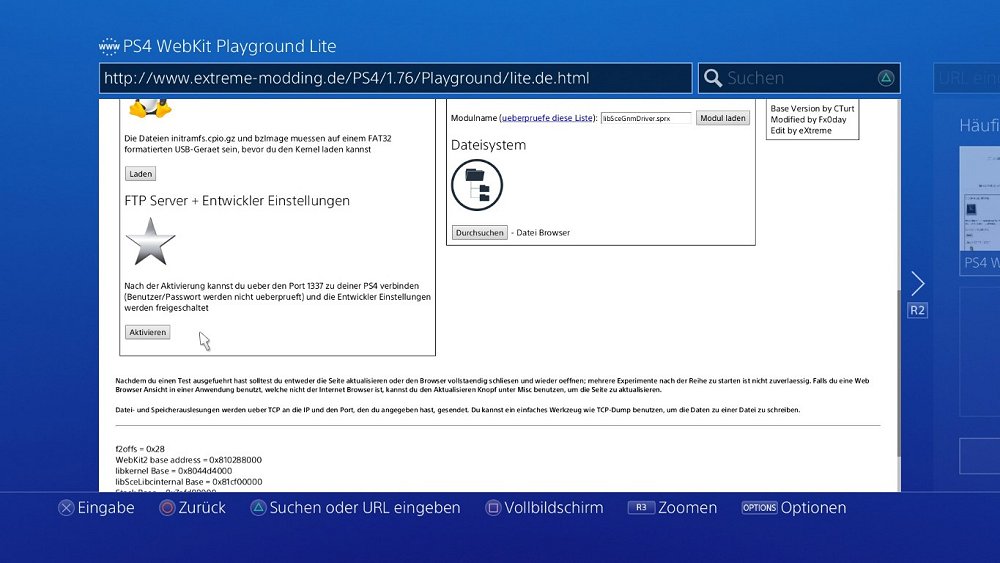
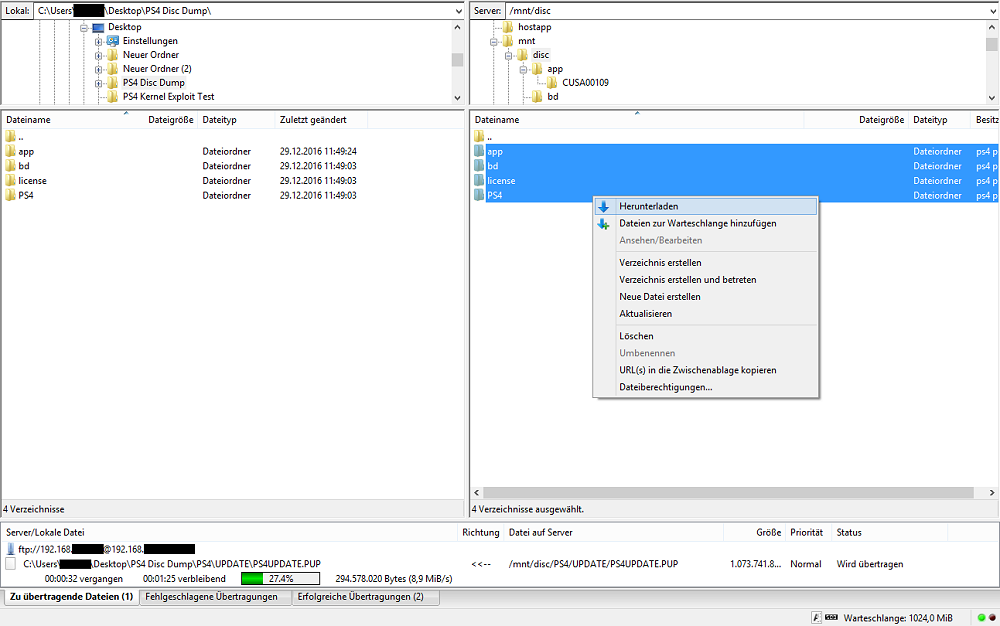
To copy the files, the game must remain open. The original size of the app.pkg is not displayed during the transfer.
Converting Disc-based PS4 Games Into Digital Games 4.05 WebKit Exploit
How to Convert PS4 Game Disc to PKG Format
DUMP YOUR PS4 GAMES FOR PS4 4.05 JAILBREAK | PLAY FREE PS4 BACKUPS GAMES WITHOUT DISCS !
Download: dumpPS4Games.rar (10.7 MB)
Finally, here is one more guide from Thibobo (Twitter) on How to Dump Your Own...
To quote, roughly translated: Dump Disc Games on PS4 1.76
Since not every drive reads PS4 disc games, there is the possibility to read the content via the PS4.
1. Insert the PlayStation 4 game disc
2. Open the game and create an FTP connection
3. The contents of the disc are located under / mnt / disc
To copy the files, the game must remain open. The original size of the app.pkg is not displayed during the transfer.Converting Disc-based PS4 Games Into Digital Games 4.05 WebKit Exploit
How to Convert PS4 Game Disc to PKG Format
DUMP YOUR PS4 GAMES FOR PS4 4.05 JAILBREAK | PLAY FREE PS4 BACKUPS GAMES WITHOUT DISCS !
Download: dumpPS4Games.rar (10.7 MB)
Finally, here is one more guide from Thibobo (Twitter) on How to Dump Your Own...
Hacking and Modding the PS4 FAQ by Hydrogen at NextGenUpdate.com
Today @HydrogenNGU (aka Ho Ho Hoes ) made available some PS4 Hacking / Modding Frequently Asked Questions via NextGenUpdate.com which can also be found below.
PlayStation 4 developers contributing to the PS4 FAQ include Zecoxao, Red-EyeX32, Specter and SC58 so a BIG THANKS to them also.
To quote: PS4 Hacking/Modding FAQs (Frequently Asked Questions)
Introduction
So today I bring you an informative thread shining light upon questions' individuals have been asking around the forums lately. This includes anything related with: P!rating, Modding, Jailbreaks, Custom Firmwares, Downgrades, etc..
This will break down most of the questions we see in our everyday lives that most people ask. We'll try to get through them all, if not, just hit us up with a Private Message (PM), and i'll attempt to respond back with an answer to your question as fast as possible.
I will be updating this with more questions including the answers so this thread doesn't go dead; so until we get a new section pertaining to PS4 Mods Questions and Support. This would be in this section for a while. We have a long way to go before anything comes up that sparks the scene, but lets get straight into this!
Table of Contents
) made available some PS4 Hacking / Modding Frequently Asked Questions via NextGenUpdate.com which can also be found below.PlayStation 4 developers contributing to the PS4 FAQ include Zecoxao, Red-EyeX32, Specter and SC58 so a BIG THANKS to them also.
To quote: PS4 Hacking/Modding FAQs (Frequently Asked Questions)
Introduction
So today I bring you an informative thread shining light upon questions' individuals have been asking around the forums lately. This includes anything related with: P!rating, Modding, Jailbreaks, Custom Firmwares, Downgrades, etc..
This will break down most of the questions we see in our everyday lives that most people ask. We'll try to get through them all, if not, just hit us up with a Private Message (PM), and i'll attempt to respond back with an answer to your question as fast as possible.
I will be updating this with more questions including the answers so this thread doesn't go dead; so until we get a new section pertaining to PS4 Mods Questions and Support. This would be in this section for a while. We have a long way to go before anything comes up that sparks the scene, but lets get straight into this!
Table of Contents
- Introduction - Shining light upon the beginning, and what this thread is going to be about.
- P!rating Questions - Questions related with p!rating, and what has been released/said towards this topic.
- Real Time Modding - Questions related with RTM, and what has been released/said towards this topic.
- Trophy Modding - Questions related with Trophy Modding, and what has been released/said towards this topic.
- Downgrade Questions - Questions related with Downgrading, and what has been said towards this topic.
- Jailbreak Questions - Questions related with a jailbreak.
- Custom Firmware Questions - Questions concerning about CFWs, and what has been said towards this topic.
- Firmware Questions - Questions concerning about Firmwares...
- PS4 Fake PKG (FPKG) Sharing Guide
- 6.XX Webkit / 6.72 PS4 Jailbreak
- 7.00-7.02 Webkit Exploit
- 7.02 Webkit / 7.02 Kernel / PS4JB
- 7.50 Kernel Exploit / PS4JB 7.55
- 7.55 / 8.00 Payloads / PS4JB2 7.55
- 9.00 PS4 Webkit Exploit
- 9.00 PS4 Payloads / GoldHEN (Latest)
- 9.00 PS4 Jailbreak Kernel Exploit
- 11.00 PS4 Jailbreak Kernel Exploit
- 13.00 PS4 Kernel Exploit / 13.02 BD-J Bug
- 4.03 PS5 Webkit Exploit
- PS5 Kernel Exploit (ExFAT Bug)
- PS5 Root Keys Obtained
- 4.03 PS5 Kernel Build String
- 4.03 PS5 Webkit Execution
- 4.03 PS5 Kernel Vulnerability
- 4.03 PS5 Filesystem Dumps
- 4.51 PS5 BD-JB Sandbox Escape
- PS5 BD-JB Exploit Hack Source Code
- Mast1c0re PS5 Userland Exploit
- PS5 Kernel Access via PS4 Exploit
- PS5 exFAT Vulnerability Disclosed
- 4.03 PS5 Kernel Exploit Webkit ROP
- 4.50 PS5 Kernel Exploit Webkit ROP
- 4.51 PS5 Kernel Exploit Webkit ROP
- 4.xx PS5 Kernel Exploit v1.01
- 4.xx PS5 Kernel Exploit v1.02 / v1.03
- PS5 1.00-6.50 Firmware Webkit
- Native PS5 ROP Chain Execution
- Mast1c0re PS5 Compiler Attack
- PS5 FreeBSD Kernel Bug & WebKit
- PS5 UMTX 2 Exploit & PS5 Jailbreak
- Byepervisor PS5 Hypervisor Exploit
- Lua Lapse PS5 Kxploit & Laps3c0re / Y2JB
- 12.00 / 12.70 PS5 Kernel Exploit