PSXHAX.COM website and domain for sale. Contact Us with your offer!

You are using an out of date browser. It may not display this or other websites correctly.
You should upgrade or use an alternative browser.
You should upgrade or use an alternative browser.
Latest ITMania PS4 Linux Distribution Updates for PlayStation 4
Proceeding their Internal PS4 HDD Linux Installation video, the IT Mania YouTube Channel folks recently released some noteworthy ITMania Linux Updates for PS4 including the latest emulators, Vulkan drivers and Kodi / Steam support among others for both retrogaming and running newer games such as Doom Eternal, MK11: Aftermath and Batman: Arkham Origins. 
Like Fedora PS4 Linux, PS4 Manjaro Linux, Gentoo PS4 Linux with the Baikal Chip Patches and PSXITArch Linux via PSXITA (PSXITATeam Patreon) the installation process for IT Mania's Linux Distribution for PS4 is similar with a brief outline from @FalconX below:
Like Fedora PS4 Linux, PS4 Manjaro Linux, Gentoo PS4 Linux with the Baikal Chip Patches and PSXITArch Linux via PSXITA (PSXITATeam Patreon) the installation process for IT Mania's Linux Distribution for PS4 is similar with a brief outline from @FalconX below:
- Format stick to Fat32
- Copy img (for example, the latest release with Manjaro) to the stick
- Rename the Manjaro image to psxitarch.tar.xz
- Copy 2 kernel files from PSXITArch (or link below)
- On PS4 go to PSXITArch website and run the payload
- PS4 reboots
- Enter "install-psxitarch.sh"
- When it's finished "exec start-psxitarch.sh"
PS4_Tools Homebrew WIP Showcase FPKG by xXxTheDarkprogramerxXx
Following his PS4 HEN 2.1.4 Port, PlayStation 4 homebrew developer @TheDarkprograme made available via Twitter a work-in-progress (WIP) PS4 Tools Homebrew Showcase FPKG for PS4 jailbroken console owners or those who plan to locate one soon to check out. 
Download: PS4_Tools_WIP.pkg / PS4_Tools GIT / Trello / PSTools Patreon Page / PS4 Tools Homebrew V1.33 with 9.00 Support
From the HB_WIP Page, to quote: PS4 Tools Homebrew WIP Showcase
After the poll on twitter where everyone wanted to see what I was making here it is
It features:
XDPx
 Also making rounds in the PlayStation 4 scene on Twitter today is...
Download: PS4_Tools_WIP.pkg / PS4_Tools GIT / Trello / PSTools Patreon Page / PS4 Tools Homebrew V1.33 with 9.00 Support
From the HB_WIP Page, to quote: PS4 Tools Homebrew WIP Showcase
After the poll on twitter where everyone wanted to see what I was making here it is
It features:
- Save data mounting and copying to usb. (A huge shout out to ChendoChap for this)
- Reading system info (IDPS, PSID, Username, UserID)
- Reading of PKG files directory from the console (This is all done using PS4_Tools).
- Mounting of PFS files.
- The File explorer is not included
- Trophy Unlocker
- Run my Hen 2.1.4 with save mount patches it can be found here (if you intend to mount saves you need this)
- Run the homebrew
- When copying save data to usb make sure you have a directory called SaveData on the root of your usb
XDPx
Also making rounds in the PlayStation 4 scene on Twitter today is...
BitHunter Tool to Extract / Pull PS4 Game Trophy Data by AlexKalopsia
Proceeding the MyTrophies PS4 Trophy Calculator for use on jailbroken PlayStation 4 consoles running PS4HEN comes BitHunter, which is a Python-based tool to extract / pull information from PS4 game trophies, apply custom frames to the trophy images and export PS4 trophy lists by AlexKalopsia of Kalopsia Games. 
Download: BitHunter (Latest Version) / GIT
This comes following the Reverse Engineering PS4 Trophies documentation and PS4 Tools updates by thedarkprogr, and here's further details from the BitHunter README.md: How to use
When you run BitHunter, you have two options, adding frames to local images (typing 0), or pulling the images from the web.
If you want to apply a custom frame to the images, create one called frame.png and place it inside the root folder.
Pulling from the web
BitHunter will ask you to type a GameID. This can be found in the game page as part of the game's URL
https://psnprofiles.com/trophies/GameID-game-name
After pressing Enter, BitHunter will start pulling the game data:
Download: BitHunter (Latest Version) / GIT
This comes following the Reverse Engineering PS4 Trophies documentation and PS4 Tools updates by thedarkprogr, and here's further details from the BitHunter README.md: How to use
When you run BitHunter, you have two options, adding frames to local images (typing 0), or pulling the images from the web.
If you want to apply a custom frame to the images, create one called frame.png and place it inside the root folder.
Pulling from the web
BitHunter will ask you to type a GameID. This can be found in the game page as part of the game's URL
https://psnprofiles.com/trophies/GameID-game-name
After pressing Enter, BitHunter will start pulling the game data:
- If you have set your configuration file with exportTrophyInfo set to true, a file named gameID-gameName.csv will be saved in the root folder.
- If you have set yout configuration file with storeOriginals set to true, the original non-framed images will be stored in /originals.
- If you have set your configuration file with processOriginals set to true, the trophy images will be processed with the applied frame image and saved in /processed.
Nanospeed Gamer 1.0 The Videogame PS4 PKG by LapyGames
The PlayStation 4 homebrew keeps flowing from scene developer @Lapy, and following Super Console Wars 1.0 comes Nanospeed Gamer 1.0 The Videogame PS4 PKG by LapyGames (PayPal for supporting his work  ) of LapyGamesCuba.SimpleSite.com with a demo video via @NanospeedGamer (Twitter) on YouTube!
Download: Nanospeed Gamer 1.0 PS4.pkg (98.1 MB) / Nanospeed Gamer 1.0 PSVita.vpk (37.2 MB) / Nanospeed Gamer 1.0 Windows.rar (16.4 MB) / Nanospeed Gamer 1.0 Android.apk (26.7 MB)
NanospeedGamer The Videogame PS Vita PS4 Android PC
) of LapyGamesCuba.SimpleSite.com with a demo video via @NanospeedGamer (Twitter) on YouTube! Download: Nanospeed Gamer 1.0 PS4.pkg (98.1 MB) / Nanospeed Gamer 1.0 PSVita.vpk (37.2 MB) / Nanospeed Gamer 1.0 Windows.rar (16.4 MB) / Nanospeed Gamer 1.0 Android.apk (26.7 MB)
NanospeedGamer The Videogame PS Vita PS4 Android PC
OrbisSWU: The PS4 Update Tool Developer Research by TheoryWrong
As mentioned previously, following Fail0verflow's Documentation, the PS4 NoBD Updating Method, his PS4 Updater Toolkit release and the PS4 RL78 Syscon implementation PlayStation 4 scene developer @theorywrong shared via Twitter a new post on his blog at TheoryWrong.me detailing his research with the PS4 Update Tool known as OrbisSWU discussing PS4 NoBD, downgrading and how updates work. 
Feel free to support his continued work on his Patreon Page, and here's a rough translation via Google of his Latest Blog Article for those feeling a bit techy today: OrbisSWU, the PS4 update tool.
Hello !
Here is finally the 1st article for the PS4 in relation to my work!
 Note: Some points may be vague, it is not easy to understand a complex system like that, but I will try to transcribe the exact operation.
Today we are going to talk about the “OrbisSWU” tool which manages the PS4 update system.
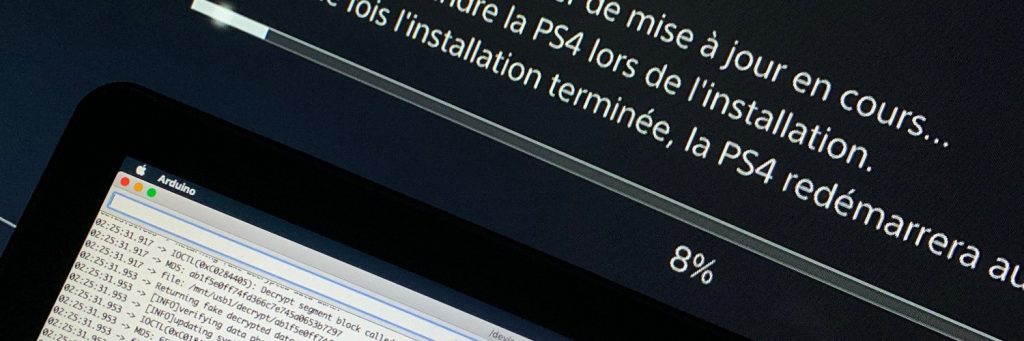
Controlled PS4 update
OrbisSWU is a special application stored in all PUPs on the PS4. It allows updating the firmware of the PS4. Kernel, Application, Blueray Reader and WiFi / Bluetooth Chipset. Everything goes through him.
It all starts in the SceShellUI, when your PS4 requests to do an update, it will start by recovering it in a specific folder. Luckily...
Feel free to support his continued work on his Patreon Page, and here's a rough translation via Google of his Latest Blog Article for those feeling a bit techy today: OrbisSWU, the PS4 update tool.Hello !
Here is finally the 1st article for the PS4 in relation to my work!
Note: Some points may be vague, it is not easy to understand a complex system like that, but I will try to transcribe the exact operation.Today we are going to talk about the “OrbisSWU” tool which manages the PS4 update system.
Controlled PS4 update
OrbisSWU is a special application stored in all PUPs on the PS4. It allows updating the firmware of the PS4. Kernel, Application, Blueray Reader and WiFi / Bluetooth Chipset. Everything goes through him.
It all starts in the SceShellUI, when your PS4 requests to do an update, it will start by recovering it in a specific folder. Luckily...
- PS4 Fake PKG (FPKG) Sharing Guide
- 6.XX Webkit / 6.72 PS4 Jailbreak
- 7.00-7.02 Webkit Exploit
- 7.02 Webkit / 7.02 Kernel / PS4JB
- 7.50 Kernel Exploit / PS4JB 7.55
- 7.55 / 8.00 Payloads / PS4JB2 7.55
- 9.00 PS4 Webkit Exploit
- 9.00 PS4 Payloads / GoldHEN (Latest)
- 9.00 PS4 Jailbreak Kernel Exploit
- 11.00 PS4 Jailbreak Kernel Exploit
- 13.00 PS4 Kernel Exploit / 13.02 BD-J Bug
- 4.03 PS5 Webkit Exploit
- PS5 Kernel Exploit (ExFAT Bug)
- PS5 Root Keys Obtained
- 4.03 PS5 Kernel Build String
- 4.03 PS5 Webkit Execution
- 4.03 PS5 Kernel Vulnerability
- 4.03 PS5 Filesystem Dumps
- 4.51 PS5 BD-JB Sandbox Escape
- PS5 BD-JB Exploit Hack Source Code
- Mast1c0re PS5 Userland Exploit
- PS5 Kernel Access via PS4 Exploit
- PS5 exFAT Vulnerability Disclosed
- 4.03 PS5 Kernel Exploit Webkit ROP
- 4.50 PS5 Kernel Exploit Webkit ROP
- 4.51 PS5 Kernel Exploit Webkit ROP
- 4.xx PS5 Kernel Exploit v1.01
- 4.xx PS5 Kernel Exploit v1.02 / v1.03
- PS5 1.00-6.50 Firmware Webkit
- Native PS5 ROP Chain Execution
- Mast1c0re PS5 Compiler Attack
- PS5 FreeBSD Kernel Bug & WebKit
- PS5 UMTX 2 Exploit & PS5 Jailbreak
- Byepervisor PS5 Hypervisor Exploit
- Lua Lapse PS5 Kxploit & Laps3c0re / Y2JB
- 12.00 / 12.70 PS5 Kernel Exploit