PSXHAX.COM website and domain for sale. Contact Us with your offer!

You are using an out of date browser. It may not display this or other websites correctly.
You should upgrade or use an alternative browser.
You should upgrade or use an alternative browser.
PSXHAX - PSXHACKS: PSX HAX - PSX HACKS - PLAYSTATION HAX - PLAYSTATION HACKS
PlayStation 4 Developer MrNiato Launches PSXHackingNews.com Site
It's been awhile since we last heard from PlayStation 4 developer @MrNiato, but today he announced the launch of a new site (while still maintaining his Blog, of course) with the collaboration of @Feniix and @JUBAKAB located at PSXHackingNews.com! 
To quote from his new site PSXHackingNews: Welcome on PSX Hacking News, a new project of 3 member of the H7K3R Team: MrNiato & Jubakab. Our goal is to bring you news about PlayStation hacks, development tutorials, and some hacks about PlayStation games like Call Of Duty or Grand Theft Auto V.
Don't forget to check the page "About us" to know us! Thanks!
To quote from his new site PSXHackingNews: Welcome on PSX Hacking News, a new project of 3 member of the H7K3R Team: MrNiato & Jubakab. Our goal is to bring you news about PlayStation hacks, development tutorials, and some hacks about PlayStation games like Call Of Duty or Grand Theft Auto V.
Don't forget to check the page "About us" to know us! Thanks!
PS3 DECR: PlayStation 3 Reference Tool DevKit Booting PS2 Game
PlayStation 3 developer @PixelButts shared a demonstration video today of his PlayStation 3 Reference Tool booting a PS2 game, as he states that PS3 DECR DevKits don't normally run PS2 nor PS1 games. 
Below are some Tweets via his Twitter feed for those interested along with the video demo- enjoy!
Below are some Tweets via his Twitter feed for those interested along with the video demo- enjoy!
FakeSave.pkg: Fake Save Data Owner PKG by Habib for PS3 CFW
Following the previous methods to resign and use someone else's PS3 gamesaves and while Rebug CFW users may already be familiar with it, today PlayStation 3 developer @smhabib made available a FakeSave.pkg for PS3 CFW users that allows you to utilize a similar Fake Save Data Owner function in CEX Custom Firmware. 
Download: fakesave.pkg (65.55 KB) / fakesave.pkg (Mirror) / Cobra Payload
To quote from Habib: Fake Save Data Owner on CEX
It will not show caution: fake save message either
Steps:
(Note: This CEX version does not have this option as the pkg itself toggles the option)
Remove Fake Save Pop-Ups on Debug VSH
Patch Remove fake data notification pop-ups with debug vsh
btw here's some good stuff
Update: From Habib, to quote: hey guys! this is something which many people wanted so i thought that i need to patch this out, its out of beta so here it goes
fake save:
game quit no request event:
fixes the pop up stuff lol
it was....easy to do that but i'm stopping work on the fake save on CEX VSH
this app is only useful to enable the flag on cex qa with dex vsh
via @Joonie
FYI, This is how you should do with PS3MAPI on REX 4.81, and it works.
Download: fakesave.pkg (65.55 KB) / fakesave.pkg (Mirror) / Cobra Payload
To quote from Habib: Fake Save Data Owner on CEX
It will not show caution: fake save message either
Steps:
- Install the pkg.
- Run the App (just black screens and returns to XMB)
- Reboot the Console.
- Fake Save Data Owner on CEX should be installed.
(Note: This CEX version does not have this option as the pkg itself toggles the option)
Remove Fake Save Pop-Ups on Debug VSH
Patch Remove fake data notification pop-ups with debug vsh
btw here's some good stuff
Update: From Habib, to quote: hey guys! this is something which many people wanted so i thought that i need to patch this out, its out of beta so here it goes
fake save:
Code:
vsh.self : 0x128bc0->0x60000000
Code:
game_ext_plugin.sprx : 0xe508->0x60000000it was....easy to do that but i'm stopping work on the fake save on CEX VSH
this app is only useful to enable the flag on cex qa with dex vsh
via @Joonie
FYI, This is how you should do with PS3MAPI on REX 4.81, and it works.
How to Create SND0.AT3 Files for PS3 Tutorial by Albatawy
Following my PS3 XMB Music Converted to SND0.AT3 service thread and the BMK AT9 & AT3 Converter v2.1, here is a guide I made for those seeking to create their own SND0.AT3 files for Sony's PlayStation 3 video gaming and entertainment system.
How to Create SND0.AT3 Files for PS3 Tutorial
1. DOWNLOAD AND INSTALL ALL THE TOOLS NEEDED ON YOUR PC https://drive.google.com/file/d/0B4BylYxiMuCkaW1OS1Y2MUlab00/view?usp=sharing / SND0.AT3 TOOLS.rar (Mirror)
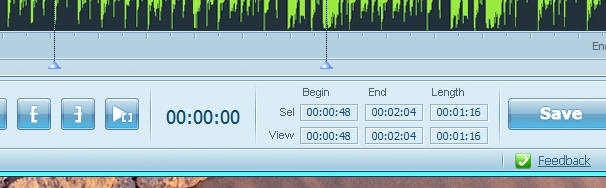
2. OPEN MP3 CUTTER AND PICK AN MP3 FILE, CUT IT WHEREVER YOU WANT,SAVE AND NAME IT AS "TEST CUT.MP3"
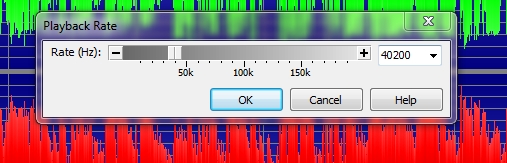
3. OPEN GOLDWAVE, PICK YOUR TEST FILE, GO TO EFFECT>PLAYBACK RATE>ENTER 40200 AND SAVE AS

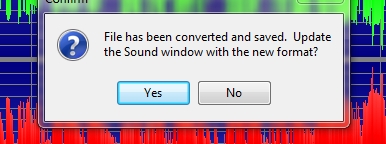
CHOOSE NO
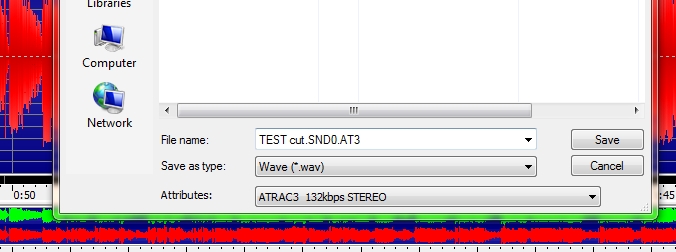
SAVE THE FILE AS SHOWN ABOVE
4. GO TO THE DIRECTORY WHERE YOU SAVE THE FILE AND RENAME IT


5. OPEN GWAT3 LOOPING, DRAG AND DROP THE FILE, CLICK START
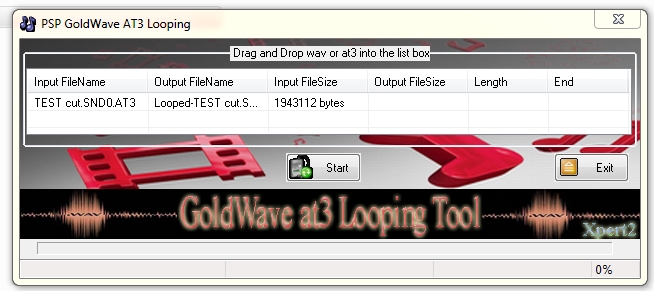

THIS IS THE RESULT
6. COPY THE FILE TO ANY BACKUP GAMES FOLDER, AND PASTE IT
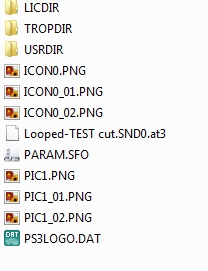
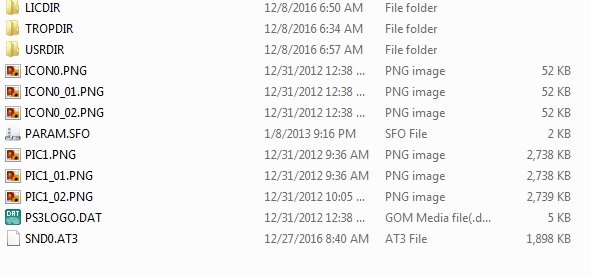
RENAME THE LOOPED FILE JUST LIKE THE PICTURE SHOWN ABOVE
7. DONE
*MAKE SURE ATRAC3 CODEC IS WELL INSTALLED AND AVAILABLE IN GOLDWAVE BEFORE PROCESSING ANY FURTHER, GOOGLE IS YOUR FRIEND IF YOU FOUND PROBLEM WITH IT.
How to Create SND0.AT3 Files for PS3 Tutorial
1. DOWNLOAD AND INSTALL ALL THE TOOLS NEEDED ON YOUR PC https://drive.google.com/file/d/0B4BylYxiMuCkaW1OS1Y2MUlab00/view?usp=sharing / SND0.AT3 TOOLS.rar (Mirror)
2. OPEN MP3 CUTTER AND PICK AN MP3 FILE, CUT IT WHEREVER YOU WANT,SAVE AND NAME IT AS "TEST CUT.MP3"
3. OPEN GOLDWAVE, PICK YOUR TEST FILE, GO TO EFFECT>PLAYBACK RATE>ENTER 40200 AND SAVE AS
CHOOSE NO
SAVE THE FILE AS SHOWN ABOVE
4. GO TO THE DIRECTORY WHERE YOU SAVE THE FILE AND RENAME IT
5. OPEN GWAT3 LOOPING, DRAG AND DROP THE FILE, CLICK START
THIS IS THE RESULT
6. COPY THE FILE TO ANY BACKUP GAMES FOLDER, AND PASTE IT
RENAME THE LOOPED FILE JUST LIKE THE PICTURE SHOWN ABOVE
7. DONE
*MAKE SURE ATRAC3 CODEC IS WELL INSTALLED AND AVAILABLE IN GOLDWAVE BEFORE PROCESSING ANY FURTHER, GOOGLE IS YOUR FRIEND IF YOU FOUND PROBLEM WITH IT.
Decrypted PS4 Package (PKG) Files, PSProxy SRC Soon by Red-EyeX32
Today PlayStation 4 developer @RedEyeX32 announced on Twitter that he plans to release some decrypted PS4 Package (PKG) contents soon alongside PSProxy source code for developers to examine!
With 2016 wrapping up soon, here are some more PlayStation 4 decryption articles from this past year to catch everyone up to speed thus far:
With 2016 wrapping up soon, here are some more PlayStation 4 decryption articles from this past year to catch everyone up to speed thus far:
- DriveClub Alpha Decrypted RIF Key
- Decrypted Audio Packet in PS4 Firmware
- Fifa 14 Fully Decrypted PS4 Retail Game
- TRSI Seeking PS4 Decryption Method Testers
- Decrypting and Dumping PlayStation 4 UserModules
- Minecraft PlayStation 4 Edition Decrypted
- PS4 ROP SPRX ELF File Archive for Developers
- Decrypting PS4 Game EBOOT & SPRX Files
- PS4 P.T. (Playable Teaser) Decrypted
- Extracting P.T. (Playable Teaser) PS4 Model Data & Textures
- PlayStation VR PS4 Game The Playroom Decrypted
- PS4 Fake PKG (FPKG) Sharing Guide
- 6.XX Webkit / 6.72 PS4 Jailbreak
- 7.00-7.02 Webkit Exploit
- 7.02 Webkit / 7.02 Kernel / PS4JB
- 7.50 Kernel Exploit / PS4JB 7.55
- 7.55 / 8.00 Payloads / PS4JB2 7.55
- 9.00 PS4 Webkit Exploit
- 9.00 PS4 Payloads / GoldHEN (Latest)
- 9.00 PS4 Jailbreak Kernel Exploit
- 11.00 PS4 Jailbreak Kernel Exploit
- 13.00 PS4 Kernel Exploit / 13.02 BD-J Bug
- 4.03 PS5 Webkit Exploit
- PS5 Kernel Exploit (ExFAT Bug)
- PS5 Root Keys Obtained
- 4.03 PS5 Kernel Build String
- 4.03 PS5 Webkit Execution
- 4.03 PS5 Kernel Vulnerability
- 4.03 PS5 Filesystem Dumps
- 4.51 PS5 BD-JB Sandbox Escape
- PS5 BD-JB Exploit Hack Source Code
- Mast1c0re PS5 Userland Exploit
- PS5 Kernel Access via PS4 Exploit
- PS5 exFAT Vulnerability Disclosed
- 4.03 PS5 Kernel Exploit Webkit ROP
- 4.50 PS5 Kernel Exploit Webkit ROP
- 4.51 PS5 Kernel Exploit Webkit ROP
- 4.xx PS5 Kernel Exploit v1.01
- 4.xx PS5 Kernel Exploit v1.02 / v1.03
- PS5 1.00-6.50 Firmware Webkit
- Native PS5 ROP Chain Execution
- Mast1c0re PS5 Compiler Attack
- PS5 FreeBSD Kernel Bug & WebKit
- PS5 UMTX 2 Exploit & PS5 Jailbreak
- Byepervisor PS5 Hypervisor Exploit
- Lua Lapse PS5 Kxploit & Laps3c0re / Y2JB
- 12.00 / 12.70 PS5 Kernel Exploit