PSXHAX.COM website and domain for sale. Contact Us with your offer!

You are using an out of date browser. It may not display this or other websites correctly.
You should upgrade or use an alternative browser.
You should upgrade or use an alternative browser.
PS4GDB_Desktop: How to Debug PS4 Applications by M0rph3us1987
Following his Exploiting PS4 Video Apps Presentation to run unsigned code regardless of Firmware version, his PS4GDB GDB Stub PS4 Port to Debug Userland Apps and PS4GDB Ring 0: GDB Stub to Debug PS4 Kernel today PlayStation 4 Scene developer m0rph3us1987 shared via Twitter a write-up on Github outlining how to debug PS4 applications with PS4GDB_Desktop which is the PC-side component to communicate with PS4GDB. 
This comes proceeding several PlayStation 4 debugging / memory editing tools, and for those new in the scene the related articles can be found below sorted by date with the oldest first:
This comes proceeding several PlayStation 4 debugging / memory editing tools, and for those new in the scene the related articles can be found below sorted by date with the oldest first:
Adding Custom Songs to Audica PSVR Tutorial & PS4 Beat Saber Converter
Since the Rock Band 4 Customs for PS4, recently compiled ForgeToolGUI build and PS4 DLC Unlocker for PPSA Disc Content developer @codemasterv (aka @mogicodemasterv) made available a detailed tutorial on adding custom songs to Audica PSVR for those in the PlayStation 4 Scene to enjoy complete with video footage from his YouTube Channel. 
Download: Adding Custom Songs to Audica PSVR
Adding Custom Songs to Audica PSVR by Mogi_codemasterv:
Video of process:
Audica PSVR Making Custom DLC
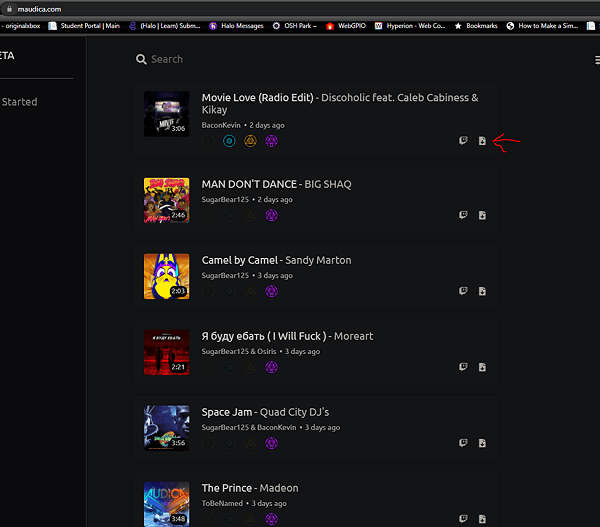
Go to maudica.com and get your .audica files of choice and click the Download Icon.
Next we need to make our directories for the files and PS4 FPKG
First make a directory for your song pack
And in the root create sys_sce and StreamingAssets
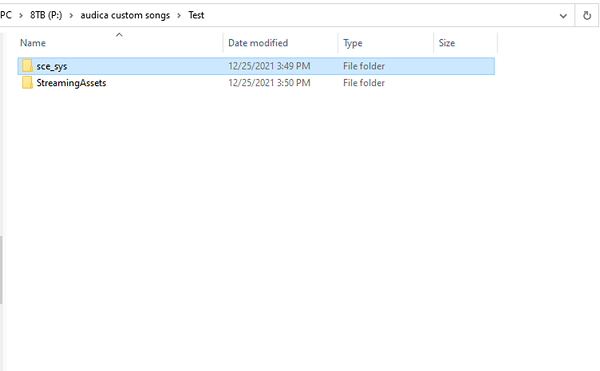
Now open StreamingAssets and make another directory called HmxAudioAssets
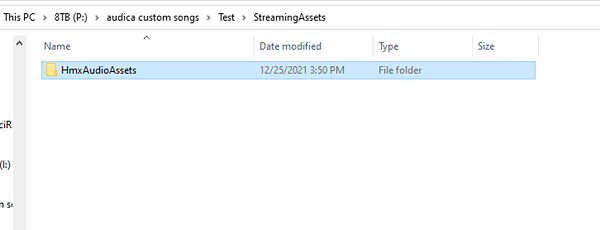
Now open HmxAudioAssets and create another directory called songs
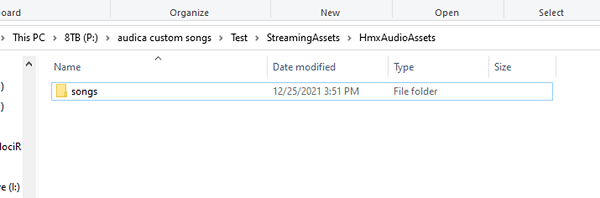
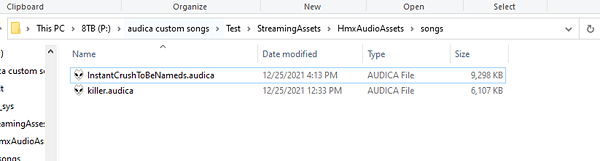
Now open songs and place all of the .audica files you downloaded off of maudica.com in there
Next we need to...
Download: Adding Custom Songs to Audica PSVR
Adding Custom Songs to Audica PSVR by Mogi_codemasterv:
Video of process:
Audica PSVR Making Custom DLC
Go to maudica.com and get your .audica files of choice and click the Download Icon.
Next we need to make our directories for the files and PS4 FPKG
First make a directory for your song pack
And in the root create sys_sce and StreamingAssets
Now open StreamingAssets and make another directory called HmxAudioAssets
Now open HmxAudioAssets and create another directory called songs
Now open songs and place all of the .audica files you downloaded off of maudica.com in there
Next we need to...
Downloading PS4 PKG Games That Are Base64 Encoded or Torrents Guide
Those in the PS4Scene with a Jailbroken PS4 console seeking new PS4 PKG Games to play may encounter Base64 Encoded links or Torrent Magnet links in addition to standard Web-based download links.
Following our PSXHAX Member Verification & PS4 Fake PKG (FPKG) Sharing Guide, this beginner's guide outlines how to decode and download PS4 FPKG Games from encoded links or torrent magnets to help newcomers in the PlayStation 4 Scene learn the basics.
Downloading Base64 Encoded PS4 PKG Games
When downloading PS4 Game PKGs you may come across a something that looks like a random text string, for example:
What the heck is that.. Where is the download link??!
 The answer is that's a Base64-encoded link, often used by uploaders to prevent automated BOTs and compliance agents from reporting or removing file downloads.
In order to decode the text string and get the actual download link, simply copy and paste it into a site like Base64Decode.org, click the green 'Decode' button and in the area below you'll see the decoded URL link as pictured:
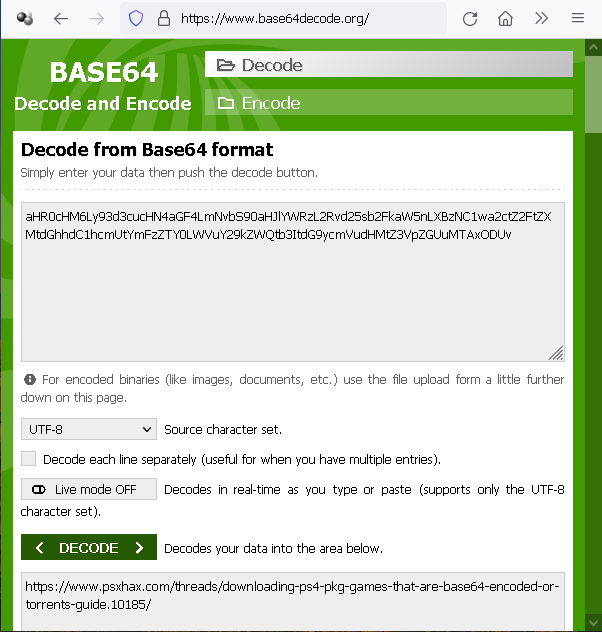
In the above example the resulting URL link was that of this guide (https://www.psxhax.com/threads/downloading-ps4-pkg-games-that-are-base64-encoded-or-torrents-guide.10185/), but in most cases the decoded link would be the URL of the PS4 FPKG Game file you're seeking to download. Leech away!
What to Do About Old / Non-working PS4 PKG Game Links
Sometimes a PS4 PKG Game you want to download has old / non-working links, if this happens there are (5) things you can do:
1. Cry (This won't solve the problem, but may help you...
Following our PSXHAX Member Verification & PS4 Fake PKG (FPKG) Sharing Guide, this beginner's guide outlines how to decode and download PS4 FPKG Games from encoded links or torrent magnets to help newcomers in the PlayStation 4 Scene learn the basics.
Downloading Base64 Encoded PS4 PKG Games
Code:
aHR0cHM6Ly93d3cucHN4aGF4LmNvbS90aHJlYWRzL2Rvd25sb2FkaW5nLXBzNC1wa2ctZ2FtZXMtdGhhdC1hcmUtYmFzZTY0LWVuY29kZWQtb3ItdG9ycmVudHMtZ3VpZGUuMTAxODUvIn order to decode the text string and get the actual download link, simply copy and paste it into a site like Base64Decode.org, click the green 'Decode' button and in the area below you'll see the decoded URL link as pictured:
In the above example the resulting URL link was that of this guide (https://www.psxhax.com/threads/downloading-ps4-pkg-games-that-are-base64-encoded-or-torrents-guide.10185/), but in most cases the decoded link would be the URL of the PS4 FPKG Game file you're seeking to download. Leech away!
What to Do About Old / Non-working PS4 PKG Game Links
1. Cry
(This won't solve the problem, but may help you...
Unlimited PS4 / PS5 Game Sharing Method Guide and Demo Video!
While this Unlimited PS4 / PS5 Game Sharing Method is currently active complete with a guide and demonstration video below, before getting too excited keep in mind the loophole will inevitably be patched and closed by Sony as was done with previous PS4Scene and PS5Scene gamesharing methods... so NOT worth the risk in attempting them for most users. 
 Update: As expected, this method has now been patched and no longer works.
Proceeding all the early PS4 ModChip-Based GameSharing Methods and PSN Account-Based PS4 GameSharing Methods, here are some more previous PS4 / PS5 GameSharing Methods for reference also sorted by date with the oldest first:
Update: As expected, this method has now been patched and no longer works. Proceeding all the early PS4 ModChip-Based GameSharing Methods and PSN Account-Based PS4 GameSharing Methods, here are some more previous PS4 / PS5 GameSharing Methods for reference also sorted by date with the oldest first:
Guide to Install PSXITArch Linux on PS4, Enable Wi-Fi and More by Hippie68
Proceeding the PSXITArch Linux v2 PS4 Distro, ITMania PS4 Linux Updates, his PS4 SFO Reader / Editor and PKGCheck PS4 Tool this weekend PS4Scene developer Hippie68 shared a guide covering How to Install PSXITArch on PS4, Enable Wi-Fi and Update the Distro in 2021 for those interested in learning! 
Check it out via Hippie68's Github repository below, from the README.md: How to install psxitarch, enable Wi-Fi, and update the distro
Update: I did all the steps below with a clean psxitarch installation to fully update it.
Download here: psxitarch.tar.xz (1.72 GB)
This is a fully updated psxitarch.tar.xz file, to be used in place of the original one.
Checksums:
1. Get the required files
You need 3 files: An initramfs file, a Linux kernel in form of a "bzImage" file and "psxitarch.tar.xz", which contains the psxitarch distro files. This is the official download page (in Italian language): PSXITArch Linux v2 (PSXITATeam Patreon)
Direct download links (as found on the official website):
Check it out via Hippie68's Github repository below, from the README.md: How to install psxitarch, enable Wi-Fi, and update the distro
Update: I did all the steps below with a clean psxitarch installation to fully update it.
Download here: psxitarch.tar.xz (1.72 GB)
This is a fully updated psxitarch.tar.xz file, to be used in place of the original one.
Checksums:
- MD5: 27c10f723e9a7aac7143157988cd700a
- SHA1: 2d12eea0e60043f25e64829cd312358d53270754
- SHA256: 2a48efae95b18eef1350bdda838ab6000d857055b2981ea893ef06b3d22394b4
1. Get the required files
You need 3 files: An initramfs file, a Linux kernel in form of a "bzImage" file and "psxitarch.tar.xz", which contains the psxitarch distro files. This is the official download page (in Italian language): PSXITArch Linux v2 (PSXITATeam Patreon)
Direct download links (as found on the official website):
- initramfs.cpio.gz (3.9 MB)
- bzImage (5.9 MB)...
- PS4 Fake PKG (FPKG) Sharing Guide
- 6.XX Webkit / 6.72 PS4 Jailbreak
- 7.00-7.02 Webkit Exploit
- 7.02 Webkit / 7.02 Kernel / PS4JB
- 7.50 Kernel Exploit / PS4JB 7.55
- 7.55 / 8.00 Payloads / PS4JB2 7.55
- 9.00 PS4 Webkit Exploit
- 9.00 PS4 Payloads / GoldHEN (Latest)
- 9.00 PS4 Jailbreak Kernel Exploit
- 11.00 PS4 Jailbreak Kernel Exploit
- 13.00 PS4 Kernel Exploit / 13.02 BD-J Bug
- 4.03 PS5 Webkit Exploit
- PS5 Kernel Exploit (ExFAT Bug)
- PS5 Root Keys Obtained
- 4.03 PS5 Kernel Build String
- 4.03 PS5 Webkit Execution
- 4.03 PS5 Kernel Vulnerability
- 4.03 PS5 Filesystem Dumps
- 4.51 PS5 BD-JB Sandbox Escape
- PS5 BD-JB Exploit Hack Source Code
- Mast1c0re PS5 Userland Exploit
- PS5 Kernel Access via PS4 Exploit
- PS5 exFAT Vulnerability Disclosed
- 4.03 PS5 Kernel Exploit Webkit ROP
- 4.50 PS5 Kernel Exploit Webkit ROP
- 4.51 PS5 Kernel Exploit Webkit ROP
- 4.xx PS5 Kernel Exploit v1.01
- 4.xx PS5 Kernel Exploit v1.02 / v1.03
- PS5 1.00-6.50 Firmware Webkit
- Native PS5 ROP Chain Execution
- Mast1c0re PS5 Compiler Attack
- PS5 FreeBSD Kernel Bug & WebKit
- PS5 UMTX 2 Exploit & PS5 Jailbreak
- Byepervisor PS5 Hypervisor Exploit
- Lua Lapse PS5 Kxploit & Laps3c0re / Y2JB
- 12.00 / 12.70 PS5 Kernel Exploit